
iiyama ProLite TExx12MIS-B3AG Manual
PDF manual · 67 Pages
English



Quick check
Incorrect answer, please try again.
Chat with your iiyama ProLite TExx12MIS-B3AG manual using AI
Get instant AI answers from your iiyama ProLite TExx12MIS-B3AG manual
Ask anything about the iiyama ProLite TExx12MIS-B3AG. Answers come from this manual, with the pages they are based on.
ProLite TExx12MIS-B3AG Maintenance Schedule
Clean the display regularly with a dry soft cloth. Do not use paper towels as they may damage the LCD.
Remove spots with a damp soft cloth using a weak dish soap solution if necessary. Avoid rubber or plastic products.
Ask a Question
Do you recommend ProLite TExx12MIS-B3AG?
Yes NoFrequently Asked Questions
The series supports a stunning 3840 x 2160 resolution which is 4K Ultra HD. This ensures sharp text and vibrant colors suitable for high-detail applications.
Is this answer helpful?
Yes, the USB Type-C port supports power delivery up to 65 watts. This allows compatible laptops to charge while connected for video and audio data.
Is this answer helpful?
Yes, it features Infrared Touch technology that supports up to 40 points of simultaneous contact for accurate and responsive interaction.
Is this answer helpful?
Yes, it comes with a built-in Android 10 or 11 operating system. This allows you to run apps directly without an attached computer.
Is this answer helpful?
The monitors are VESA compliant. Specific sizes vary with VESA patterns ranging from 400x200mm to 800x600mm depending on the screen size.
Is this answer helpful?
In standby mode, the power consumption is reduced to less than 0.5 watts. In power off mode it is under 0.3 watts.
Is this answer helpful?
Yes, the monitors include LAN and RS232C ports. These allow for centralized control and integration into large network environments.
Is this answer helpful?
Advantages and Disadvantages
Advantages

- 4K Ultra HD resolution for crystal clear visuals
- Infrared Touch technology supports 40 simultaneous touch points
- Built-in Android operating system for standalone app usage
- USB Type-C port provides video and 65W power delivery
- Multiple VESA mounting options for flexible installation
Disadvantages

- Large screen sizes can be heavy and difficult to move alone
- Infrared touch sensors can be affected by strong ambient light
- Complex initial setup for networked management features
- Price point is higher compared to standard non-touch displays
- Android interface may require learning for some users
Product Specification
Backlight
LED, Blue Light Filter
Response Time
8 ms
Refresh Rate
60 Hz (3840x2160)
Signal Frequency
30-135 kHz (H) / 24-60 Hz (V)
Shape
Straight (flat)
Viewing Angle
178 deg / 178 deg
Touch
Infrared, Multi-Touch
Coating
Anti-glare (matte), Hardness 7H, Protective Glass (0.12 in)
Color Depth
10-bit (1.07 Billion Colors)
FRC
Yes (8-bit + 2-bit)
Speakers
Speakers (2 x 16W)
Controls
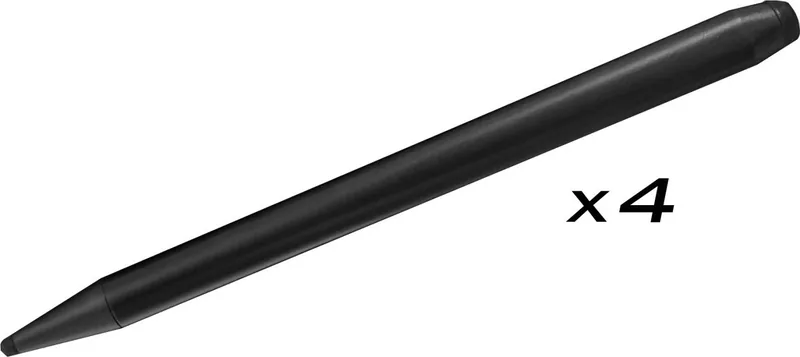
Stylus, Remote Control included
Ergonomics
Without Stand
Wireless
Wi-Fi 6 (WLAN 802.11a/b/g/n/ac/ax), Bluetooth 5.0
Computing
Android, Built-in Media Player (ARM Cortex A55, ARM Mali G52, 8GB RAM, 64GB Flash)
USB Interface
Link
Product Description
Discovering the Power of the iiyama ProLite TExx12MIS-B3AG Series
The iiyama ProLite TExx12MIS-B3AG series represents a significant leap in interactive display technology designed for modern educational and commercial environments. These massive screens offer a seamless blend of functionality and visual fidelity, catering to diverse needs from classrooms to corporate boardrooms. With dimensions ranging from 55 inches to a staggering 98 inches, users can select the perfect size for their space while maintaining consistent performance across the lineup. Each model is built for reliability with a robust chassis designed to withstand the rigors of daily public use and frequent handling by staff members.
At the heart of these displays lies a stunning 4K Ultra HD resolution of 3840 by 2160 pixels. This crystal-clear quality ensures that text remains sharp and images retain their vibrant colors. The IPS panel technology provides wide viewing angles of 178 degrees, making it easy for large groups to see the content clearly regardless of their seating position. Brightness levels hover around 400 cd/m2, which is sufficient for well-lit rooms, while contrast ratios vary between 1200:1 and 4000:1 depending on the specific panel model used for that size. Some models feature VA technology for deeper blacks, enhancing media consumption experiences and making them suitable for darker presentation rooms.
Interaction is key to this series. Equipped with Infrared Touch technology supporting up to 40 points of simultaneous contact, these monitors allow for highly responsive navigation without latency. You can engage with content using fingers or the provided stylus for precision work. The built-in Android 10 or 11 operating system transforms the screen into an all-in-one smart solution. This means you can run applications directly without needing an external computer attached. Users can access cloud storage and manage files through the integrated file browser or connect via Wi-Fi modules for wireless casting. It supports multi-window modes where two applications run side by side on the screen efficiently.
Connectivity is robust with multiple HDMI ports ensuring compatibility with various devices including laptops and media players. A standout feature is the USB Type-C port which supports up to 65 watts of power delivery. This allows a laptop to connect via a single cable for video, audio, data, and charging efficiently. The integrated stereo speakers offer decent sound quality for presentations, rated at 16 watts per channel. Mounting is flexible with standard VESA compatibility ranging from 400x200mm to 800x600mm depending on the size, allowing for wall or ceiling installation with M8 screws. Energy management is critical for continuous operation, with features like Pixel Shift to prevent image burn-in and an Eco mode to reduce power consumption during idle periods. For commercial installations, the Kiosk Mode ensures the interface remains locked to prevent unauthorized changes.
RS232C and LAN ports allow for integration into larger networks and control systems for centralized management. Security features include screen locking and password protection to keep content safe from prying eyes. The unit includes USB hubs for peripheral connection, streamlining workspace cables and reducing clutter around the installation site. Maintenance involves regular cleaning with soft cloths to ensure long life and optimal signal transmission. Whether for digital signage, interactive tutoring, or corporate meeting rooms, this series delivers a professional grade experience with robust construction and modern connectivity options designed for longevity and ease of use in various settings worldwide.
Notes
Always follow the safety guidelines provided by the manufacturer. Ensure proper ventilation to prevent overheating during extended operations. Use the included accessories for optimal setup experience.
Search for 67,706 Manuals online


Type-in Brand or Model