
iiyama ProLite B1780SD-W1 Manual
PDF manual · 34 Pages
English



Quick check
Incorrect answer, please try again.
Chat with your iiyama ProLite B1780SD-W1 manual using AI
Get instant AI answers from your iiyama ProLite B1780SD-W1 manual
Ask anything about the iiyama ProLite B1780SD-W1. Answers come from this manual, with the pages they are based on.
ProLite B1780SD-W1 Maintenance Schedule
Use a dry soft cloth to clean the LCD screen. Do not use paper towels as they may damage the LCD.
Remove stains with a damp soft cloth using a weak dish soap solution. Avoid long contact with rubber or plastic products.
Free maintenance reminders
Timed to your purchase date. Always free, unsubscribe anytime.
Ask a Question
Do you recommend ProLite B1780SD-W1?
Yes NoFrequently Asked Questions
The monitor uses a native SXGA resolution of 1280 x 1024 pixels. This 5:4 format is well suited to business software, legacy systems, point-of-sale terminals, and work that benefits from a compact vertical screen area.
Is this answer helpful?
Yes. Its stand allows the panel to rotate 90 degrees. For portrait display output, the connected graphics card and operating system must support screen rotation.
Is this answer helpful?
The monitor provides a VGA D-sub input for analog connections and a DVI-D input for digital video. DVI-D is generally the preferred option when it is available on the computer.
Is this answer helpful?
Yes. It includes two integrated 1 W stereo speakers and a 3.5 mm stereo audio input. They are convenient for basic notifications, voice playback, and low-volume media.
Is this answer helpful?
The stand supports up to 130 mm of height adjustment, tilt from 2 degrees forward to 22 degrees backward, 45-degree swivel to each side, and 90-degree panel rotation.
Is this answer helpful?
Yes. The ProLite B1780SD-W1 supports the 100 x 100 mm VESA mounting standard. Use compatible M4 mounting screws with a maximum length of 7 mm.
Is this answer helpful?
Advantages and Disadvantages
Advantages

- Ergonomic stand offers height adjustment, tilt, 45-degree swivel, and 90-degree portrait rotation.
- VGA and DVI-D inputs support both older computers and digital desktop connections.
- Native 1280 x 1024 SXGA resolution suits office, administration, and legacy 5:4 applications.
- Built-in 1 W stereo speakers, audio input, VESA mounting, and a security-lock slot add practical versatility.
- Energy-saving management mode lowers inactive power use to a maximum of 0.5 W.
Disadvantages

- The 17-inch 5:4 format provides less workspace than modern widescreen monitors.
- TN panel viewing angles and color presentation are less advanced than current IPS alternatives.
- Native resolution is limited to 1280 x 1024, which may not suit detailed creative or multitasking work.
- Integrated 1 W speakers are suitable for basic audio but not strong sound output.
- The product is not designed specifically for continuous 24/7 use.
Product Specification
Function
Desktop monitor
Diagonal
17 in
Resolution
1280 x 1024 (SXGA), 5:4, 96 ppi
Panel
TN
Backlight
LED
Brightness
250 cd/m2 (typical)
Contrast
1,000:1 (static), 12,000,000:1 (dynamic)
Response time
5 ms (GtG)
Refresh rate
60 Hz (1280 x 1024)
Signal frequency
24-80 kHz (H) / 55-75 Hz (V)
Ports
1 x VGA (60 Hz at 1280 x 1024), 1 x DVI, 1 x 0.14 in jack (Line-In), 1 x AC-in C13 (power connection)
Shape
flat
Viewing angles
170 degrees / 160 degrees
Coating
non-glare (matte)
Color depth
8-bit (16.7 million colors)
FRC
unknown
Certifications/Standards
EPEAT
Speakers
Speakers (2 x 1 W)
Controls
mechanical buttons
Ergonomics
with stand, height-adjustable (5.12 in), pivot (+90 degrees), swivel (+/-45 degrees), tilt (+22 degrees / -2 degrees)
VESA
3.94 x 3.94 in (occupied)
Power consumption
14 W (typical), 0.5 W (standby)
SDR energy efficiency (A to G)
12 kWh/1,000 h (E)
Special features
Security lock (Kensington Security Slot)
Screen-to-body ratio
76.34% (calculated)
Dimensions
14.57 x 15.75 x 9.06 in (W x H x D) with stand compressed, 14.57 x 12.68 x 1.93 in (W x H x D) without stand
Color
white (display bezel) / white (lower bezel) / white (stand) / white (rear)
Weight
10.14 lb (with stand)
Power supply
internal
Warranty
3 years (processed through manufacturer, product registration within 60 days of purchase: Link, warranty information: Link)
USB notation
Link
Product Description
iiyama ProLite B1780SD-W1, 17" - Read, Download & Print Free
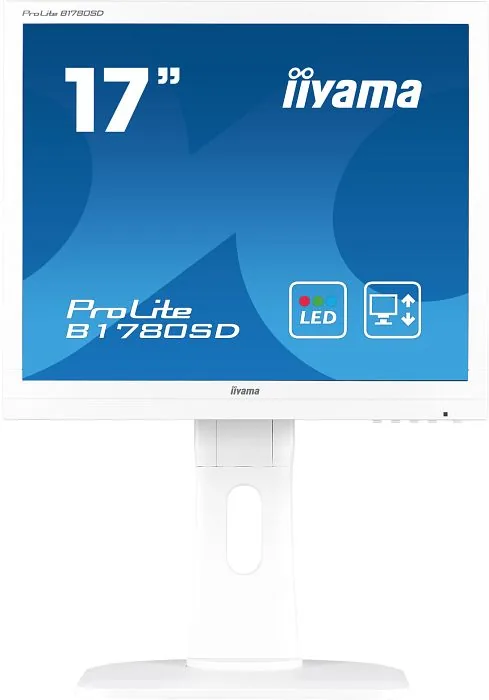
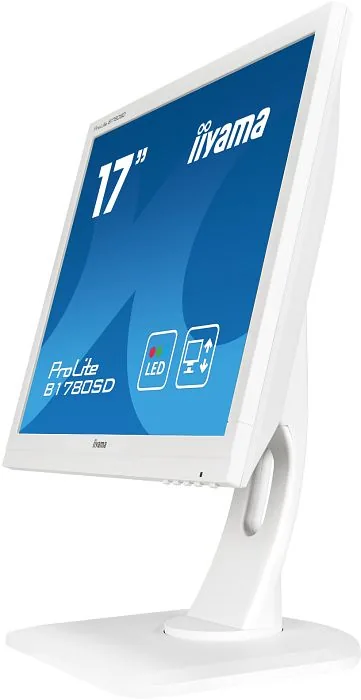
The iiyama ProLite B1780SD-W1 is a compact 17-inch business monitor designed for dependable everyday workspaces. Its SXGA resolution of 1280 x 1024 delivers a clear, traditional 5:4 desktop format that suits office software, point-of-sale systems, industrial applications, and legacy computer setups. With a TN LCD panel, 5 ms response time, and approximately 16.7 million display colors, it provides responsive and practical visual performance for routine tasks.
Flexible Ergonomics for Focused Work
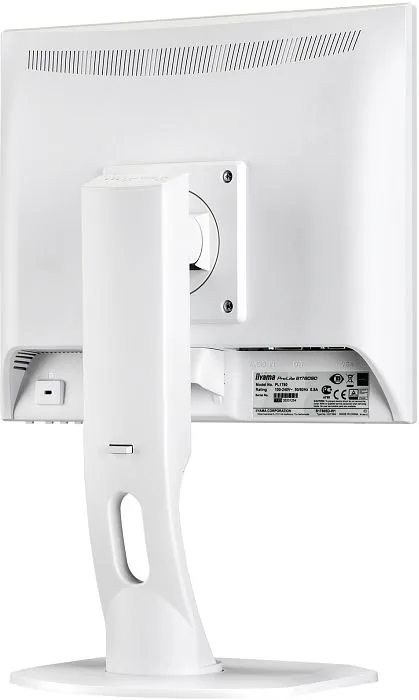
A major advantage of the ProLite B1780SD-W1 is its highly adjustable stand. Users can raise the screen by up to 130 mm, tilt it from 2 degrees forward to 22 degrees back, swivel it 45 degrees in either direction, and rotate the panel 90 degrees into portrait orientation. These adjustments help create a more comfortable viewing position and make the monitor especially useful for long documents, coding, administration, and vertical content.
The 17-inch display has a typical brightness of 250 cd/m2 and a 1000:1 contrast ratio, supported by an advanced contrast function. iiyama also includes i-Style Color presets for standard use, text, games, video, and landscape imagery. On-screen controls provide access to brightness, contrast, color temperature, sharpness, audio level, input selection, and image adjustments.
Straightforward Connectivity
The monitor supports both VGA and DVI-D inputs, helping it connect with a broad range of desktop PCs and older equipment. An audio input and two integrated 1 W stereo speakers add basic sound capability without requiring separate desktop speakers. Plug and Play support and automatic image adjustment simplify setup, while a cable-routing opening helps keep a desk area tidy.
For installations where desk space is limited, the ProLite B1780SD-W1 supports 100 x 100 mm VESA mounting. It also includes a security-lock slot for shared offices, classrooms, and public-facing environments. Its typical power use is 14 W, and the power-management mode reduces consumption to a maximum of 0.5 W when inactive.
Practical Design for Professional Environments
The ProLite B1780SD-W1 is built for users who value adjustability, stable image quality, and conventional connectivity over a widescreen layout. It is not intended for dedicated 24/7 operation, but it is a capable choice for daily office and specialist workstation use.
Notes
- Best visual performance is achieved at the native 1280 x 1024 resolution.
- Use DVI-D when available for a digital signal connection.
- The monitor supports portrait mode when the connected graphics system supports screen rotation.
Search for 67,706 Manuals online


Type-in Brand or Model