

iiyama G-Master GB3271QSU-B1 Red Eagle Manual
PDF manual · 35 Pages
English



Quick check
Incorrect answer, please try again.
Chat with your iiyama G-Master GB3271QSU-B1 Red Eagle manual using AI
Get instant AI answers from your iiyama G-Master GB3271QSU-B1 Red Eagle manual
Ask anything about the iiyama G-Master GB3271QSU-B1 Red Eagle. Answers come from this manual, with the pages they are based on.
Ask a Question
Do you recommend G-Master GB3271QSU-B1 Red Eagle?
Yes No
Serena Kuvalis
6 months ago
Does this monitor support G-Sync or FreeSync, and do I need a DisplayPort cable for 165Hz?

Manual.ly
6 months ago
Yes, this monitor supports both AMD FreeSync and NVIDIA G-Sync Compatible modes. For the full 165Hz refresh rate, we recommend using a DisplayPort connection, as HDMI may be limited to 144Hz on some systems. Regarding cables, the package includes an HDMI cable, but a DisplayPort cable is not always included in all regions. We suggest checking your specific box contents or purchasing a compatible DisplayPort 1.2 cable separately if it is missing.

IdVoluptatem10
7 months ago
Is the stand sturdy enough for a 32-inch screen, and does it include a DisplayPort cable?
Video Manual
Gamingowy IDEAŁ? 32 cale, szybka matryca VA i zakrzywienie iiyama G-Master GCB3280QSU-B1 Red Eagle
Frequently Asked Questions
The iiyama G-Master GB3271QSU-B1 supports a maximum refresh rate of 165Hz when connected via DisplayPort and 144Hz when using HDMI connections.
Is this answer helpful?
Yes, this monitor fully supports AMD FreeSync Premium technology to reduce screen tearing and stuttering for a smoother gaming experience.
Is this answer helpful?
This product is not designed for wall mounting or digital signage applications. It is intended for desk use only.
Is this answer helpful?
The monitor is equipped with one USB upstream port and four USB 3.0 downstream ports for connecting peripherals.
Is this answer helpful?
No, this product is not specifically designed for 24/7 usage in all environments. It is recommended to turn it off when not in use.
Is this answer helpful?
The monitor features two HDMI ports and two DisplayPort inputs, along with a headphone jack and USB connectivity.
Is this answer helpful?
You can access the Blue Light Reducer menu via the remote control or OSD buttons to select from three levels of blue light reduction.
Is this answer helpful?
Advantages and Disadvantages
Advantages

- Ultra-fast 1ms MPRT response time ensures smooth motion handling
- High refresh rates up to 165Hz support fluid gameplay visuals
- AMD FreeSync Premium technology prevents screen tearing effectively
- IPS panel provides excellent color accuracy and wide viewing angles
- Ergonomic stand offers extensive height and swivel adjustments
Disadvantages

- Not designed for 24/7 usage in all environments
- Does not support wall mounting for digital signage applications
- No Picture-by-Picture (PbP) functionality available on this model
- Remote control requires separate AAA batteries which are not rechargeable
- Monitor orientation is restricted to landscape mode only
Product Specification
Function
Monitor (stationary)
Diagonal
31.5" (80.0cm)
Resolution
2560x1440 (QHD), 16:9, 93ppi
Panel
IPS
Backlight
LED, blue light filter, flicker-free
Brightness
400 cd/m^2 (typical)
Contrast
1,200:1 (static), 80,000,000:1 (dynamic)
Response Time
1ms (MPRT)
Refresh Rate
165Hz (2560x1440)
Variable Synchronization
Adaptive Sync, AMD FreeSync Premium certified (48-165Hz via DisplayPort, 48-144Hz via HDMI, with LFC support, with HDR)
Signal Frequency
30-242kHz (H) / 48-165Hz (V)
Connections
2x HDMI 2.0, 2x DisplayPort 1.2, 1x USB-B 3.0 (Upstream, 5Gb/s), 4x USB-A 3.0 (Downstream, 5Gb/s), 1x 3.5mm jack (Line-Out), 1x AC-In C13 (power inlet)
Shape
straight (flat)
Viewing Angle
178°/178°
Coating
non-glare (matte)
Color Depth
8bit (16.7 million colors)
FRC
unknown
sRGB
100%
Speakers
Speakers (2x 3W)
Operation
mechanical buttons, remote control included
Ergonomics
with stand, height adjustable (120mm), Pivot N/A, swivel (+/-45°), tilt (+22°/-3°)
VESA
100x100 (occupied)
Power Consumption
45W (typical), 0.5W (standby)
Energy Efficiency SDR (A to G)
31kWh/1000h (F)
Energy Efficiency HDR (A to G)
50kWh/1000h (G)
Features
Security lock (Kensington Security Slot), Slim Bezel
Screen-to-Body Ratio
90.36% (calculated)
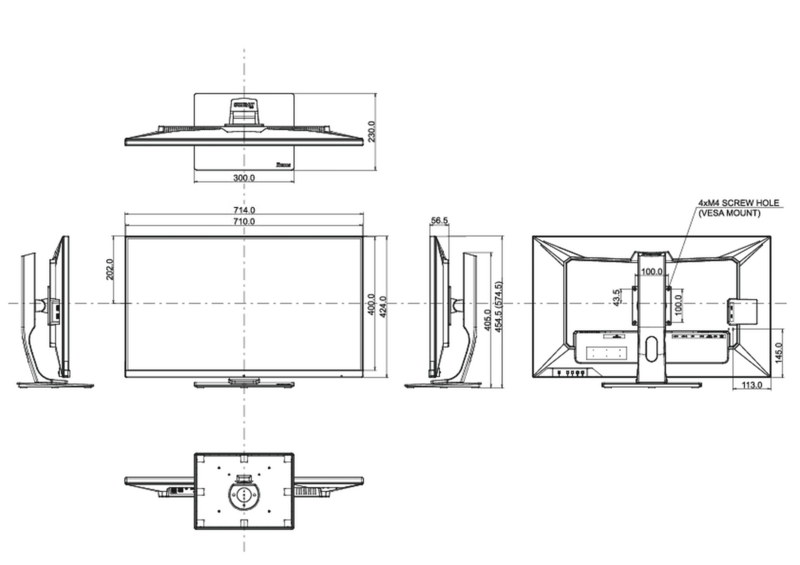
Dimensions
28.1x17.9x9.1in (WxDxH) with stand compressed, 28.1x16.7x2.2in (WxDxH) without stand
Color
black (display frame) / black (lower bezel) / black (stand) / black (back)
Weight
24.91lbs (with stand)
Power Supply
internal
Warranty
three years (processing via manufacturer, product registration within 60 days of purchase: Link, warranty information: Link)
USB Spelling
Link
Product Description
Experience High-Performance Gaming with the iiyama G-Master GB3271QSU-B1 Red Eagle
The iiyama G-Master GB3271QSU-B1 Red Eagle is a premium 31.5-inch gaming monitor designed to deliver an immersive visual experience for serious gamers and professionals alike. This IPS panel boasts a stunning native resolution of 2560 x 1440 pixels, ensuring crisp details and vibrant colors across the entire screen. With a typical brightness of 400 cd/m² and a high contrast ratio of 1200:1, images appear sharp and dynamic, making it ideal for both competitive gaming and creative work.
One of the standout features of this monitor is its incredible speed. It supports a refresh rate of up to 165Hz via DisplayPort and 144Hz via HDMI, coupled with a Moving Picture Response Time (MPRT) of just 1ms. This rapid response eliminates motion blur and ghosting, allowing you to track fast-moving objects with precision. The integration of AMD FreeSync Premium technology further enhances gameplay by synchronizing the monitor's refresh rate with your graphics card to prevent screen tearing and stuttering.
User comfort is paramount during long sessions. The monitor includes Blue Light Reducer and Flicker-Free technologies to minimize eye strain. Additionally, the i-Style Mode offers preset configurations tailored for specific genres like FPS, Strategy, Sports, and Text editing, optimizing settings instantly. The built-in 2x3W stereo speakers provide convenient audio without needing external devices, while the ergonomic stand allows for height adjustment up to 120mm and swivel capabilities for perfect viewing angles.
Connectivity is robust, featuring two HDMI ports, two DisplayPort inputs, and four USB 3.0 downstream ports, making it easy to connect multiple peripherals. The monitor also supports VESA mounting for flexible installation options. Whether you are dominating in battle royales or editing high-resolution video, the iiyama G-Master GB3271QSU-B1 Red Eagle stands out as a powerful tool for performance.
Important Notes
- Ensure the monitor is placed on a stable surface to prevent tipping.
- Do not operate the monitor in direct sunlight or humid environments.
- Use only the specified power cable to maintain warranty validity.
- Allow at least 10cm of ventilation space around the unit to prevent overheating.
Search for 67,706 Manuals online


Type-in Brand or Model
Elsbeth Marquardt
9 months ago
Can I run the monitor at the full 165Hz using HDMI, and what should I do to prevent tearing in games?
Manual.ly
9 months ago
For best results, use DisplayPort to reach 165Hz. Several users report that with HDMI (especially on Windows/NVIDIA settings) the maximum refresh rate can be lower. To reduce tearing, make sure your game and Windows are set to the monitor's intended refresh rate, then enable adaptive sync: the monitor supports AMD FreeSync, and if you use NVIDIA, enable G-Sync Compatible mode in the NVIDIA Control Panel and test. Also confirm you are using HDMI 2.0 quality cabling and select the correct input mode on the monitor. If you still see tearing, switching to DisplayPort and re-checking refresh rate settings usually resolves it.