
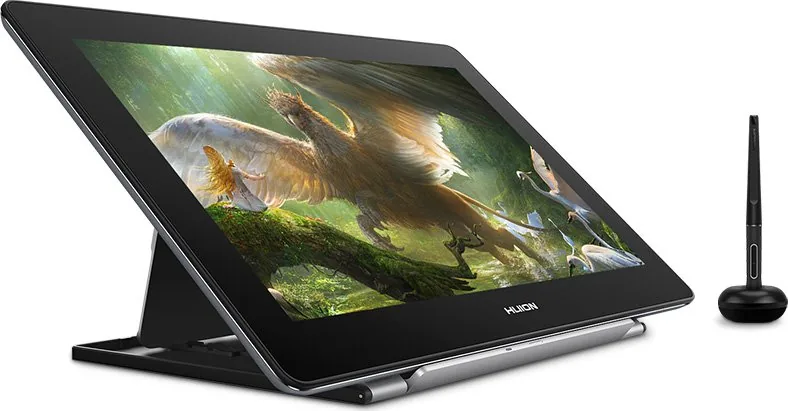

Huion Kamvas Pro 16 (4K) Manual
PDF manual · 135 Pages
English



Quick check
Incorrect answer, please try again.
Chat with your Huion Kamvas Pro 16 (4K) manual using AI
Get instant AI answers from your Huion Kamvas Pro 16 (4K) manual
Ask anything about the Huion Kamvas Pro 16 (4K). Answers come from this manual, with the pages they are based on.
Kamvas Pro 16 (4K) Maintenance Schedule
Replace the pen nib when it wears out after long use. Use the included clip to remove the old nib and insert a new one firmly.
Unplug the USB cable before cleaning. Wipe with a soft damp cloth only; do not use any detergents.
Ask a Question
Do you recommend Kamvas Pro 16 (4K)?
Yes NoFrequently Asked Questions
This display supports Windows 7 or later and macOS 10.12 or later. It also works with Android devices if they support USB 3.1 GEN1 and DP1.2 or above.
Is this answer helpful?
No, the included PW517 pen is battery-free. It uses electromagnetic resonance technology to function without needing internal power sources.
Is this answer helpful?
You can connect using the 3-in-1 cable which carries data, video, and power, or use a separate USB-C to USB-C cable along with a power adapter. Ensure your computer has the appropriate ports.
Is this answer helpful?
Yes, the driver software allows you to customize pressure sensitivity. You can drag a slider to make the pen more or less sensitive based on your personal preference and hand size.
Is this answer helpful?
Yes, the package includes an adjustable stand. You can change the angle of the display to find a comfortable position for drawing, reducing neck and back strain.
Is this answer helpful?
Check that the power is on and cables are securely connected. Ensure the correct input source is selected in the OSD menu. If using a desktop, verify the HDMI cable is plugged into the graphics card, not the motherboard.
Is this answer helpful?
Nibs wear down with regular use. Replace them when you notice inconsistent line width or rough texture. They are stored inside the pen holder and can be swapped easily by rotating the holder.
Is this answer helpful?
Advantages and Disadvantages
Advantages

- Stunning 4K UHD resolution delivers incredibly sharp and detailed images
- 120% sRGB color gamut ensures accurate and vibrant color representation
- Battery-free pen provides 8192 pressure levels for natural drawing control
- Multiple connection options including HDMI, DP, and USB-C offer great flexibility
- Ergonomic adjustable stand allows for comfortable positioning during long sessions
Disadvantages

- Brightness is capped at 220cd/m2 which may be lower than some competitors
- No built-in touch functionality limits interaction methods compared to touch screens
- Response time of 25ms might cause slight lag for fast-paced animation work
- Requires external power adapter which adds to cable clutter on the desk
- Pen nibs wear out over time and need regular replacement for best performance
Product Specification
Type
Graphics tablet with screen
Active area
13.6x7.65in
Pen
Wireless, tip, 2 buttons
Resolution
200lpi
Pressure levels
8192
Tilt range
60°
Max pen distance
0.4in
Display
15.6in, 3840x2160, IPS, 120% sRGB, Full Lamination
Signal input
HDMI 2.0 (via 3-in-1 cable), USB-C with DisplayPort 1.2
Brightness
66 cd/ft^2
Contrast
1000:1
Response time
25ms
Keys
N/A
CPU
N/A
RAM
N/A
Storage
N/A
Graphics
N/A
Host connection
USB-C
Other connections
1x USB-A 2.0, 1x USB-C 3.0 with DisplayPort 1.2
Wireless
N/A
Card reader
N/A
Webcam
N/A
Operating system
N/A
Power consumption
3180W (typical), 0.2W (standby), 0.2W (sleep)
Dimensions
15.85x10.13x0.51in
Weight
2.8lbs
Features
Stand (tiltable 20°/45°, foldable)
Package contents
Main unit, stand (ST200), pen (PW517), pen holder, 10 replacement tips, power supply, 3-in-1 cable, glove, cleaning cloth
Energy efficiency class SDR (A to G)
E
Energy consumption SDR
10kWh/1000h
Product Description
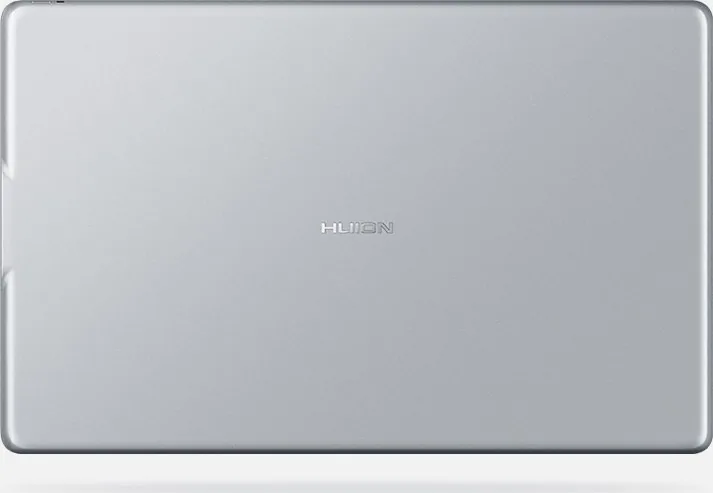
Discover the Huion Kamvas Pro 16 (4K) Silvery Frost
The Huion Kamvas Pro 16 (4K) Silvery Frost is a masterpiece of modern digital art, designed to elevate your creative workflow. This professional drawing display combines stunning visual fidelity with intuitive functionality, making it an essential tool for artists, designers, and illustrators. The sleek Silvery Frost finish not only looks elegant on any desk but also reflects light efficiently to reduce eye strain during long sessions.
At the heart of this device lies a 15.6-inch IPS panel boasting a breathtaking 3840 x 2160 UHD resolution. This 4K clarity ensures that every brushstroke, color gradient, and fine detail is rendered with absolute precision. The screen covers 120% of the sRGB gamut, delivering vibrant and accurate colors that bring your digital masterpieces to life. Whether you are working on complex illustrations or photo editing, the visual experience is nothing short of immersive.
The device features a battery-free pen that offers 8192 levels of pressure sensitivity, mimicking the natural feel of ink on paper. The pen includes customizable side buttons that can be programmed to suit your specific software needs, enhancing efficiency. The active area is perfectly sized at 345.6 x 194.4mm, providing ample space for fluid movements without sacrificing portability.
Connectivity is seamless with multiple options including HDMI, DisplayPort via the included 3-in-1 cable, and direct USB-C connections. This flexibility allows you to connect to PCs, Macs, and even Android devices with ease. The adjustable ergonomic stand lets you find the perfect angle for drawing, ensuring comfort whether you are sitting or standing. With driver support for Windows and macOS, setting up your workspace is straightforward and reliable.
Key Features Overview
- Ultra-High Definition: 4K UHD resolution for crisp, detailed visuals.
- Natural Drawing Feel: Battery-free pen with 8192 pressure levels.
- Versatile Connectivity: Supports HDMI, DP, and USB-C connections.
- Ergonomic Design: Adjustable stand for comfortable viewing angles.
- Color Accuracy: 120% sRGB coverage for professional color reproduction.
Notes
Ensure you use the provided power adapter rated at 5V and 3A for optimal performance. Always uninstall previous drivers before installing the latest version to avoid conflicts. Keep the pen tip clean and replace it when worn to maintain consistent writing quality.
Search for 67,706 Manuals online


Type-in Brand or Model