
Huion Kamvas Pro 13 Manual
PDF manual · 20 Pages
English



Quick check
Incorrect answer, please try again.
Chat with your Huion Kamvas Pro 13 manual using AI
Get instant AI answers from your Huion Kamvas Pro 13 manual
Ask anything about the Huion Kamvas Pro 13. Answers come from this manual, with the pages they are based on.
Ask a Question
Do you recommend Kamvas Pro 13?
Yes NoFrequently Asked Questions
Yes, the device supports Macintosh operating systems version 10.12 or later as well as Windows 7 or later. You will need to install the specific driver software provided on the manufacturer website.
Is this answer helpful?
If the pen does not work or has no pressure, try reinstalling the driver, restarting your computer, or re-inserting the USB cable. You can also use the calibration tool in the driver settings to fix alignment.
Is this answer helpful?
The package includes a 3-in-1 cable that supports USB, HDMI, and Power connections via a Type-C port, along with a power adapter and a stand.
Is this answer helpful?
No, this display requires a computer connection for power and video signal. It functions as a pen monitor and cannot operate as a standalone tablet without a host device.
Is this answer helpful?
Click the red point of the crosshair appearing on the screen within the driver software to complete screen calibration. You can also restore factory settings if needed.
Is this answer helpful?
Yes, Windows Ink support enables compatibility with applications like Microsoft Office, Windows Journal, and Adobe Photoshop CC for enhanced pen input.
Is this answer helpful?
The screen resolution is 1920 by 1080 pixels in a 16:9 aspect ratio, providing Full HD clarity for detailed artwork.
Is this answer helpful?
Advantages and Disadvantages
Advantages

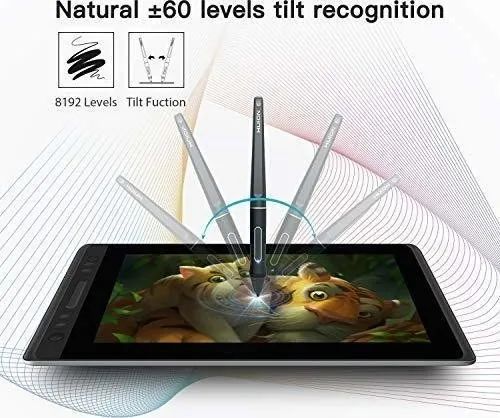
- 8192 levels of pressure sensitivity provide precise and natural drawing control for professional artists.
- 120 percent sRGB gamut ensures vibrant and accurate colors for photo editing and digital painting.
- Versatile connectivity includes HDMI and Type-C ports for easy connection to most laptops and desktops.
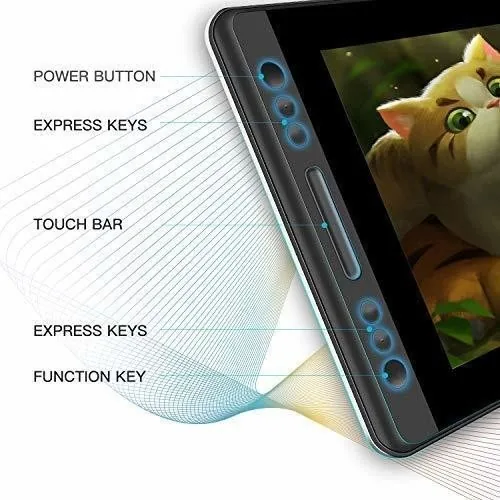
- Customizable press keys and touch bar allow users to optimize their specific workflow shortcuts.
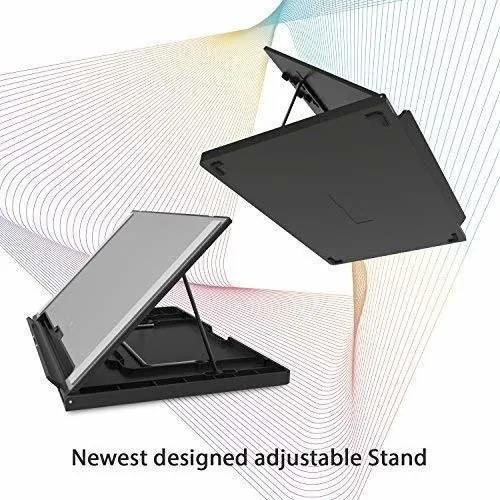
- Portable design with an adjustable stand offers ergonomic comfort and stability during long sessions.
Disadvantages

- The device requires an external power adapter and does not have an internal battery for mobility.
- Driver installation may require closing antivirus software temporarily to avoid detection errors.
- Occasional screen calibration is necessary to maintain accuracy between the pen tip and cursor.
- The stand provides limited adjustability angles compared to some higher-end standalone solutions.
- Color temperature may vary slightly based on room temperature affecting display consistency.
Product Specification
Type
Graphics Tablet with Screen
Active Area
11.57x6.50 inches
Stylus
Wireless, Tip, 2 Buttons, Eraser Function
Resolution
5080lpi
Pressure Levels
8192
Tilt Range
90 degrees
Max Pen Distance
0.39 inches
Display
13.3", 1920x1080, IPS
Signal Input
HDMI
Brightness
220 cd/m2
Contrast
1000:1
Response Time
25ms
Keys
6x Keys, 1x Touchstrip
CPU
N/A
RAM
N/A
Storage
N/A
Graphics
N/A
Host Port
USB-C
Additional Ports
N/A
Wireless
N/A
Card Reader
N/A
Webcam
N/A
Operating System
N/A
Power Consumption
5.6W (typ), Not specified (Standby), 0.2W (Sleep)
Battery
N/A
Dimensions
15.28x10.24x0.43 inches
Weight
2.01 lbs
Features
Stand
Package Contents
Main Unit, Pen (PW507), Pen Holder, Stand, 10x Replacement Tips, 3-in-1 Cable, Charger
SDR Energy Efficiency Class (A to G)
C
SDR Energy Consumption
6 kWh/1000h
Product Description
Discover the Huion Kamvas Pro 13
Welcome to the world of digital art with the Huion Kamvas Pro 13. This tablet represents a significant leap forward in portable drawing technology designed for professionals and hobbyists alike. It offers a realistic drawing experience directly on your screen without needing extra monitors. The product includes a pen holder, nibs, and a cleaning cloth for your convenience during your work sessions. The Huion Kamvas Pro 13 HDMI Manual provides crucial insights into maximizing your creative workflow efficiently. Whether you are an illustrator or an animator, efficiency is key to success in this competitive industry today.
Unmatched Portability and Performance
The 13.3-inch IPS LCD screen delivers vibrant colors with a 120 percent sRGB gamut coverage. You will notice the color difference immediately when editing photos or painting complex scenes in Adobe Photoshop CC software. The native resolution is a crisp 1920 by 1080 pixels ensuring fine details remain sharp and visible at all times. Connectivity is streamlined significantly via the included 3-in-1 cable which features both HDMI and Type-C support. This flexibility allows connection to various gaming laptops and desktop computers without complex dongles or hubs being required.
Precision Control and Setup
The included PW507 digital pen supports 8192 levels of pressure sensitivity for accurate strokes. This means light pen strokes create thin lines while heavier pressure yields bold and dark marks mimicking traditional media paper perfectly. The tilt recognition function and electromagnetic resonance technology ensure natural movement during rapid sketching sessions. Adjusting the drawing angle is easy with the adjustable stand included securely in the box for stability. It fits comfortably on any desk surface for ergonomic comfort with two adjustable levels to choose from based on your height.
Customization and Software Support
Users can personalize their specific workflow significantly through the dedicated driver software interface on their computer. There are four customizable press keys located on the device top left side for shortcut actions instantly. A touch bar on the left side allows for zooming and scrolling through timelines in video software applications seamlessly. Driver installation is straightforward for both Windows and Macintosh operating systems with support for newer OS versions. Windows Ink support ensures compatibility with modern third-party applications for seamless integration into your daily work.
Maintenance and Care Guidelines
To keep your electronic display functioning well always follow basic safety guidelines provided in the manual. Clean the screen surface with a soft damp cloth while avoiding water sources and strong detergents entirely. Do not place the monitor on soft surfaces like beds where ventilation holes might get blocked causing overheating risks. To prevent short circuits ensure no foreign bodies get inside the monitor through the grooves. If you encounter technical issues the troubleshooting section of the guide offers solutions for power or connection problems. Always use the provided power adapter to prevent damage to internal components during operation.
Final Thoughts on Features
The device supports data export and import for your customized configuration settings easily. This is convenient when switching between different software applications or computers efficiently. You can also enable the Windows Ink feature for broader software support across the ecosystem. Embrace creativity with the Huion Kamvas Pro 13 and transform your computer into a mobile studio for any project. Read the guide fully to unlock all potential features available for your artistic projects starting today.
Search for 67,706 Manuals online


Type-in Brand or Model