
Huion Kamvas Pro 13 (2.5K) Manual
PDF manual · 50 Pages
English



Quick check
Incorrect answer, please try again.
Chat with your Huion Kamvas Pro 13 (2.5K) manual using AI
Get instant AI answers from your Huion Kamvas Pro 13 (2.5K) manual
Ask anything about the Huion Kamvas Pro 13 (2.5K). Answers come from this manual, with the pages they are based on.
Ask a Question
Do you recommend Kamvas Pro 13 (2.5K)?
Yes NoFrequently Asked Questions
Download from the official website, close antivirus programs to prevent errors, run the installer file, agree to terms, and restart the driver or computer if connection issues occur.
Is this answer helpful?
Yes, if the device supports USB 3.1 and DP1.2 protocols and uses a full-featured USB-C cable. Ensure power adapter output is at least 5V, 2A.
Is this answer helpful?
It supports 8,192 levels of pressure sensitivity for natural stroke variation and tilting support up to 60 degrees.
Is this answer helpful?
Yes, use the calibration tab in the driver to align the pen tip with the cursor by clicking on red dots displayed on the screen.
Is this answer helpful?
The pressure sensor detects the pen on the display. Remove the digital pen from the working area when not in use to resolve this conflict.
Is this answer helpful?
Yes, it uses electromagnetic resonance technology that requires no charging, making it lighter and ready to use.
Is this answer helpful?
Windows 7 or later, macOS 10.12 or later, and Linux. Linux users should avoid VMware Play version for driver support.
Is this answer helpful?
Advantages and Disadvantages
Advantages

- High resolution 2560x1600 with 145% sRGB coverage ensures accurate colors
- Battery-free digital pen removes charging needs and offers 8k pressure levels
- Full lamination reduces parallax for a more natural drawing experience
- USB-C connectivity supports video and power through a single cable
- Compatible with Windows, macOS, Linux, and select Android devices
Disadvantages

- Driver installation can be complex on Linux requiring command line usage
- Placing pen on screen may prevent computer from entering sleep mode
- Mac display settings require specific full-featured USB-C cable usage
- Stand might be less stable on uneven surfaces without additional weight
- Color settings limited to brightness/saturation in some color spaces
Product Specification
Type
Graphics Tablet with Display
Active Area
11.28" x 7.05"
Pen
Wireless, Tip, 2 Buttons, Eraser Function
Resolution
5080 lpi
Pressure Levels
8192
Tilt Range
90 degrees
Max Pen Distance
0.39"
Display
13.3", 2560x1600, IPS
Signal Input
HDMI, USB-C 3.0 with DisplayPort 1.2
Brightness
220 cd/m^2
Contrast
1200:1
Response Time
25 ms
Buttons
6 Buttons, 1 Touchstrip
CPU
N/A
RAM
N/A
Storage
N/A
Graphics
N/A
Host Port
USB-C
Additional Ports
N/A
Wireless
N/A
Card Reader
N/A
Webcam
N/A
Operating System
N/A
Power Consumption
8W (typical), 0.3W (Sleep)
Battery
N/A
Dimensions
14.70" x 9.02" x 0.39"
Weight
2.20 lbs
Features
Stand
Package Contents
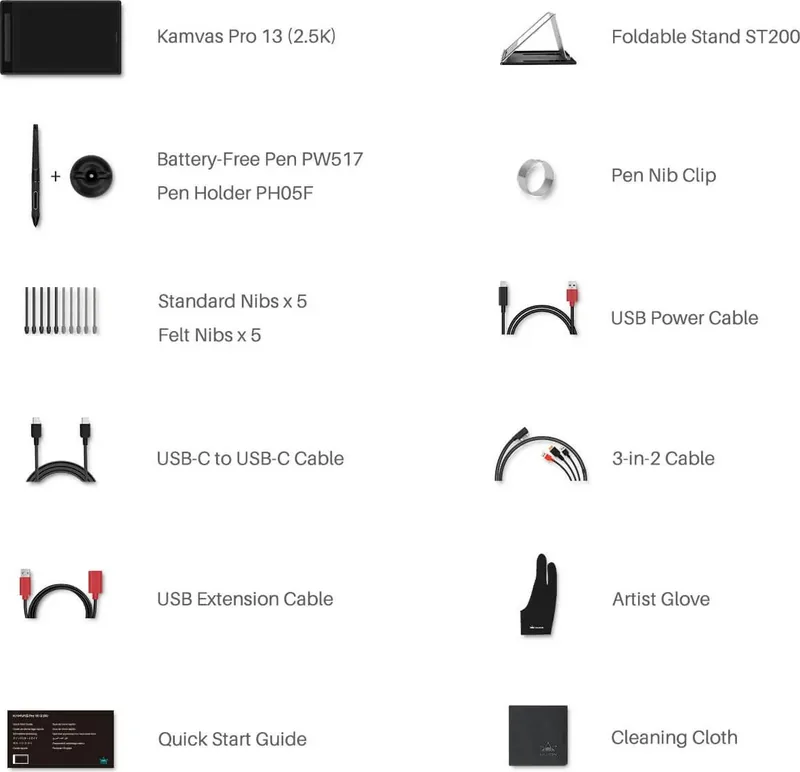
Main Unit, Pen (PW517), Pen Holder, Stand (Foldable Stand ST200), 10x Replacement Tips, 3-in-1 Cable, USB-C to USB-C Cable, USB-C to USB-A Cable, USB Extension Cable
Energy Efficiency Class SDR (A to G)
D
Energy Consumption SDR
8 kWh/1000h
Product Description
Experience Professional Art with the Huion Kamvas Pro 13
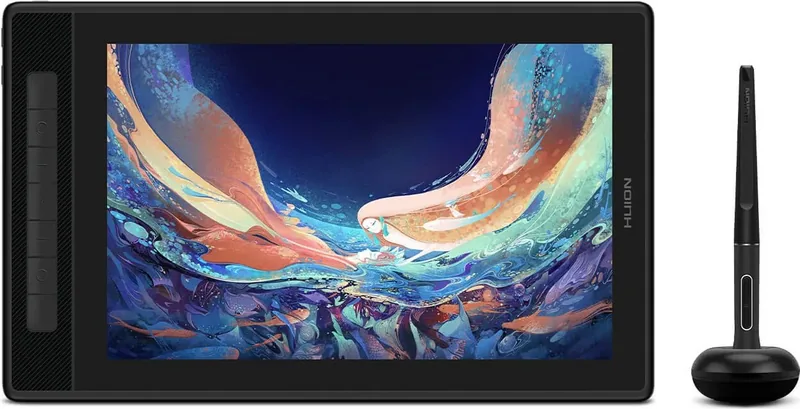
The Huion Kamvas Pro 13 (2.5K) redefines portable creative displays for modern workflows. Designed specifically for digital artists and illustrators seeking quality. This unit boasts a stunning 2.5K IPS screen where every pixel is vibrant thanks to the 145 percent sRGB color gamut. Anti-glare etched glass protects your vision during extended use. Full lamination eliminates the gap between glass and screen, enhancing precision.
Precision and Control
The included battery-free digital pen transforms how you interact with files. Eight thousand one hundred ninety-two pressure levels capture every nuance. Tilting the pen up to sixty degrees enables realistic shading strokes. There is no need for charging, ensuring uninterrupted creativity. Users can map press keys for shortcuts within favorite software.
Versatile Connectivity
Setup is flexible with multiple cable options. The full-featured USB-C cable handles video and power transfer. You can connect to Windows, Mac, or Linux computers seamlessly. Android devices work if they support USB 3.1 and DisplayPort protocols. The three-in-two cable simplifies connections for older laptops. A sturdy stand adjusts to various drawing angles.
Software and Customization
The driver suite offers deep customization. Calibration tools align the pen movement with screen output. You can define custom working areas to match monitors. The On-Screen Display menu allows direct adjustments. Options include brightness, contrast, and color temperature settings. Presets exist for gaming, movies, and standard use.
Accessories and Durability
The package contains essential items for immediate use. Spare nibs and a pen holder are included for replacements. The foldable stand makes travel easy for field work. Drivers are required to maintain functionality after updates. Troubleshooting steps help resolve sleep mode conflicts. This display combines portability with studio-grade performance needs. Artists find the low latency response time very satisfying. It supports Windows 7 or newer systems easily. Memory consumption is minimal during operation. The device maintains stability across different operating environments. This product is built for serious work demands.
Installation guidelines require specific steps. Close antivirus programs before installing drivers to avoid errors. On Mac OS, accessibility permissions must be granted manually. Linux users must use specific commands or the application store package. These steps ensure the device functions correctly. Once set up, the system supports simultaneous dual display usage. Color settings can be saved for backup restoration. This flexibility ensures you always have a reliable workflow. It is the perfect choice for freelancers and studios alike.
Search for 67,706 Manuals online


Type-in Brand or Model