
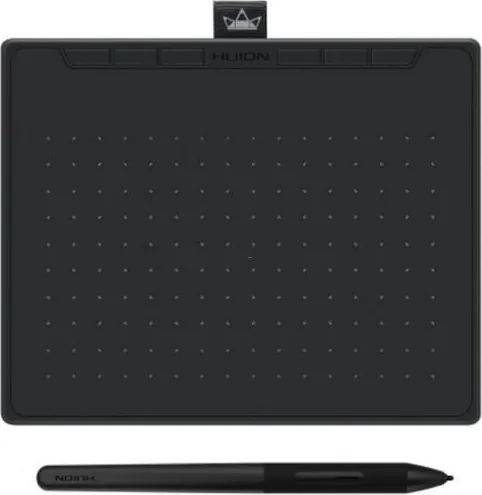

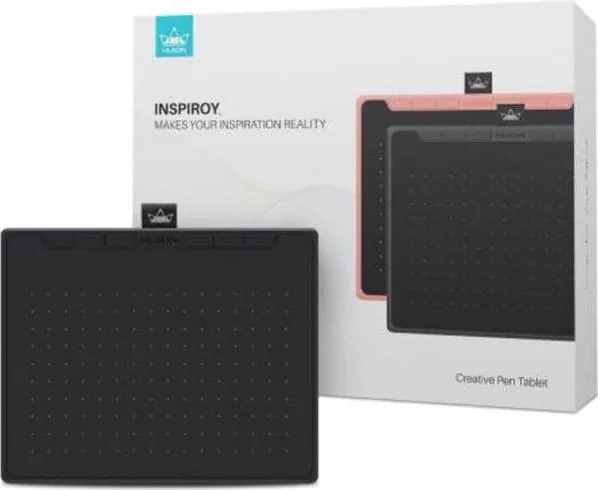
Huion Inspiroy RTS-300 Manual
PDF manual · 32 Pages
English



Quick check
Incorrect answer, please try again.
Chat with your Huion Inspiroy RTS-300 manual using AI
Get instant AI answers from your Huion Inspiroy RTS-300 manual
Ask anything about the Huion Inspiroy RTS-300. Answers come from this manual, with the pages they are based on.
Ask a Question
Do you recommend Inspiroy RTS-300?
Yes NoFrequently Asked Questions
No. The digital pen operates on battery-free electromagnetic resonance technology. This means you do not need to charge or replace batteries for the stylus itself.
Is this answer helpful?
Yes. You can connect via an OTG adapter on devices running Android OS 6.0 or later. Ensure the OTG function is enabled in your phone settings.
Is this answer helpful?
The tablet supports Windows 7 or later, macOS 10.12 or later, ChromeOS 88 or later, and Android 6.0 or later with USB-C connectivity.
Is this answer helpful?
Rotate the pen holder cover to open it. Pull out the old nib using the nib clip. Insert a new nib straight into the pen and push firmly until it stops.
Is this answer helpful?
Check if the driver is installed correctly or if another tablet driver is conflicting. Close graphic software before reinstalling the driver and restart your computer.
Is this answer helpful?
Yes. You can map keyboard shortcuts, mouse buttons, system applications, or launch specific programs through the dedicated driver interface settings.
Is this answer helpful?
The tablet itself uses a USB-C interface for power and data. The digital pen is battery-free, so there is no charging required for the stylus.
Is this answer helpful?
Advantages and Disadvantages
Advantages

- Battery-free pen technology for convenience
- Supports Android mobile devices via OTG
- 8192 levels of pressure sensitivity
- Customizable express keys and side buttons
- Windows Ink support for major apps
Disadvantages

- Requires driver installation before use
- Some software does not support switch brush
- Limited working area compared to larger boards
Product Specification
Type
Graphics Tablet
Active Area
6.30x3.94in
Pen
Wireless, Tip, 2 Buttons
Resolution
5080 lpi
Pressure Levels
8192
Tilt Range
60°
Max. Pen Height
0.39in
Display
N/A
Signal Input
N/A
Brightness
N/A
Contrast
N/A
Response Time
N/A
Keys
6 x Buttons
CPU
N/A
RAM
N/A
Storage
N/A
Graphics
N/A
Host Port
USB-C
Other Ports
N/A
Wireless
N/A
Card Reader
N/A
Webcam
N/A
Operating System
N/A
Power Consumption
None specified (typical), None specified (Sleep)
Battery
N/A
Dimensions
7.87x6.42x0.33in
Weight
0.50 lbs
Package Contents
Main Device, 1 x Pen (PW400), 1 x Pen Holder, 10 x Replacement Tips, 1 x USB Cable
Product Description
Discovering the Huion Inspiroy RTS-300 Creative Experience
Creating art has never been more accessible with the arrival of the Huion Inspiroy RTS-300. This new generation of professional battery-free drawing tablet is designed to enhance your workflow efficiency while keeping the creative process joyful. Whether you are a seasoned digital painter or a hobbyist eager to explore vector graphics, this device brings a shock experience to your workflow. By freely painting and writing, you can depict different lines and colors just as a pen writes on paper. The tablet serves as a bridge between your imagination and the digital canvas with precision.
Connectivity and Setup
Connecting your hardware is straightforward and versatile. The device supports wired connections via a USB-C cable included in the box. Simply connect the tablet to your computer and install the necessary software from the official website. Users on Windows 7 or later, macOS 10.12 or later, and ChromeOS 88 or later will find full compatibility. For mobile creators, Android connection via OTG is supported on OS 6.0 or later. An OTG Adapter is included in the package to facilitate this mobile workflow without hassle. You can connect two digital drawing devices at the same time using the driver switch function for advanced projects.
Digital Pen Technology
The included PW400 digital pen is a highlight of this unit. It utilizes battery-free electromagnetic resonance technology. This means you never have to charge a stylus or worry about weight imbalances. With 8192 levels of pressure sensitivity and a report rate greater than 300PPS, the pen delivers accuracy within 0.3mm. The sensing height allows for comfortable hovering at up to 10mm above the surface. The pen nibs can be replaced easily when worn, ensuring consistent performance over time. Side buttons on the pen can be assigned to custom functions for rapid workflow adjustments.
Customization and Driver Interface
Customization is key to productivity. The driver interface allows you to press the express keys on the tablet to map shortcuts like Ctrl+A or Ctrl+Z. You can also configure side buttons on the pen to launch programs or switch brush sizes immediately. The working area can be mapped to specific screen ratios or customized manually. Furthermore, you can rotate the working area by degrees to suit left or right-handed operation styles. The software supports Windows Ink features for seamless interaction with apps like Photoshop. You can backup your settings to avoid reconfiguring them on different machines. Game Mode is available to increase cursor following speed for OSU games, while Mouse Mode changes the coordinate system for standard navigation.
Final Thoughts
Reading the Huion Inspiroy RTS-300 Manual ensures you unlock every feature hidden within this sleek device. Troubleshooting is handled through the driver settings or by contacting support if installation fails. The dimensions of 200 x 163 x 8.35mm make it lightweight for travel. With two color options available, you get a device that fits your style perfectly. This tablet invites you to paint freely and write without restrictions, offering a comprehensive tool for digital illustration needs. Whether you are doing design, animation, or editing, this hardware stands ready to assist your creative journey with reliable support and intuitive settings. The included quick start guide helps you begin immediately after unboxing. The package includes one battery-free pen, one pen holder, ten replacement nibs, one USB cable, and a quick start guide. Ensure you close graphic software before installing the driver to avoid conflicts. If the pen does not work, verify the nib is active and the OS settings support the tablet. This hardware stands ready to assist your creative journey with reliable support and intuitive settings.
Search for 67,706 Manuals online


Type-in Brand or Model