

HP ZBook Studio Power G8 Manual
PDF manual · 87 Pages
English


Quick check
Incorrect answer, please try again.
Chat with your HP ZBook Studio Power G8 manual using AI
Get instant AI answers from your HP ZBook Studio Power G8 manual
Ask anything about the HP ZBook Studio Power G8. Answers come from this manual, with the pages they are based on.
Ask a Question
Do you recommend ZBook Studio Power G8?
Yes NoFrequently Asked Questions
You can connect an external monitor using the USB Type-C Thunderbolt port or the HDMI port. For the best results, use a high-quality cable and press the F1 key to toggle between display modes like extend or duplicate.
Is this answer helpful?
Yes, this laptop is excellent for video editing. It features powerful processors and dedicated graphics capabilities that allow for smooth rendering and playback of high-resolution video files.
Is this answer helpful?
The HP ZBook Studio Power G8 typically comes with soldered RAM, meaning it cannot be upgraded after purchase. It is recommended to choose the desired memory configuration at the time of buying.
Is this answer helpful?
To enable fingerprint login, go to Settings, select Accounts, and then choose Sign-in options. Follow the on-screen instructions to register your fingerprint with the built-in reader.
Is this answer helpful?
Ensure the air vents are not blocked by soft surfaces like pillows or blankets. Use the laptop on a hard, flat surface to allow proper airflow and cooling.
Is this answer helpful?
Advantages and Disadvantages
Advantages

- High-performance processor handles demanding professional workloads efficiently
- Thunderbolt 4 ports offer versatile connectivity and fast data transfer speeds
- Advanced security features like fingerprint readers protect sensitive business data
Disadvantages

- Premium build quality may result in a higher price point compared to standard laptops
- Battery life can decrease significantly under maximum load conditions
- Some advanced features require specific configurations or additional hardware
Product Specification
Type
Notebook
HDD
N/A
Flash
N/A
Input
Keyboard with DE layout (backlit, numpad, rubber dome, splash-proof), touchpad
Connections
3x USB-A 3.0 (5Gb/s), 1x Thunderbolt 4 (40Gb/s, PD), 1x HDMI 2.0, 1x 3.5mm jack, 1x RJ-45 1Gb LAN, 1x Smartcard, 1x DC-In barrel jack (power, 4.5mm)
Wireless
Wi-Fi 6 (WLAN 802.11a/b/g/n/ac/ax, 2x2, Intel AX201), Bluetooth 5.2
Camera
0.9 Megapixel
Optical Drive
N/A
Battery
Fixed, Li-Polymer, 6 cells, 83Wh
Power Adapter
1x Barrel connector (150W, 4.5mm)
Weight
4.17 lbs
Dimensions
14.15x9.21x0.90 in (WxDxH)
Color
Gray
Warranty
Three years
USB Writing Style
Left
Product Description
Discover the Power of the HP ZBook Studio Power G8
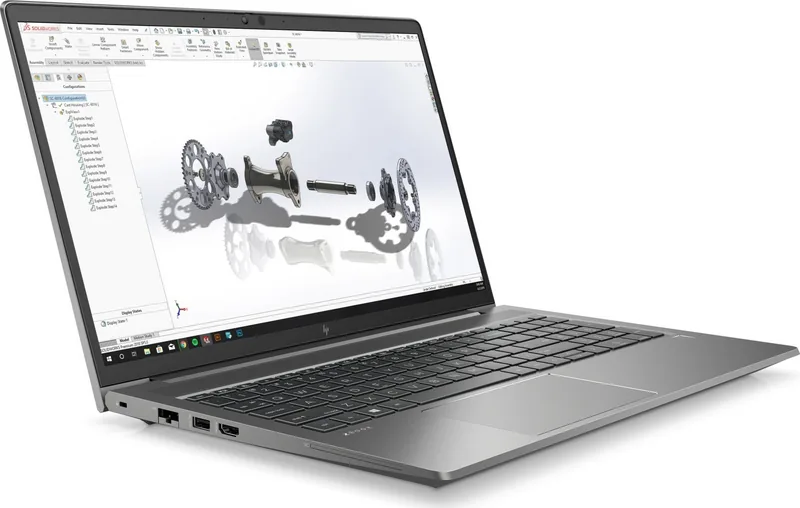
The HP ZBook Studio Power G8 represents a pinnacle in mobile workstation technology, designed for professionals who demand high performance without compromising on portability. This sleek machine is engineered to handle demanding creative tasks, complex data analysis, and rigorous development workflows with ease. Whether you are a graphic designer, engineer, or software developer, this laptop provides the robust computing power necessary to bring your most ambitious projects to life.
At the heart of the ZBook Studio Power G8 lies a powerful processor capable of multitasking seamlessly. The system ensures that even the most resource-intensive applications run smoothly, allowing you to switch between heavy workloads without lag. The display is another standout feature, offering vibrant colors and sharp resolution that make it ideal for visual content creation. Users can rely on the accurate color reproduction to ensure their work looks perfect on any screen.
Connectivity is seamless with the inclusion of Thunderbolt 4 ports, which support rapid data transfer and external display connections. The laptop also features advanced security measures, including fingerprint readers and hardware-based encryption, keeping your sensitive business data safe from unauthorized access. The battery life has been optimized to last through long meetings or travel days, ensuring you stay productive wherever you go.
The keyboard and touchpad are designed for comfort during extended use, featuring responsive keys and precise gesture controls. Audio quality is enhanced by premium speakers that deliver clear sound for video conferences and media consumption. With its durable build and professional aesthetic, the HP ZBook Studio Power G8 is not just a tool but a statement of excellence in the modern workspace.
Important Notes
- Ensure you update BIOS and drivers regularly for optimal performance.
- Use the included HP Support Assistant for quick diagnostics and updates.
- Always follow safety guidelines regarding ventilation to prevent overheating.
Search for 67,706 Manuals online


Type-in Brand or Model