

HP StoreFabric 8/24 Manual
PDF manual · 101 Pages
English


Quick check
Incorrect answer, please try again.
Chat with your HP StoreFabric 8/24 manual using AI
Get instant AI answers from your HP StoreFabric 8/24 manual
Ask anything about the HP StoreFabric 8/24. Answers come from this manual, with the pages they are based on.
Ask a Question
Do you recommend StoreFabric 8/24?
Yes NoFrequently Asked Questions
The HP StoreFabric 8/24 SAN Switch ships with 16 ports activated. Additional ports up to 24 can be enabled through the purchase and installation of specific upgrade licenses.
Is this answer helpful?
Standard software components include Advanced Web Tools, Advanced Zoning, and Enhanced Group Management. These provide comprehensive management capabilities without extra licensing fees.
Is this answer helpful?
Yes. You can activate additional ports by purchasing upgrade licenses. This allows for on-demand scaling without replacing the entire switch hardware unit.
Is this answer helpful?
You can configure a static IP address using the CLI or enable DHCP to obtain an address automatically from a server on the same subnet.
Is this answer helpful?
Connect power cords to separate circuits for redundancy. Ensure the supply circuit meets the electrical rating on the nameplate and provide minimum airflow.
Is this answer helpful?
The 8/24 SAN Switch ships with a Full Fabric license installed by default. This enables connections to other switches and fabric expansion.
Is this answer helpful?
You can use NTP servers to synchronize local time for accurate logging. Time zone settings are preserved in nonvolatile memory across reboots.
Is this answer helpful?
Advantages and Disadvantages
Advantages

- Scalable port architecture allows expansion from 16 up to 24 ports using optional licenses.
- Advanced Web Tools and Advanced Zoning included as standard software components.
- Universal ports self-configure to support E_Ports, F_Ports, and FL_Port roles automatically.
- DPS routing optimizes fabric-wide performance by selecting efficient data paths.
- EZSwitch Setup Wizard simplifies initial configuration and basic network setup tasks.
Disadvantages

- Base configuration ships with only 16 active ports requiring upgrade for full 24 port usage.
- Specific installation requirements must be met for airflow and temperature stability.
- Power cord redundancy requires connection to separate circuits for larger models.
- Fiber optic cable management demands strict adherence to bend radius guidelines.
- Full Fabric license required for connecting to other switches on base 8/8 models.
Product Specification
Function
SAN Switch
Type
Standalone, Rackmount (via mounting brackets)
Network Ports
16x SFP+
Speed
16x SFP+ (1G/2G/4G/8Gb/s)
PoE
N/A
Configuration
Web interface, Console, serial (RJ-45, USB-A), Network (RJ-45, dedicated, 10/100Base-T), Configuration Software
Cooling
Active
Dimensions (WxHxD)
16.89 x 1.69 x 12.09 in, 1U
Weight
9.30 lbs
Color
Gray
Features
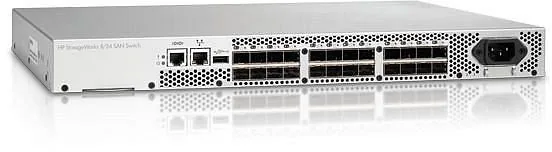
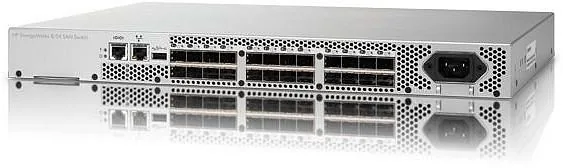
Metal housing, removable mounting brackets, firmware updates possible, front-mounted network port
Manufacturer Warranty
1 year
Product Description
Elevate Your Storage Network with High Performance
Enterprise storage environments demand reliability and speed to support critical business applications. The HP StoreFabric 8/24 Rackmount 8G Managed SAN-Switch delivers robust Fibre Channel capabilities designed specifically for modern data centers. This solution integrates high-performance ASIC technology tailored for the demands of enterprise SAN environments that require a high-port footprint for aggregation. With a strong focus on scalability, it allows administrators to expand port capacity as data growth demands arise without replacing hardware.
The switch comes with significant out-of-box value. Standard software components include Advanced Web Tools and Advanced Zoning for efficient management. It ships with 16 ports activated, providing a solid initial foundation. The hardware design supports forced-air cooling with airflow directed from the nonport side to ensure optimal thermal performance during sustained operation. System status LEDs located on the port side provide immediate visual feedback on power and link activity.
Connectivity is managed through universal ports that self-configure to support various fabric roles including E_Ports, F_Ports, and FL_Ports. This flexibility simplifies network integration and reduces the complexity of initial setup. The EZSwitch Setup Wizard further streamlines the process, allowing technicians to configure basic settings quickly using a serial connection or Ethernet port. Secure remote access is facilitated through dedicated Ethernet management ports and Telnet sessions for advanced configuration tasks.
Installation considerations are vital for success. The unit is designed for standard rack mounting using specific rail kits. Cabling considerations require strict attention to bend radius and slack management to prevent signal degradation in fiber optic cables. Technicians should leave at least one meter of slack for each port cable to allow for maintenance. Power requirements vary by model, with specific instructions for connecting power cords to separate circuits for redundancy.
For organizations requiring extended features, optional licenses unlock advanced capabilities like ISL Trunking for increased bandwidth between switches. This ensures load balancing and optimal path selection across the fabric using DPS routing. The system supports standard protocols while maintaining low latency. Synchronizing local time using Network Time Protocol helps with accurate logging and error detection. Regular configuration backups to an FTP server are recommended to preserve settings before making changes.
Overall, this switch represents a solid investment for storage networking. It balances ease of use with the power required for critical infrastructure. Whether integrating into an existing fabric or building a new network, the architecture provides the necessary tools for maintaining high availability and efficient data transfer across your enterprise storage landscape. The 8-Gb specification ensures compatibility with a wide range of host adapters and storage devices on the market today. Scaling up to 24 ports is possible through upgrade licenses, ensuring the switch grows with your needs. Environmental considerations include maintaining ambient air temperatures below 40 degrees Celsius at air intake vents. Proper airflow planning ensures components stay within operating ranges.
Search for 67,732 Manuals online


Type-in Brand or Model