
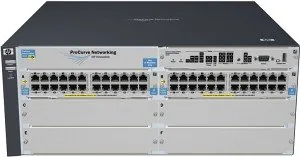
HP ProCurve 5400zl Manual
PDF manual · 134 Pages
English


Quick check
Incorrect answer, please try again.
Chat with your HP ProCurve 5400zl manual using AI
Get instant AI answers from your HP ProCurve 5400zl manual
Ask anything about the HP ProCurve 5400zl. Answers come from this manual, with the pages they are based on.
Ask a Question
Do you recommend ProCurve 5400zl?
Yes NoFrequently Asked Questions
Yes, most modules are hot swappable except the Management Module.
Is this answer helpful?
The 5406 zl supports two and 5412 zl supports four power supplies.
Is this answer helpful?
Yes, it supports IEEE 802.3af and 802.3at PoE standards.
Is this answer helpful?
Use Telnet, Web Browser, or SNMP tools like ProCurve Manager.
Is this answer helpful?
Traffic continues if redundant setup exists, but loss of PoE may occur.
Is this answer helpful?
Yes, it is designed for standard 19-inch telco racks or cabinets.
Is this answer helpful?
Yes, it supports static routes, RIP, OSPF, and IRDP protocols.
Is this answer helpful?
Advantages and Disadvantages
Advantages

- Hot swappable modules allow hardware changes without powering off the system
- Supports Layer 3 routing and spanning tree protocols for advanced networking
- Redundant power supplies ensure continuous uptime during failures
- Comprehensive management options via web, console, and SNMP tools
- High throughput capacity with Gigabit Ethernet and 10-Gigabit support
Disadvantages

- Requires specific cooling space of three to four inches around the unit
- Battery on management module needs eventual replacement over time
- Initial configuration requires CLI access for IP settings
- Older generation technology may lack support for very newest features
- Module compatibility is restricted to zl specific types only
Product Specification
Feature
Switch
Type
Standalone, Rackmount (via Mounting Brackets), with Module Slot
Network Ports
48 RJ-45, 4 Expansion Slots
Speeds
48 RJ-45 (10/100/1000Base-T)
PoE
N/A
Backplane
322.8Gb/s, 240.2Mp/s
Officially Supported Standards
802.1AX, 802.1AB, 802.1D, 802.1Q, 802.1X, 802.1ad, 802.1p, 802.1s, 802.1v, 802.1w, 802.3, 802.3ab, 802.3u, 802.3x, IGMPv3, MLDv2
Configuration
Web Interface, Configuration Software, serial (DB9)
Cooling
Active
Dimensions (WxHxD)
17.52 x 6.89 x 17.76 in, 4U
Weight
34.26 lbs
Color
Black/Light Gray
Features
Metal enclosure, removable mounting brackets, firmware updates possible, 2x power supply hot-plug capable, optional redundant power supply (redundant power supply)
Note
For this device, "link aggregation" was officially specified with the obsolete standard IEEE 802.3ad. The function is no longer managed by the IEEE "Working Group 3" (IEEE 802.3, CSMA/CD - Ethernet) since 2008, but by the "Working Group 1" (IEEE 802.1, High Level Interface - Internetworking) and is technically defined unchanged via IEEE 802.1AX.
Product Description
Unlock Enterprise Networking with the HP ProCurve 5400zl Series
The HP ProCurve 5400zl Rackmount Gigabit Managed Switch delivers robust performance for modern enterprise data centers requiring high availability. Designed for maximum scalability, this hardware supports Layer 3 routing features with exceptionally low latency. The 5400 zl switches include models like the 5406 zl and 5412 zl, offering open chassis options with multiple slots for flexible module installation. You can customize port density significantly using various zl Modules. The system supports Power over Ethernet plus standards, allowing connected devices such as phones and access points to draw power directly from the network infrastructure.
Installation is straightforward when you follow the proper procedures outlined by the manufacturer. The switches come with accessory kits containing metal mounting brackets and console cables for initial connection. You can mount the unit securely in a standard 19-inch rack or place it on a flat horizontal surface. Power supplies are redundant and hot swappable to ensure continuous operation even during component replacement. The Front of the Switch features numerous LEDs that indicate critical status for power, faults, links, and activities. This visual feedback helps administrators diagnose issues quickly without needing complex diagnostic tools.
Management is versatile through web browser interfaces, console access, or SNMP tools like ProCurve Manager. You can configure VLANs and IP settings using the Command Line Interface effectively. The switch learns network addresses automatically and supports spanning tree protocols to prevent network loops. Security features include password protection and access controls to prevent unauthorized entry.
Why Choose the 5400zl Series
This series is ideal for network expansion in growing organizations. It provides high throughput capacity, with models supporting up to 993.6 Gbps using v2 modules. Optimizing 10-Gigabit Ethernet port configurations ensures wire speed performance when multiple uplinks are active simultaneously. Whether serving as an edge switch or connecting to a campus backbone, these units maintain high reliability standards. The HP ProCurve 5400zl Rackmount Gigabit Managed Switch, 48x RJ-45, 4x Module-Slot Manual provides the foundational guide for setting up these powerful devices efficiently. Users benefit from hot swappable modules and extensive cabling options including fiber and copper connections. Proper grounding and ventilation are critical during deployment to prevent overheating. With premium software options activated, advanced routing protocols become available for complex network environments requiring detailed control.
Notes
- Ensure power cords meet local safety standards before connecting.
- Redundant power supplies require separate AC sources for true backup protection.
- Check module compatibility before installing new hardware to avoid errors.
- Maintain three to four inches of space around the sides for cooling.
Search for 67,732 Manuals online


Type-in Brand or Model