
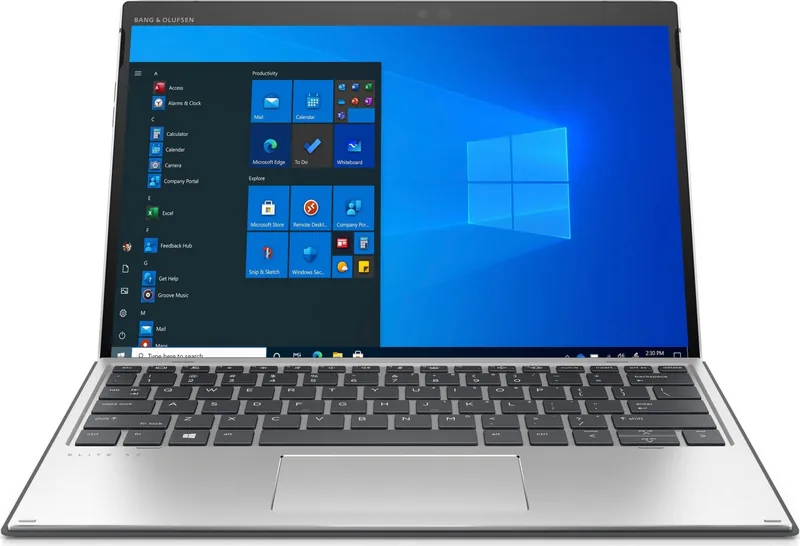

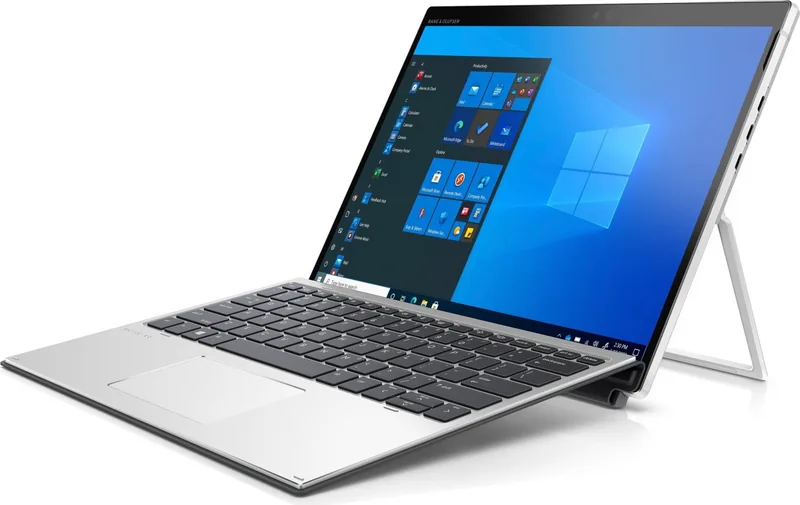
HP Elite x2 G8 Manual
PDF manual · 94 Pages
English


Quick check
Incorrect answer, please try again.
Chat with your HP Elite x2 G8 manual using AI
Get instant AI answers from your HP Elite x2 G8 manual
Ask anything about the HP Elite x2 G8. Answers come from this manual, with the pages they are based on.
Ask a Question
Do you recommend Elite x2 G8?
Yes NoFrequently Asked Questions
You can connect an external monitor using a USB Type-C cable that supports DisplayPort or Thunderbolt. Plug one end into the port on your device and the other into the monitor. Press the F1 key to cycle through display modes like Duplicate, Extend, or Second Screen Only.
Is this answer helpful?
Yes, select models support a nano SIM card located under the kickstand. You can insert it using the removal tool provided. Some models also support eSIM for digital carrier profiles, allowing you to switch networks without physical cards.
Is this answer helpful?
The camera privacy cover physically blocks the front-facing camera lens when slid to the right. This prevents unauthorized video access and enhances user privacy when the camera is not in use.
Is this answer helpful?
HP Fast Charge quickly restores battery power by charging the battery to 50% capacity in approximately 30 to 45 minutes when the device is shut down and connected to AC power.
Is this answer helpful?
While primarily designed for business, it handles light gaming well. However, for intensive graphics tasks, the integrated Intel graphics may be limiting compared to dedicated gaming laptops.
Is this answer helpful?
You can update the BIOS via the HP Support Assistant app or by downloading the latest version from the HP website. Ensure the device is plugged into power before starting the update process.
Is this answer helpful?
Advantages and Disadvantages
Advantages

- Versatile 2-in-1 design with detachable keyboard and adjustable kickstand
- Advanced security features including Windows Hello and TPM chip
- High-speed connectivity via Thunderbolt and USB Type-C ports
- Long battery life with fast charging capabilities
- Enterprise-grade manageability and support tools
Disadvantages

- Optional accessories like keyboards and SIM cards increase total cost
- Some advanced features require specific software configurations
- Battery replacement may require professional service due to sealed design
- Wireless range depends heavily on router quality and environmental factors
- Touchscreen gestures may take time to master for new users
Product Specification
Connectors
1x USB-C 3.1 with DisplayPort 1.4 (10Gb/s, PD), 1x Thunderbolt 4 (40Gb/s, Power Delivery, PD), 1x Thunderbolt 4 (40Gb/s), 1x 3.5mm jack
Wireless
Wi-Fi 6 (WLAN 802.11a/b/g/n/ac/ax, 2x2, Intel AX201), Bluetooth 5.2
Navigation
N/A
SIM
N/A
Cellular
N/A
Networks
N/A
Card reader
N/A
Webcam
2 Megapixel, webcam cover, IR camera (front), 8 Megapixel (rear)
Battery
Li-Polymer, 2 cells, 47Wh
Dimensions
11.39 x 8.49 x 0.35 in (with dock: 11.39 x 8.49 x 0.56 in)
Weight
1.81 lbs (tablet), 0.77 lbs (dock)
Color
silver
Features
Fan, TPM 2.0, light sensor, stand, accelerometer, orientation sensor, Hall sensor
Warranty
three years
Note
Different country versions possible.
Product Description
HP Elite x2 G8: The Ultimate 2-in-1 Business Companion
The HP Elite x2 G8 stands as a pinnacle of modern mobile productivity, designed for professionals who demand versatility without compromise. This powerful device seamlessly blends the portability of a tablet with the robust functionality of a laptop, making it an ideal tool for dynamic work environments. Whether you are attending a board meeting, working from a coffee shop, or collaborating in a home office, the Elite x2 G8 adapts to your needs instantly.
At its core, this device features a stunning display that serves as the hub for all your activities. The included kickstand allows for flexible viewing angles, supporting both creative tasks and standard typing workflows. When paired with the optional keyboard, it transforms into a traditional laptop experience, complete with a responsive touchpad and dedicated function keys for quick system control. The integration of Windows Hello ensures secure and rapid access via facial recognition or fingerprint scanning, keeping your sensitive data safe while streamlining your login process.
Connectivity is at the heart of the Elite x2 G8's design. Equipped with Thunderbolt ports and USB Type-C connectors, users can effortlessly link to high-speed peripherals, external monitors, and charging stations. The support for wireless technologies like Wi-Fi 6, Bluetooth, and optional mobile broadband means you stay connected anywhere. Features such as eSIM support allow for seamless switching between network providers, ensuring uninterrupted internet access during travel. The device also includes advanced audio capabilities, with dual microphones and support for high-quality headphones, perfect for virtual meetings and multimedia consumption.
Power management on the Elite x2 G8 is engineered for efficiency. With options for Sleep and Hibernation modes, along with HP Fast Charge technology, you can maximize your battery life and minimize downtime. The built-in security features, including TPM chips and hardware-based encryption, provide enterprise-grade protection against threats. Regular updates through HP Support Assistant keep your system optimized and secure, ensuring long-term reliability. This device is not just a computer; it is a comprehensive solution for the modern workforce, combining performance, security, and flexibility in a sleek, professional package.
Search for 67,706 Manuals online


Type-in Brand or Model