

HP Elite x2 1013 G3 Manual
PDF manual · 96 Pages
English


Quick check
Incorrect answer, please try again.
Chat with your HP Elite x2 1013 G3 manual using AI
Get instant AI answers from your HP Elite x2 1013 G3 manual
Ask anything about the HP Elite x2 1013 G3. Answers come from this manual, with the pages they are based on.
Elite x2 1013 G3 Maintenance Schedule
Use Disk Defragmenter to defragment the hard drive at least once a month. Do not run this on solid-state drives.
Update programs and drivers regularly using HP Support Assistant or by visiting hp.com/support to resolve issues and improve performance.
Turn off and unplug the computer before cleaning. Use a soft microfiber cloth moistened with alcohol-free glass cleaner for the display and mild soap solution for the cover.
Free maintenance reminders
Timed to your purchase date. Always free, unsubscribe anytime.
Ask a Question
Do you recommend Elite x2 1013 G3?
Yes NoFrequently Asked Questions
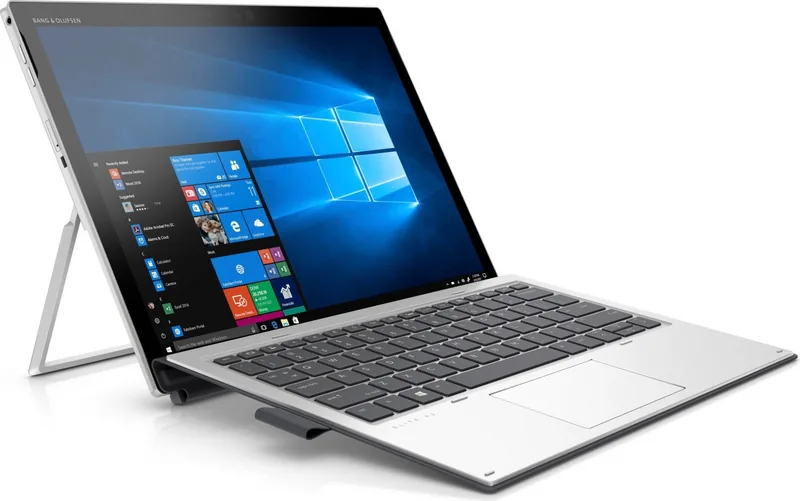
It is a detachable 2-in-1 device that works like both a tablet and a laptop. It is built for mobility, productivity, and flexible everyday use.
Is this answer helpful?
Yes. The Core i5-8250U is well suited for office tasks, browsing, video calls, document editing, and multitasking with everyday business apps.
Is this answer helpful?
8GB RAM supports smoother multitasking. It helps the system run multiple apps and browser tabs with less slowdown during typical work use.
Is this answer helpful?
The SSD offers fast startup, quick file access, and better overall responsiveness than a traditional hard drive. It also helps the device feel more agile.
Is this answer helpful?
Yes. The USB-C and Thunderbolt-related ports can support display output with compatible cables or adapters, depending on the configuration.
Is this answer helpful?
No, the battery is factory-sealed. If battery performance drops significantly, HP support or a service provider is the recommended route.
Is this answer helpful?
Advantages and Disadvantages
Advantages

- Compact 2-in-1 design supports both tablet and laptop-style use.
- Core i5-8250U, 8GB RAM, and SSD storage deliver smooth everyday performance.
- USB-C and Thunderbolt support expand charging, display, and data options.
- Strong security and recovery tools suit business users and managed environments.
Disadvantages

- Some features and accessories are only available on select configurations.
- Battery is factory-sealed, so user replacement is limited.
- Certain ports and external connections may require extra adapters or cables.
- Keyboard and other add-ons may not be included in every setup.
Product Specification
CPU
Intel Core i5-8250U, 4C/8T, 1.60-3.40GHz, 6MB+1MB Cache, 15W TDP, 10-25W cTDP, Codename "Kaby Lake-R" (Kaby Lake, Intel 14nm+)
RAM
8GB DDR3L-2133
Storage
256GB SSD (M.2 PCIe)
Graphics
Intel UHD Graphics 620 (iGPU), 24EU/192SP, 0.30-1.10GHz, Architecture "Gen 9.5" (Kaby Lake GT2)
Display
13", 3000x2000, 277ppi, Multi-Touch, glare, IPS, 450cd/m^2, 100% sRGB, Glass (Corning Gorilla Glass 4)
Ports
1x USB-C 3.0 with DisplayPort 1.2 (5Gb/s), 1x Thunderbolt 3 (40Gb/s, Power connection, PD), 1x Thunderbolt 3 (40Gb/s)
Wireless
Wi-Fi 5 (WLAN 802.11a/b/g/n/ac, 2x2, Intel 8265), Bluetooth 4.2
Navigation
N/A
SIM
N/A
Cellular
N/A
Networks
N/A
Card reader
N/A
Webcam
5 Megapixel (front), 8 Megapixel, IR camera (rear)
Operating System
Windows 10 Pro 64bit
Battery
Li-Polymer, 4 cells, 50Wh, 10.5h runtime
Dimensions
11.81x9.13x0.31in (with Dock: 11.81x9.13x0.52in)
Weight
1.81lb (Tablet), 0.77lb (Dock)
Color
silver/black
Special features
Kickstand, Windows Hello, TPM 2.0, Orientation sensor, Fan, Accelerometer, Light sensor, Fingerprint reader, Dock (Touchpad)
Warranty
one year
Note
Different country versions possible.
Product Description
HP Elite x2 1013 G3: A Refined 2-in-1 for Work on the Move
The HP Elite x2 1013 G3 is designed for people who want the convenience of a tablet with the practicality of a laptop. With its Intel Core i5-8250U processor, 8GB of RAM, and 256GB SSD, it delivers a balanced mix of speed, responsiveness, and everyday reliability. It feels especially suited to business users, frequent travelers, and anyone who values a compact system that can keep up with a full day of tasks.
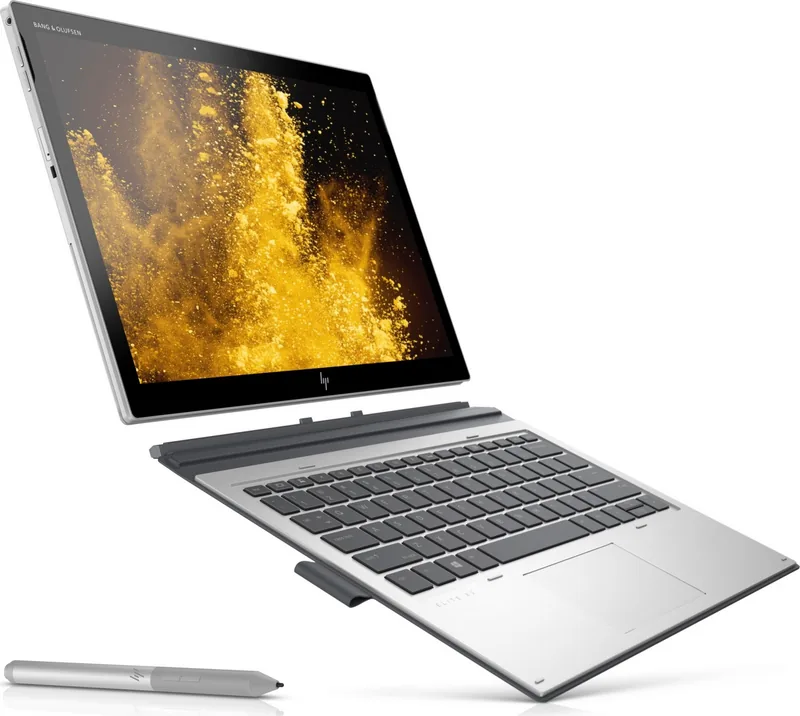
What makes this device appealing is its flexibility. The detachable design, kickstand, and optional keyboard create a smooth transition between touch-first use and traditional typing. That makes it useful for notes, presentations, email, document editing, and media viewing. The display can be adjusted easily, while touch gestures and keyboard shortcuts help users work in the style that suits them best.
Connectivity is another strong point. The Elite x2 line supports modern USB-C features, including power delivery, fast data transfer, and display output through compatible ports. Depending on the configuration, users may also get wireless broadband, Bluetooth, GPS, NFC, and security-focused features such as a fingerprint reader. These options make the system practical for both office and mobile environments.
The included Windows and HP security tools are clearly aimed at professional use. From BIOS-level protection and DriveLock options to recovery tools and diagnostics, the platform is built with control and support in mind. The guide also emphasizes battery care, power-saving modes, and safe handling, which reflects a device intended for long-term use rather than casual browsing alone.
Why it stands out
The HP Elite x2 1013 G3 combines premium portability with business-friendly hardware. Its SSD storage keeps boot times quick, while 8GB of memory is enough for multitasking across productivity apps, web tools, and communication platforms. The Core i5-8250U adds efficient performance without sacrificing battery-conscious design.
It is also a practical choice for users who move between meetings, home, and travel. The kickstand, touch support, and optional keyboard make it adaptable, while the slim form factor keeps it easy to carry. In daily use, it aims to be more than a tablet and lighter than a traditional notebook.
Notes
- Best for productivity, travel, and flexible work styles.
- Some features depend on the exact configuration.
- Accessories and cables may be required for certain connections.
Search for 67,706 Manuals online


Type-in Brand or Model