
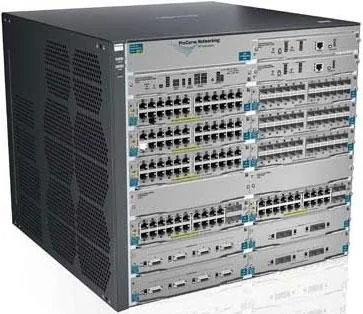
HP E8200 v2 zl 92G Manual
PDF manual · 144 Pages
English


Quick check
Incorrect answer, please try again.
Chat with your HP E8200 v2 zl 92G manual using AI
Get instant AI answers from your HP E8200 v2 zl 92G manual
Ask anything about the HP E8200 v2 zl 92G. Answers come from this manual, with the pages they are based on.
E8200 v2 zl 92G Maintenance Schedule
Check for dust accumulation on chassis vents and fan trays to ensure proper cooling. Clean if necessary.
Check Power LEDs and verify redundant power supplies are functioning correctly during scheduled maintenance.
Verify ambient temperature is within normal room limits and check for any signs of overheating or fan failure.
Free maintenance reminders
Timed to your purchase date. Always free, unsubscribe anytime.
Ask a Question
Do you recommend E8200 v2 zl 92G?
Yes NoFrequently Asked Questions
Yes, most modules support hot swapping which means you can install or replace them while the switch is powered on. However, you cannot hot swap the System Support Module or a single Management Module unless you have a redundancy pair in the chassis.
Is this answer helpful?
This platform supports up to 92 RJ-45 ports depending on the specific module configuration and chassis size you choose. The 92G variant is configured to handle this density with Power over Ethernet Plus capabilities.
Is this answer helpful?
Yes, the switch fully supports the IEEE 802.3at Power over Ethernet Plus standard. It allows you to power devices like IP phones and wireless access points directly through the network cables.
Is this answer helpful?
Yes, this core switch platform comes with a lifetime warranty. This covers the hardware against defects and ensures long-term reliability for your business network infrastructure without needing a separate extended service plan.
Is this answer helpful?
You will need a Phillips screwdriver to attach the mounting brackets and secure the unit to the rack. Since the chassis is heavy, you should plan for at least two people to handle the installation safely.
Is this answer helpful?
You can use the Clear button located on the System Support Module. Press and hold it for at least one second to delete console access passwords and restore basic access to the device.
Is this answer helpful?
Advantages and Disadvantages
Advantages

- High scalability with eight modular slots for flexible configuration
- Supports up to 92 RJ-45 ports for extensive connectivity
- Fully compatible with IEEE 802.3at Power over Ethernet Plus standards
- Features a lifetime warranty on the core switch platform for reliability
- Allows hot swapping of most modules without powering down the unit
Disadvantages

- Heavy chassis requires two people to safely mount in a standard rack
- Single power supply limits operation to slots A-F only on 8212 models
- Switch must be rebooted if changing module types while in service
- Specific power supply models must be matched for redundancy within a switch
- Installation requires proper grounding and significant airflow for cooling
Product Specification
Function
Switch
Type
Standalone, Rackmount (via mounting brackets), with module slot
Network Connections
92x RJ-45, 2x SFP+, 8x Expansion Slots
Speeds
92x RJ-45 (10/100/1000Base-T), 2x SFP+ (10Gbps), 8x Expansion Slots (10Gbps x96)
PoE
92x RJ-45 PoE+ (92x 30W)
Backplane
993.6 Gbps, 739 Mpps, 64k MAC Addresses
Officially Supported Standards
802.1AB, 802.1AX, 802.1D, 802.1Q, 802.1X, 802.1ad, 802.1ap, 802.1p, 802.1s, 802.1v, 802.1w, 802.3, 802.3ab, 802.3af, 802.3ak, 802.3at, 802.3az, 802.3u, 802.3x, IGMPv3, MLDv2
Configuration
Web interface, Console, Serial (RJ-45, USB-A), via Controller
Cooling
Active
Dimensions (W x H x D)
17.52 x 15.59 x 18.70 in, 9U
Weight
102.76 lbs
Color
Black/Light Gray
Special Features
Metal case, removable mounting brackets, 4x power supply hot-plug capable, 2x optional redundant power supply (redundant power source), 2x optional external redundant power supply (redundant power source), firmware updates possible
Manufacturer Warranty
Lifetime (10 years in AT/DE)
Product Description
Elevate Your Network Infrastructure with the HP E8200 v2 zl 92G Rackmount Gigabit Managed Switch
Modern businesses demand networks that are robust, scalable, and incredibly reliable. The HP E8200 v2 zl 92G Rackmount Gigabit Managed Switch is engineered to meet these high expectations head on. This powerhouse device serves as a core or edge switch capable of handling demanding traffic loads while providing flexible connectivity options for diverse environments. It represents a significant step forward in network architecture for large enterprise setups.
Performance and Scalability
At the heart of this platform is a chassis designed for maximum flexibility and growth. With eight modular slots dedicated to various functionalities, users can tailor the switch to their specific needs without overpaying for unused capacity. The system supports up to 92 RJ-45 ports across various module configurations, ensuring you have plenty of connections for computers, printers, IP phones, and surveillance equipment. The switch boasts impressive routing and switching capacities, utilizing advanced v2 modules to push throughput figures significantly higher than previous generations. This ensures smooth data flow even during peak usage times without bottlenecks or congestion affecting productivity.
Connectivity and Power
Networking often requires a mix of copper and fiber connections to handle different distances and bandwidth requirements. This unit includes 2x SFP+ ports for high-speed uplinks to other core devices or aggregation switches. It also fully supports Power over Ethernet Plus, allowing you to connect IP phones, wireless access points, and cameras directly without needing separate power adapters or outlets nearby. The automatic power allocation simplifies initial installation and reduces cabling clutter in office spaces significantly.
Reliability and Management
Downtime is not an option for critical operations in a busy enterprise. This switch features redundant power supplies to ensure continuous operation even if a primary power source fails unexpectedly. Modules can be hot swapped for maintenance or upgrades without shutting down the entire system, keeping the network alive. Management is straightforward through an intuitive web interface, command line interface, or SNMP tools like ProCurve Manager. A lifetime warranty on the core switch platform underscores the manufacturer's confidence in the hardware durability and long-term performance.
Installation Considerations
Setting up this equipment requires careful planning. The chassis is heavy, often requiring two people to safely mount it in a standard 19-inch rack. Proper grounding and sufficient airflow around the unit are essential for preventing overheating and protecting sensitive internal components. Clear labels and LEDs help administrators quickly identify power status, faults, and module health at a glance during routine checks.
Final Thoughts
Integrating the HP E8200 v2 zl 92G Rackmount Gigabit Managed Switch into your network provides stability and performance. Its modular design allows growth without replacing the entire chassis. Whether used as a distribution layer switch or a robust edge solution, this hardware delivers exceptional value for complex networks requiring high availability and extensive port density.
Search for 67,732 Manuals online


Type-in Brand or Model