Manual.ly Logo

Hori HOTAS Flight Stick Manual

1.0 · 1 Ratings

PDF manual · 1 Pages

English

M: QW-35-FL
page

/ 1

Loading...
8825192d907a352d52a7c978244f137fbae1 page 1
①PressingthePSbuttondoesnotturnonthePlayStation®4system
Troubleshooting
ThePSbuttononthisproductwillnotturnonthePlayStation®4system.PleasepressthePSbutton
ontheDUALSHOCK®4orpressthepowerbuttononthePlayStation®4system.
②ThePSbuttondoesnotrespondduringgameplay
PleasecheckthePS4/PS3SystemToggleSwitchonthisproduct.Makesureitissetto"PS4"for
PlayStation®4and"PS3"forPlayStation®3.
③Controlsrespondinthehomescreenbutnotduringgameplay
ForthePlayStation®4,controlswillnotrespondiftheuseraccountisdifferentfromtheoneusedatthe
startofthegame.Makesuretoalwaysloginwiththesameuseraccount.
Caution
●Neverdisassemble,repair,ormodifythisproduct.
●Keepthecontrollerawayfromdustyorhumidareas.
●Donotapplystrongimpactorweightontheproduct.
●Donotpullroughlyorbendthecableofthecontroller.
●Ifproductneedscleaning,useonlyasoftdrycloth.Donotuseanychemicalagentslikebenzineorthinner.
●Keepthisproductoutofthereachofchildrenunder3.
“”,”PlayStation”,“DUALSHOCK”,“”and“”areregisteredtrademarksortrademarksofSonyInteractiveEntertainmentInc.
Allrightsreserved.Allothertrademarksarethepropertyoftheirrespectiveowners.ManufacturedanddistributedunderlicensefromSonyInteractiveEntertainmentLLC.
Theimageonthepackagingmaydifferfromtheactualproduct.
Themanufacturerreservestherighttochangetheproductdesignorspecificationswithoutnotice.
HORIandHORIlogoareregisteredtrademarksofHORI.
Warranty
HORIwarrantstotheoriginalpurchaserthattheproductpurchasednewinitsoriginalpackagingshallbefreeofanydefects
inmaterialandworkmanshipforaperiodof1yearfromtheoriginaldateofpurchase.Forallwarrantyclaimsmadewithinthefirst30daysafterpurchase,
pleasecheckwiththeretailerwheretheoriginalpurchasewasmadefordetails.Ifthewarrantyclaimcannotbeprocessedthroughtheoriginalretaileror
foranyotherinquiriespertainingtoourproducts,pleaseaddressdirectlytoHORIat[email protected].
ThenormalfunctionoftheproductmaybedisturbedbystrongElectro-MagneticInterference.
Ifso,simplyresettheproducttoresumenormaloperationbyfollowingtheinstructionmanual(Howtoconnect).
Incasethefunctiondosenotresume,pleaserelocatetoanareawhichdoesnothaveelectro-magneticinterferencetousetheproduct.
Pleaseretaincontactinformationforfuturereference.
PRODUCTDISPOSALINFORMATION
Whereyouseethissymbolonanyofourelectricalproductsorpackaging,
itindicatesthattherelevantelectricalproductorbatteryshouldnotbedisposedofasgeneralhouseholdwasteinEurope.
Toensurethecorrectwastetreatmentoftheproductandbattery,pleasedisposeoftheminaccordancewithanyapplicable
locallawsorrequirementsfordisposalofelectricalequipmentorbatteries.
Insodoing,youwillhelptoconservenaturalresourcesandimprovestandardsofenvironmentalprotection
intreatmentanddisposalofelectricalwaste.ApplicabletoEUcountriesonly.
THEFCCWANTSYOUTOKNOW
ThisequipmenthasbeentestedandfoundtocomplywiththelimitsforaClassBdigitaldevice,
pursuanttoPart15oftheFCCRules.Theselimitsaredesignedtoprovidereasonableprotectionagainstharmful
interferenceinaresidentialinstallation.
Thisequipmentgenerates,usesandcanradiateradiofrequencyenergyand,ifnotinstalledandusedinaccordance
withtheinstructions,maycauseharmfulinterferencetoradiocommunications.
However,thereisnoguaranteethatinterferencewillnotoccurinaparticularinstallation.
Ifthisequipmentdoescauseharmfulinterferencetoradioortelevisionreception,whichcanbedeterminedbyturningthe
equipmentoffandon,theuserisencouragedtotrytocorrecttheinterferencebyoneormoreofthefollowingmeasures:
•Reorientorrelocatethereceivingantenna.
•Increasetheseparationbetweentheequipmentandreceiver.
JoystickSensitivityToggleSwitch
Joystick
AdjustingJoystickSensitivity
Throttle/RudderToggleSwitch
Thejoysticksensitivitytoggleswitchcanbeset
to3differentlevelsofsensitivity.
Thethrottle/ruddertoggleswitchcanbeset
to3differentsettingsasshowninthediagram.
WideModeNarrowMode NormalMode
Throttle/RudderToggleSwitch
Normaljoystick
sensitivitylevel
Moresensitive
thannormalmode
Lesssensitive
thannormalmode
1 2 3
Throttle
Switchposition
Rudder
RightAnalogStick
verticalcontrol
R1(UP)/
L1(DOWN)
R2(UP)/
L2(DOWN)
R2(RIGHT)/
L2(LEFT)
R1(RIGHT)/
L1(LEFT)
RightAnalogStick
horizontalcontrol
RightanalogstickwillnotfunctionduringSetting3(R3willfunction).
Ifyoufeelthejoystickdoesnotfitforyourhands,
tryattachingtheHandrestExtendertothebaseofthejoystick.
PeeloffthesheetonthebacksideoftheHandrestExtenderand
affixontothebaseofthejoystickasshowninthediagram.
*Makesuretoremoveanydustordirtfromthearmrest
priortoaffixingtheHandrestExtender.
AttachingtheHandrestExtender
HandrestExtender
Armrest
AudioJack(PlayStation®4only)
Connecttheheadset/microphoneintotheaudiojacktouse.
Beforeplacingaheadsetontoyourears,makesuretolowerthevolumetoavoidhearingdamage.
AudioJack
Joystick
TouchPad(PlayStation®4only)
*TouchpadisonlyforPlayStation®4.
NotcompatiblewithPlayStation®3/WindowsPC
Joystick
Thisproductfeaturestouchpadfunctionality.
LEFTLEFT RIGHTRIGHT
下DOWN下DOWN
UP
UP
AdjustingThrottleResistance
Theresistancecanbeadjustedbyturningthescrewlocated
onthebottomsideofthethrottle.
ThrottleBottomSide
Thankyouforpurchasingthisproduct.
Beforeusingthisproductpleasereadtheinstructionscarefully.
Afterreadingtheinstructionmanual,pleasekeepitforreference.
InstructionManual
Includes
CompatibleSystems
Joystick:×1 Throttle:×1 SuctionCups:×8
Pleaseupgradetothelatestsystemsoftwarebeforeuse.
(PlayStation®4...Ver.4.73orlaterrecommended,PlayStation®3...Ver.2.80orlaterrecommended)
Thisproductdoesnotfeaturelightbar,motionsensors.Inaddition,thisproductdoesnotsupport
featuresotherthanthosedescribed.PleasenotethisproductmaynotsupportsomePlayStation®4
andPlayStation®3standardsoftware.Fordetails,pleasevisitourwebsite(http://www.horiusa.com).
PlayStation®4/PlayStation®3/PC
SystemRequirements 
Windows®10/8.1/8/7
USBport、InternetConnection
*FunctionsasPCcontrollerthroughXInput.ThisproductdoesnotsupportDirectInput.
*Thisproductisnotawirelesscontroller.
Handrest
Extender
:× 1
EN
1913-56F4USNR
SHAREButton
(PlayStation®3:SELECTButton)
(PC:BACK)
OPTIONSButton
(PlayStation®3:STARTButton)
(PC:START)
USBConnector
ModularJack
(ToconnectThrottleunit)
×Button
(PC:A)
L3+R3Button
(PC:LSB+RSB)
L1+R1Button
(PC:LB+RB)
ControllerCable
RightAnalogStick/
R3Button
(PC:RSB)
□Button
(PC:X)
○Button
(PC:B)
△Button
(PC:Y)
D-Pad
LeftAnalogStick
TouchPad
JoystickSensitivityToggleSwitch
SystemToggleSwitch
AudioJack
PSButton
(PC:GUIDE)
NoFunction
(Decorativepurposeonly)
D-Pad
*ThePSbuttonwillnotturnthePlayStation®4orPlayStation®3systemʼspoweron.
Throttle/
RudderToggleSwitch
TouchPad
Button
L2+R2Button
(PC:LT+RT)
Rudder
(FromFrontView)
RIGHT:R1Button
(PC:RB)
LEFT:L1Button
(PC:LB)
Throttle
(FromFrontView)
UP :R2Button
(PC:RT)
DOWN:L2Button
(PC:LT)
NoFunction
(Decorativepurposeonly)
L3Button
(PC:LSB)
ModularCable
ModularConnector
(ToconnecttoJoystickunit)
Joystick
Throttle
Layout
Front
Front
Back
Back
LEFTLEFT
左
RIGHT
左
RIGHT
下
DOWN
下
DOWN
上
UP
上
UP
*Throttle/RuddersettingabovebasedonThrottle/RudderToggleSwitchMode1.
HowtoConnect
AttachingtheSuctionCups
PlatformToggleSwitch
Joystick
Throttle
Modular
Connector
①
②
ConsoleUSBPorts
①Insertthemodularconnectortothejoystickmodularjack.
②InserttheUSBconnectortotheconsoleUSBport.
*Pluggingandunpluggingduringgameplaymay
causeamalfunction.
*Reconnecttheconnectorifanymalfunctionoccurs.
①Insertthesuctioncupsintotheholeslocatedonthebottomsideofjoystickandthrottle.
②Rotatethesuctioncups90degreestolockinplace.
USBConnector
*Pleaseattachtosmooth,flat,stablesurface.
ThePlatformToggleSwitchtogglesbetweenPlayStation®4andPlayStation®3compatibility.
*Toggletheswitchbeforeconnecting.
ThrottleBottomSide
Hole
①
②
90°

Chat with your Hori HOTAS Flight Stick manual using AI

Get instant AI answers from your Hori HOTAS Flight Stick manual

Ask anything about the Hori HOTAS Flight Stick. Answers come from this manual, with the pages they are based on.

Ask a Question

0/1000

Do you recommend HOTAS Flight Stick?

Yes No
0
User Pic

Max Weber

6 months ago

Is this product actually a flight stick or just a regular joystick?

0
User Pic

Manual.ly

5 months ago

This item is a standard gaming joystick and does not function as a dedicated flight stick. Users looking for realistic flight simulation controls should consider purchasing a specific flight controller to avoid disappointment.

M: QW-35-FL
M: QW-35-FL
0
User Pic

Lisa Schmidt

6 months ago

Does anyone know if there are better alternatives to this joystick for flight games?

M: QW-35-FL

Frequently Asked Questions

A

No, the PS button on this product is decorative only. You must use the DUALSHOCK 4 controller or the power button on the console itself to turn the system on.

Is this answer helpful?

A

No, the touch pad feature is exclusive to the PlayStation 4 version. It is not compatible with PlayStation 3 or Windows PC systems.

Is this answer helpful?

A

Locate the Joystick Sensitivity Toggle Switch on the unit. You can set it to one of three levels: normal, more sensitive, or less sensitive depending on your preference.

Is this answer helpful?

A

HORI provides a one-year warranty against defects in material and workmanship from the original date of purchase. Claims within 30 days should be handled through the retailer.

Is this answer helpful?

A

No, this is a wired controller that connects to the console via a USB connector. It requires a physical connection to function.

Is this answer helpful?

M: QW-35-FL

Advantages and Disadvantages

Advantages

  • Adjustable joystick sensitivity with three distinct levels for personalized control
  • Includes a handrest extender for improved ergonomics during long gaming sessions
  • Compatible with PlayStation 4, PlayStation 3, and Windows PC via XInput
VS

Disadvantages

  • PS button does not turn on the console and is purely decorative
  • Requires a flat, smooth surface for suction cup attachment stability
  • Touch pad functionality is unavailable when used with PlayStation 3 or PC
M: QW-35-FL

Product Specification

Type

HOTAS

Compatibility

PS4, PS3

Material

Plastic

Connection

Wired (9.84 ft), USB

Power Supply

USB

Features

Includes throttle lever, vibration motors, Coolie Hat, Touchpad

M: QW-35-FL

Product Description

Experience Realistic Flight Control with the Hori HOTAS Flight Stick

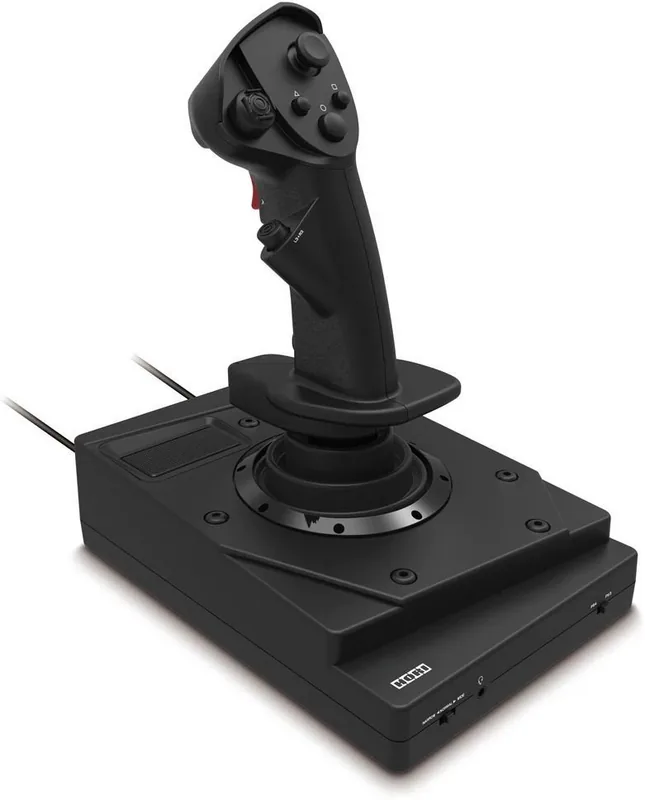
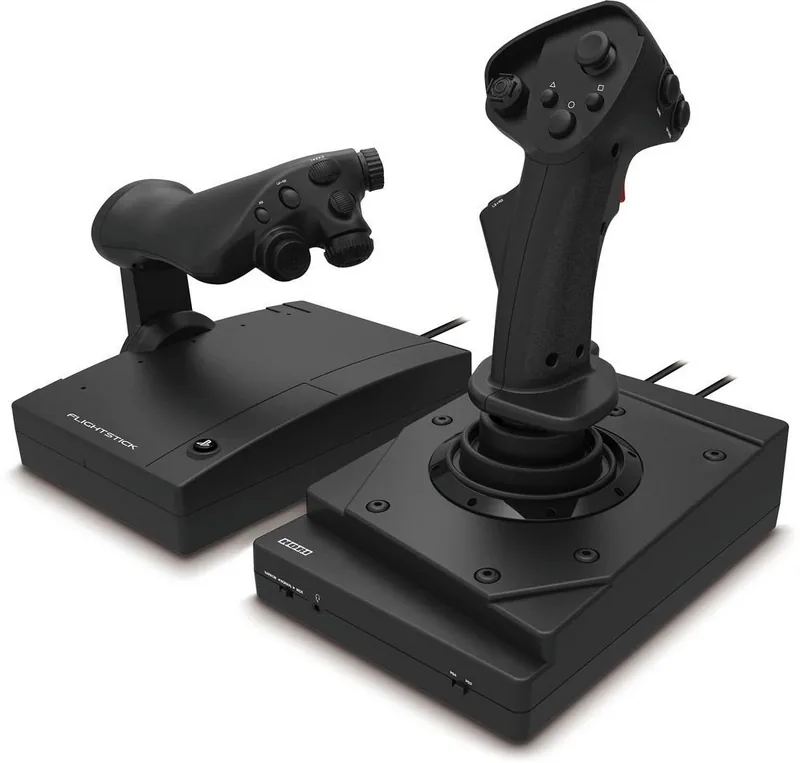
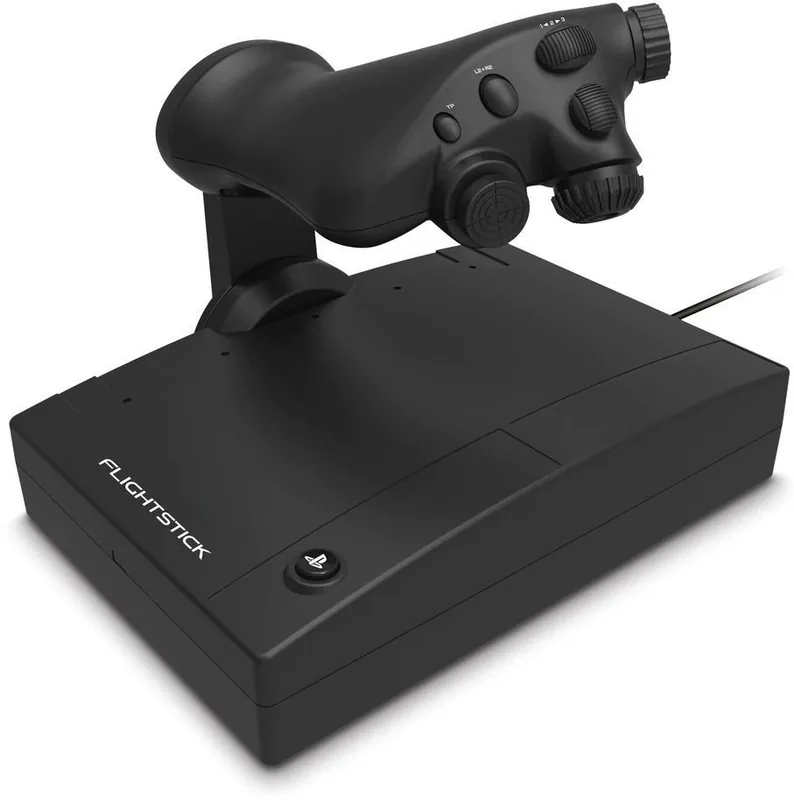
The Hori HOTAS Flight Stick for PS4 and PS3 brings an immersive aviation experience directly to your living room. Designed for simulation enthusiasts, this peripheral combines a precision joystick with a responsive throttle unit, allowing pilots to master complex maneuvers with authentic feel. The system features a dedicated touch pad for PlayStation 4 users, expanding input options beyond standard buttons. Whether you are navigating through dogfights or managing long-haul flights, the ergonomic design ensures comfort during extended sessions.

Customization is at the heart of this controller. Users can adjust joystick sensitivity across three distinct levels using a toggle switch, ensuring the stick feels right for any flight scenario. Similarly, the throttle and rudder controls offer three different settings to fine-tune resistance and response. For those needing extra support, a Handrest Extender is included to attach to the base, providing a more stable grip. The audio jack allows for direct headset connection on PS4, facilitating clear communication with squad members without lag.

Connectivity is straightforward via USB, though users must remember that this is a wired device requiring a stable surface. Suction cups are provided to secure both the joystick and throttle units firmly to your desk. It is important to note that the PS button serves only as a decorative element and will not power on the console; users must rely on their DualShock controller or the console's physical power button. Compatibility extends to Windows PCs via XInput, making it a versatile choice for multi-platform gamers.

Important Usage Notes

  • Always set the System Toggle Switch before connecting the USB cable to ensure proper mode detection.
  • Do not attempt to disassemble the unit or modify internal components as this voids the warranty.
  • Clean the device only with a soft dry cloth; avoid chemical agents entirely.
  • Keep the product away from children under three years old due to small parts.
  • If electromagnetic interference occurs, reset the product by reconnecting the modular cable.
M: QW-35-FL

© Copyright 2026 Manual.ly