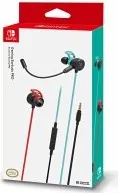
Deux types de microphones peuvent être utilisés selon vos préférences.
・Le micro intégré sera désactivé lorsque vous connecterez le microphone.
Utilisez le microphone lorsque votre environnement est bruyant.
・Le micro intégré est activé lorsque vous déconnectez le microphone.
Utilisez le micro intégré pour discuter en ligne.
Oreillettes (S/M/L) ×2
(M est utilisé par défaut sur les écouteurs)
【Écouteur】
Impédance : 32Ω±15%
Pilote d'ouverture : φ10mm
Puissance maximale : 20mW
Bande de fréquence audio : 100Hz~20kHz
Pression acoustique : 110dB±3dB
【Microphone】
Impédance : 6kΩ
Sensibilité : -42dB±4dB
Bande de fréquence : 100Hz~16kHz
Directivité : Unidirectionnelle
【Micro intégrée】
Impédance : 6kΩ
Sensibilité : -42dB±4dB
Bande de fréquence : 100Hz~16kHz
Directivité : Omnidirectionnelle
【Caractéristiques principales】
Longueur du câble : 1.2m
Entrée : fiche à 4 bagues de 3,5 mm
Poids : 25g
FR
Mode d'emploi
Merci d'avoir acheté ce produit.
Veuillez lire attentivement les instructions avant d'en commencer toute utilisation.
Après avoir lu le feuillet d'instruction, veuillez le conserver à portée de main
pour de future référence.
Attention
Assurez-vous de baisser le volume du système Nintendo Switch ou du téléphone portable avant de connecter ce produit.
● Ne pas utiliser le produit à volumes élevés pendant de très longues
périodes de temps afin d'éviter tout dommage auditif.
● Veuillez tenir ce produit hors de portée des enfants de moins de 3 ans.
● Si le produit nécessite un nettoyage, utilisez uniquement un chiffon doux et sec.
N'utilisez aucun agent chimique comme le benzène ou un diluant.
● Ne pas tirer ou plier le câble.
● Ne pas utiliser si le produit est endommagé.
● Ne jamais démonter, réparer ou modifier ce produit.
* Für nicht Φ3.5mm, 4-Ring mini Audioklinken-kompatible Geräte,
erwerben Sie bitte einen separaten Umwandler.
Beinhaltet
Plattform
Bedienungsanleitung ×1
・ Nintendo Switch
・ Φ3.5mm, 4-Ring mini
Audioklinken-kompatible Geräte
Wichtig
Bitte ziehen Sie die Bedienungsanleitung der Nintendo Switch/kompatibler
Hardware und der Software zu Rate bevor Sie das Produkt verwenden.
Audio Mixer×1Kopfhörer ×1Mikrofon (Abnehmbar) ×1
Kunststoff-Aufsätze (S/M/L) ×2
(M ist standardmäßig auf den
Kopfhörern angebracht)
DE
Bedienungsanleitung
Vielen Dank für den Kauf dieses Produkts.
Lesen Sie vor der Nutzung des Produktes die Bedienungsanleitung sorgfältig durch.
Bewahren Sie die Bedienungsanleitung nach dem Durchlesen zum
Nachschlagen auf.
Achtung
Stellen Sie sicher, dass die Lautstärke der Nintendo Switch oder des Mobiltelefons heruntergestellt ist bevor Sie das
Produkt verbinden.
● Vermeiden Sie die Nutzung bei hoher Lautstärke über längere Zeiträume
um Hörschäden zu vermeiden.
● Halten Sie dieses Produkt von Kindern unter 3 Jahren fern.
● Wenn das Produkt gereinigt werden muss, nutzen Sie nur ein trockenes,
weiches Tuch. Nutzen Sie keine chemischen Mittel wie Verdünner oder Benzol.
● Reißen oder biegen Sie das Kabel nicht.
● Nutzen Sie das Produkt nicht wenn es beschädigt ist.
● Versuchen Sie nicht das Produkt auseinanderzunehmen,
zu reparieren oder zu modifizieren.
Red
/2
%
Quick check
I'm not a robot
Incorrect answer, please try again.
Chat with your Hori Gaming Earbuds Pro manual using AI
Get instant AI answers from your Hori Gaming Earbuds Pro manual
Ask anything about the Hori Gaming Earbuds Pro. Answers come from this manual, with the pages they are based on.
Ask a Question
0/1000
Do you recommend Gaming Earbuds Pro?
YesNo
Frequently Asked
Questions
A
Minimize the Nintendo Switch volume first, then plug in the 3.5mm connectors fully. Connect the microphone to the left earphone and attach the ear hook. Use the in-line remote to adjust volume and toggle the microphone ON/OFF as needed.
Is this answer helpful?
A
The headset is meant for Nintendo Switch and compatible hardware that supports a 3.5mm 4-ring mini jack. If your device uses a different 3.5mm layout (not 4-ring 3.5mm), the manual indicates you may need a separate converter.
Is this answer helpful?
A
You can choose between the detachable microphone and the in-line mic. The manual explains that one mic is disabled depending on whether the detachable mic is connected. Use the detachable mic when you want a more directed pick-up, and switch to the in-line mic for a more convenient option when you detach it.
Is this answer helpful?
A
Check that all plugs are inserted all the way in, then confirm the volume control slide on the in-line remote is increased. Also verify the Nintendo Switch volume setting. If you are using voice chat, confirm the mic switch is ON.
Is this answer helpful?
A
Confirm the microphone ON/OFF switch is set to ON and that the microphone is connected fully. Make sure the front side of the microphone faces your mouth. If you use the Nintendo Switch Online app, increase both app and mobile phone volume and adjust in-game voice settings.
Is this answer helpful?
A
Yes. The product includes S/M/L silicone ear tips, with M pre-attached. Attach the ear hook and adjust the microphone position and angle so the mic faces your mouth for clearer voice pickup.
Is this answer helpful?
A
The manual advises lowering your device volume before connecting and avoiding high-volume listening for extended periods to help prevent hearing loss. Use only gentle cleaning with a soft dry cloth and do not use chemical agents.
Is this answer helpful?
M: OA-GPT-54-NAN
Advantagesand
Disadvantages
Advantages
Wired connection designed for stable Nintendo Switch audio and voice chat.
In-line remote controller lets you adjust volume and switch microphone ON/OFF quickly.
Two microphone options (detachable and in-line) support different environments and preferences.
Ear hook plus S/M/L ear tips improve comfort and fit during play.
Troubleshooting tips focus on plug-in seating, Switch volume, mic switch, and app volume.
VS
Disadvantages
Not wireless, so you must manage a wired cable connection.
Requires compatible 3.5mm 4-ring mini jack hardware; non-compatible devices need an extra converter.
Voice performance depends on correct mic orientation toward your mouth.
Using Nintendo Switch Online voice chat may require matching app and in-game volume settings.
M: OA-GPT-54-NAN
Product
Specification
Connection
0.14 in Jack
Wireless
no
M: GO-GEM-FL-25
Product
Description
Hori Gaming Earbuds Pro - Using the Hori Gaming Earbuds Pro Manual
Built for Nintendo Switch voice chat
The Hori Gaming Earbuds Pro deliver a focused wired audio experience tuned for gaming on Nintendo Switch and compatible devices. With a detachable microphone system and an in-line remote, you can adjust volume and control your mic without leaving the game. Setup is straightforward as long as your device supports the required 3.5mm 4-ring mini jack input.
Two mic options for different environments
This headset includes two microphone types so you can match your surroundings. Use the detachable microphone when you want a more directed pick-up, and switch to the in-line mic when you need a more convenient option for on-the-go voice chat. The microphone ON/OFF switch on the in-line remote helps you mute quickly during tense moments or when you need privacy.
Comfort that stays put
Comfort is built around a secure ear hook and included silicone ear tips in S/M/L sizes, with the M size pre-attached. You can fine-tune the microphone position and angle to keep the mic facing toward your mouth, which the manual specifically calls out for better voice pickup.
What you get in the box
You will find an earbud audio setup, a detachable microphone, an in-line remote with volume control, and an audio mixer, plus S/M/L silicone earbuds. The cable length is 1.2m and the total weight is listed at 25g, making it portable while remaining stable for wired connections.
Notes for smooth use
Lower your device volume before plugging in, and avoid long high-volume listening to protect your hearing.
If sound is missing or voice chat fails, check that all plugs are fully inserted, confirm the mic switch is ON, and verify Nintendo Switch volume and Nintendo Switch Online app volume settings.
If your hardware does not use the 3.5mm 4-ring mini jack, you may need a separate converter (not included).
Key takeaways
Wired setup aimed at consistent Switch audio and voice chat.
In-line remote offers volume control and fast mic ON/OFF.
Detachable mic plus in-line mic lets you choose how your voice is captured.
Ear hook and S/M/L tips support a comfortable, adjustable fit.