
Hori Fighting Stick Alpha Manual
PDF manual · 9 Pages
English



Quick check
Incorrect answer, please try again.
Chat with your Hori Fighting Stick Alpha manual using AI
Get instant AI answers from your Hori Fighting Stick Alpha manual
Ask anything about the Hori Fighting Stick Alpha. Answers come from this manual, with the pages they are based on.
Ask a Question
Do you recommend Fighting Stick Alpha?
Yes NoFrequently Asked Questions
Yes. It supports PS5 and PS4 via the platform switch and works on PC using XInput. Note that some features (touchpad, headset jack) are platform-limited and PC compatibility for some functions is not guaranteed by Sony.
Is this answer helpful?
No. The PS button on this fighting stick does not power on PS5 or PS4 consoles and cannot wake them from rest/standby. Use a paired DualSense or DUALSHOCK4 controller to initialize or wake the console.
Is this answer helpful?
Use the HORI Device Manager app to remap buttons, change directional/input modes, and configure up to four profiles. The device also allows manual maintenance such as button swaps and artwork changes by opening the case.
Is this answer helpful?
Keep the stick dry and dust-free. Clean with a soft, dry cloth only; do not use chemical solvents like benzene. Disconnect the USB cable before opening the case for maintenance and avoid excessive force when removing parts.
Is this answer helpful?
Warranty terms vary by region: HORI offers 90 days in the US for defects from the original purchase and guidance for EU claims typically beginning with the retailer within 30 days. Contact HORI support if the dealer cannot process a claim.
Is this answer helpful?
No. The Hori Fighting Stick Alpha functions as a PC controller via XInput and does not support DirectInput.
Is this answer helpful?
Yes. Keep the product away from children under 3, avoid moisture and high heat, prevent cable strain or sudden pulls, and don’t touch the metal USB connector. Supervise minors and store the product safely.
Is this answer helpful?
Advantages and Disadvantages
Advantages

- Authentic arcade feel with Hayabusa joystick and Hori buttons for precise inputs.
- Sturdy, compact build (410×300×120 mm, ~2.7 kg) that resists movement during play.
- Long 3.0 m USB cable for flexible placement and wired reliability.
- Customizable via HORI Device Manager: remapping, profiles, and directional settings.
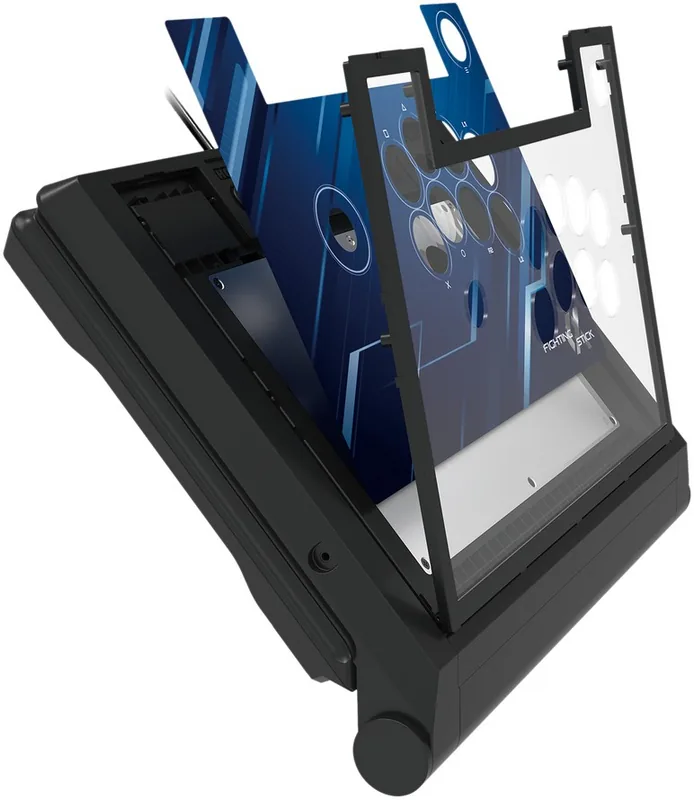
- User-serviceable case for artwork swaps, button replacement, and maintenance.
Disadvantages

- PS button cannot power on PS4/PS5 or resume from rest/standby modes.
- Some PlayStation features (touchpad, headset jack) are not PC-compatible.
- Requires wired USB connection; no wireless option for convenience.
- PC support limited to XInput; DirectInput is unsupported.
- Warranty voided by improper modification or unauthorized repairs.
Product Specification
Type
Arcade Stick
Compatibility
PS5, PS4, PC
Connectivity
wired (9.84 ft), USB
Power supply
USB
Buttons
14 (total), 6 (function buttons), 8 (action buttons)
Analog sticks
1 spherical (left)
D-pad
without
Special features
0.14 in jack, programmable buttons, lockable buttons
Product Description
Hori Fighting Stick Alpha (PS5/PS4/PC) Manual
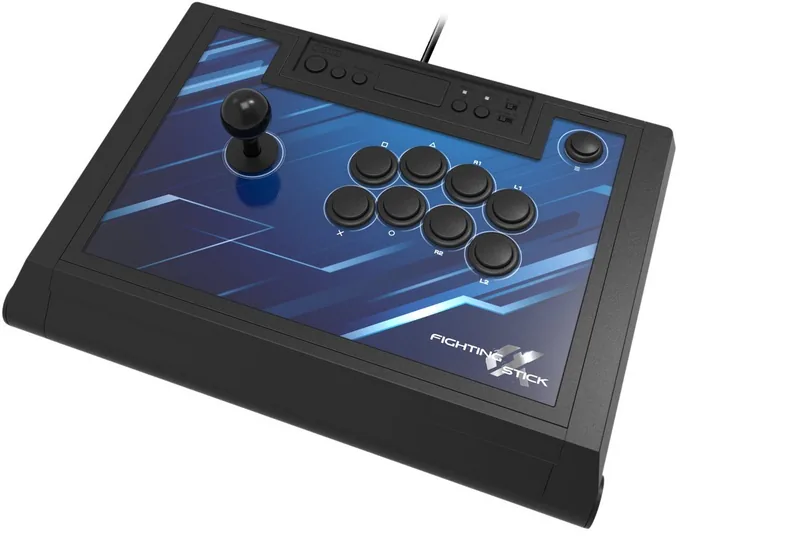
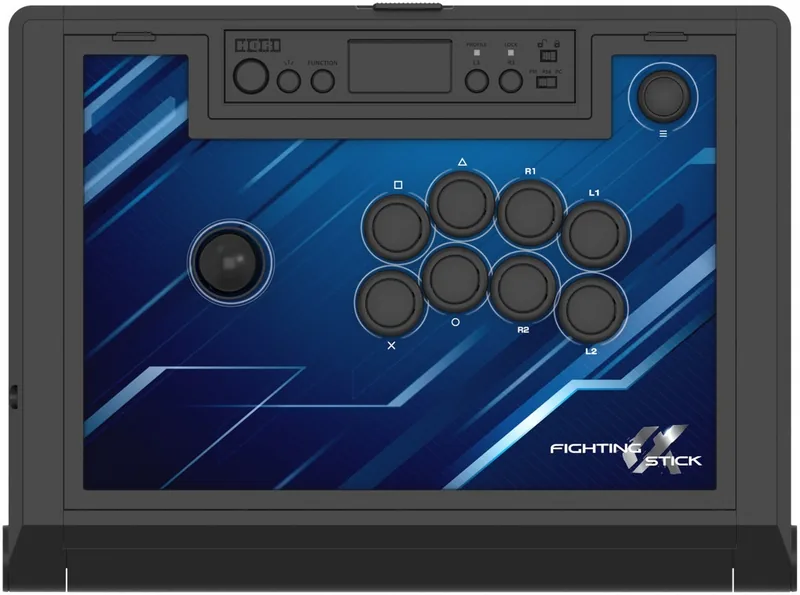
The Hori Fighting Stick Alpha (PS5/PS4/PC) is a compact, wired arcade-style controller designed for fighting-game enthusiasts who want a dedicated, authentic input experience. Built with a robust Hayabusa joystick and responsive Hori buttons, this stick aims to deliver precision and durability for casual and competitive play. Its layout mirrors traditional arcade cabinets, providing eight main action buttons, shoulder buttons, and a platform switch to toggle between PS4 and PS5 modes. The unit connects via USB Type-A and functions on PC using XInput, while some features—like the touchpad and headset jack—are platform-limited.
Key features and usage
The stick measures roughly 410 × 300 × 120 mm and weighs around 2.7 kg, providing a stable base during intense sessions. A 3.0 m cable helps maintain flexible setup options. The housing opens for maintenance, allowing users to swap artwork, replace buttons, or access wiring. Profile LEDs indicate four configurable profiles and the device supports button lock modes to disable specific inputs for tournament play. The PS button doesn’t power on consoles and the device cannot initialize a console on first boot; users should pair or power their consoles with standard controllers when needed.
Compatibility and software
Primarily designed for PS5 and PS4 consoles, the stick is also PC-compatible under XInput. Some PlayStation features (touchpad, headset jack) are not available on PC. The HORI Device Manager app enables deeper customization: remap inputs, change the directional input mode, and configure profiles. Ensure console firmware is up to date for best compatibility.
Safety, maintenance, and warranty
Observe warnings: keep out of reach of young children, avoid moisture and excessive heat, and don’t yank or sharply bend the cable. Clean with a soft dry cloth—no solvents. The casing can be opened for maintenance, but warranty exclusions apply for unauthorized modification or damage. HORI provides region-specific warranty terms (90 days in the US, 30 days dealer guidance in the EU) and contact information for support.
Notes
- The PS button will not turn on PS4/PS5 consoles or exit rest/standby modes. Use a paired DualSense or DUALSHOCK4 for console setup.
- Headset and touchpad functions may be limited depending on platform.
- PC compatibility is via XInput only; DirectInput is not supported.
Search for 67,706 Manuals online


Type-in Brand or Model