
Honeywell Voyager 1602g Manual
PDF manual · 202 Pages
English



Quick check
Incorrect answer, please try again.
Chat with your Honeywell Voyager 1602g manual using AI
Get instant AI answers from your Honeywell Voyager 1602g manual
Ask anything about the Honeywell Voyager 1602g. Answers come from this manual, with the pages they are based on.
Voyager 1602g Maintenance Schedule
Wipe the housing with a soft cloth or tissue dampened with water or mild detergent. Rinse with water if detergent is used.
If visibly dirty or performance degrades, clean with gentle dish soap and water. Do not use abrasive wipes or solvents.
Check the interface cable and connector for wear or damage that may interfere with operation.
Ask a Question
Do you recommend Voyager 1602g?
Yes NoFrequently Asked Questions
Yes, the 2D imaging engine is specifically designed to decode barcodes displayed on LCD and OLED screens, including QR codes and Data Matrix symbols found on mobile devices.
Is this answer helpful?
You can pair the scanner with an iPhone by scanning the SPP pairing barcode in the manual if using an MFI-certified app, or simply scan the Bluetooth Connect code for standard HID keyboard mode.
Is this answer helpful?
If Batch Mode is enabled, the scanner stores the data internally and transmits it automatically once you return to range. If not enabled, you will hear an error tone indicating no communication.
Is this answer helpful?
The battery is integrated into the unit. While it is designed for longevity, replacing it typically requires sending the device to an authorized service center or using a specific replacement kit if available.
Is this answer helpful?
Yes, the scanner allows extensive customization of output sequences, including adding custom prefixes, suffixes, and delimiters to suit your specific database or application requirements.
Is this answer helpful?
The scanner generally works with Android and many Linux distributions via Bluetooth HID or Serial port emulation, provided the host system supports the necessary drivers or protocols.
Is this answer helpful?
The system supports Multiple Scanner Operation, allowing up to seven scanners to be linked simultaneously to a single Honeywell Access Point for coordinated multi-user environments.
Is this answer helpful?
Advantages and Disadvantages
Advantages

- Reads damaged, wrinkled, or screen-displayed 2D barcodes with high accuracy
- Compact and lightweight design fits easily in a pocket or on a belt
- Long battery life with fast charging capabilities via USB or wall outlet
- Seamless Bluetooth connectivity for multiple host devices
- Flexible programming options for custom workflows and symbologies
Disadvantages

- Requires initial setup and barcode scanning for configuration
- Bluetooth range may be limited in environments with heavy interference
- Battery replacement requires specialized tools or service center visit
- Cannot read certain proprietary codes without specific software support
- Initial cost is higher than basic laser scanners
Product Specification
Type
Handheld scanner
Decoding capabilities
1D, 2D
Reading distance
1.26-16.06 inches
Connections
USB 2.0 Micro-B
Wireless
Wireless (2.4GHz)
Protection rating
IP42 certified
Package contents
Barcode scanner
Dimensions
1.89x4.72x0.87 inches
Weight
3.53 ounces
Features
Battery (Li-Ion, 750mAh)
Manufacturer warranty
3 years
Product Description
Discover the Versatility of the Honeywell Voyager 1602g 2D Pocket Scanner
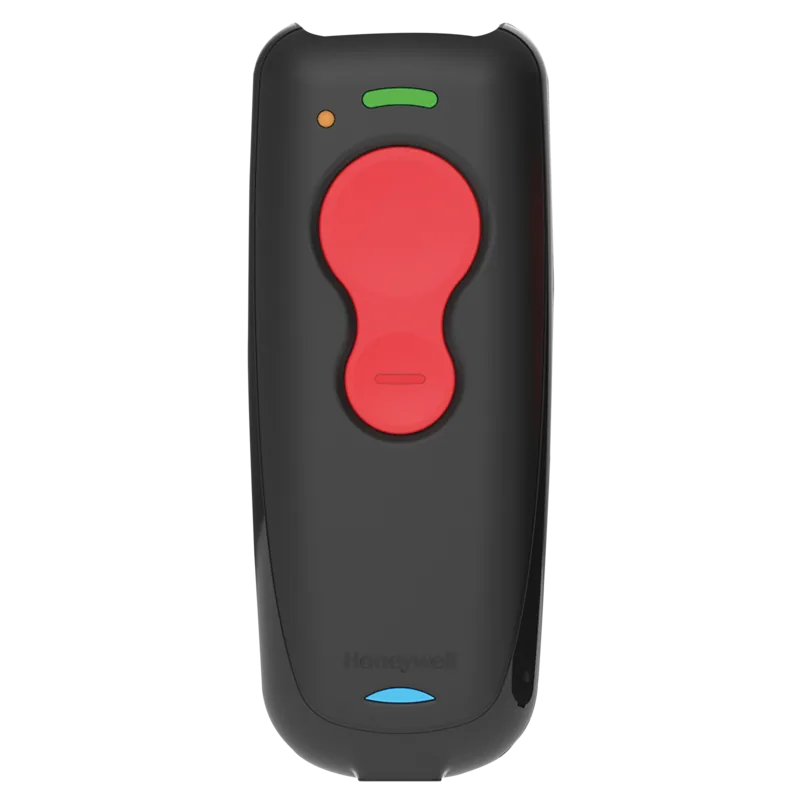
The Honeywell Voyager 1602g 2D Pocket Scanner represents a significant leap in mobile data collection technology. Designed for professionals who demand speed and reliability, this compact device combines the power of area imaging with the convenience of wireless freedom. Whether you are working in a bustling warehouse, a retail environment, or on the go, this scanner ensures that your workflow remains uninterrupted.
At the heart of the Voyager 1602g is its advanced 2D imaging engine, capable of reading linear barcodes as well as complex two-dimensional codes like QR, Data Matrix, and PDF417 directly from screens or damaged labels. Its pocket-sized form factor makes it easy to carry in a shirt pocket or clip to a belt, offering unparalleled ergonomics for all-day use. The device features a rechargeable lithium-ion battery that provides long-lasting performance, ensuring you can work through shifts without frequent interruptions.
Connectivity is seamless thanks to Bluetooth technology. Users can pair the scanner instantly with smartphones, tablets, laptops, and PDAs. The intuitive pairing process allows for quick setup with Apple devices using Serial Port Profile (SPP) or standard HID connections for PCs. For environments requiring multiple users, the scanner supports flexible linking modes, allowing up to seven devices to connect to a single access point efficiently. This flexibility makes it an ideal choice for teams where coordination and shared resources are key.
Programming the scanner is straightforward, utilizing a menu of barcodes included in the user guide. You can customize settings such as keyboard layouts, symbology priorities, and output sequences to match your specific application needs. Features like Batch Mode allow the scanner to store hundreds of scans when out of range, automatically transmitting them once connectivity is restored. This capability is crucial for inventory management or logistics operations in areas with spotty signal coverage.
With robust error handling, audible feedback, and visual LED indicators, the Voyager 1602g keeps you informed of every scan status. From low battery warnings to connection alerts, the device ensures you never miss a beat. It is built to withstand the rigors of daily industrial use while maintaining high accuracy and speed.
Key Notes
- Supports both cordless and corded operation via USB.
- Compatible with Windows, Mac, and various mobile operating systems.
- Includes programmable buttons for custom functions.
- Features a durable design suitable for harsh environments.
Search for 67,706 Manuals online


Type-in Brand or Model