
Honeywell QuietSet HSF600WE4 Manual
PDF manual · 29 Pages
English



Quick check
Incorrect answer, please try again.
Chat with your Honeywell QuietSet HSF600WE4 manual using AI
Get instant AI answers from your Honeywell QuietSet HSF600WE4 manual
Ask anything about the Honeywell QuietSet HSF600WE4. Answers come from this manual, with the pages they are based on.
QuietSet HSF600WE4 Maintenance Schedule
Unplug fan and wipe with soft damp cloth. Do not immerse or use chemicals.
Remove grille and blade to clean thoroughly, then store in original box or covered in plastic.
Ask a Question
Do you recommend QuietSet HSF600WE4?
Yes NoFrequently Asked Questions
It combines quiet operation, multiple speed settings, oscillation, and a timer in a standing design meant for whole-room comfort.
Is this answer helpful?
Yes. It includes a remote control for easier operation, though the AAA batteries needed for it are not included.
Is this answer helpful?
Yes. The Twist & Lock height adjustment lets you raise or lower the fan and lock it into the desired position.
Is this answer helpful?
The timer can be set for 1, 2, 4, or 8 hours, depending on how many times you press the timer button.
Is this answer helpful?
Yes. Unplug it first, then wipe it with a soft damp cloth. The front grille can also be removed for more thorough cleaning.
Is this answer helpful?
No. The instructions specifically advise against using an extension cord or power strip with the fan.
Is this answer helpful?
Advantages and Disadvantages
Advantages

- QuietSet technology helps reduce noise for more comfortable daily use.
- Multiple speed levels make it easy to match airflow to the room.
- Oscillation and height adjustment improve air coverage and positioning.
- Remote control and timer add convenience for bedrooms and offices.
Disadvantages

- AAA batteries for the remote are not included.
- US models require proper fuse replacement if the safety plug blows.
- The fan must not be used with extension cords or power strips.
- Assembly is required before first use, including several parts and steps.
Product Specification
Operating Mode
Mains operation (40W)
Color
white
Speed Levels
5
Oscillation Range
70° horizontal oscillating (switchable)
Airflow
28,498.94 ft3/h
Special Features
Remote control, Automatic shut-off after 8h (adjustable), Height-adjustable
Noise Level
48dB(A)
Dimensions
15.75x48.03x15.75in (WxHxD)
Product Description
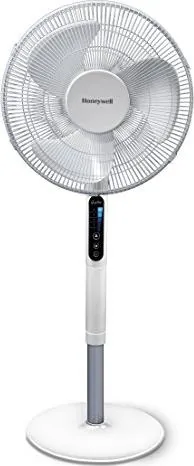
Honeywell HSF600WE4 QuietSet Standing Fan
The Honeywell HSF600WE4 QuietSet Standing Fan is built for people who want steady cooling without the constant buzz that often comes with traditional fans. Designed for whole-room comfort, it pairs a slim standing profile with Noise Reduction Technology, making it a practical fit for bedrooms, home offices, living rooms, and other spaces where quieter airflow matters. If you are looking up the Honeywell HSF600WE4 QuietSet Standing Fan Manual, you are probably after a fan that is easy to assemble, simple to control, and dependable for everyday use.
What makes this model appealing is the balance between convenience and control. It includes multiple speed settings, oscillation for wider air circulation, and a timer that can be set for 1, 2, 4, or 8 hours. The remote control adds another layer of comfort, letting you adjust settings without getting up. A dimming control panel light is another thoughtful touch, especially for nighttime use when bright indicators can be distracting.
The height-adjustable design helps the fan adapt to different room layouts and seating arrangements. With its Twist & Lock feature, you can raise or lower the fan to direct airflow where it is needed most. That makes it a versatile option whether you want a gentle breeze near a desk or broader circulation across a room. The fan also uses a fused safety plug in US models, reflecting the brand’s focus on built-in protection and responsible operation.
Maintenance is straightforward as well. The fan can be cleaned with a soft damp cloth, and the front grille can be removed for more detailed care when needed. Storage is easy too, since the unit can be disassembled or covered while fully assembled. For best results, the manual emphasizes safe placement on a dry, level surface and careful handling of the cord, plug, and moving parts.
Notes
- Best suited for indoor household use only.
- Remote batteries are not included.
- The fan should not be used with extension cords or power strips.
- Follow the manual carefully for fuse replacement and cleaning.
Overall, the HSF600WE4 QuietSet Standing Fan stands out as a user-friendly cooling solution that combines quiet performance, flexible setup, and practical everyday features.
Search for 67,706 Manuals online


Type-in Brand or Model
Enrique Segura
7 months ago
How quiet is this fan for bedroom use, and do buyers report any problems with height adjustment or rattling from the grille?
Manual.ly
7 months ago
Many reviewers say it is very quiet, even in night mode, and strong enough for bedroom use. It also offers several airflow levels for fine adjustment. The main minor issues mentioned are: (1) the height adjustment can loosen over time; placing it at the lowest position is still sufficient, and you should check that the height-locking mechanism is fully engaged as described in the manual. (2) some users noticed a slight clinking between the two grille parts due to metal-on-metal contact. A practical fix is to insert small foam strips between the grille contact points and ensure the grids are assembled correctly. With these tweaks, it is described as sleep-friendly.