
Honeywell PX940V Manual
PDF manual · 114 Pages
English



Quick check
Incorrect answer, please try again.
Chat with your Honeywell PX940V manual using AI
Get instant AI answers from your Honeywell PX940V manual
Ask anything about the Honeywell PX940V. Answers come from this manual, with the pages they are based on.
PX940V Maintenance Schedule
Honeywell recommends calibrating the verifier every six months for maximum performance using the calibration card.
Honeywell recommends cleaning the printhead each time you replace the media to ensure print quality and printhead life.
Clean the verifier at the end of every roll of media to accurately verify barcodes and keep the surface free of residue.
Free maintenance reminders
Timed to your purchase date. Always free, unsubscribe anytime.
Ask a Question
Do you recommend PX940V?
Yes NoFrequently Asked Questions
The PX940V includes an integrated barcode verification module. It can scan and verify barcodes during printing, store verification results, and support actions like void and reprint based on your verification settings.
Is this answer helpful?
Select your printing type through the printer setup and configure the printer for thermal transfer when using ribbon. The ribbon workflow includes correct ribbon orientation (ink in or ink out), routing through the print mechanism, and tightening ribbon take-up so the ribbon runs wrinkle-free.
Is this answer helpful?
Rewind printing routes media so it takes up on a rewinder core. Peel-off printing routes the liner through the rewinder path while keeping the label handling aligned for downstream peeling. You select the appropriate printing mode in the printer menu after loading media.
Is this answer helpful?
Verification can be configured for modes like Read/No Read or ISO 15415/15416 grading. You can set a passing grade threshold, choose aperture settings (usually automatic), define maximum consecutive failures, and select the failure action behavior for failed labels.
Is this answer helpful?
You can set command language from the printer web page, the Main Menu, or via PrintSet 5/Print Set MC. After selecting the command language, the printer typically requires a restart to apply changes.
Is this answer helpful?
Verification results are available through the printer web page interfaces when enabled and can be exported. Failed label images can be saved (up to a stored limit) and exported using tools such as USB thumb drives or FTP, depending on configuration.
Is this answer helpful?
Advantages and Disadvantages
Advantages

- Integrated barcode verification on PX940V to validate print quality and readability.
- Peel-off and rewind media modes supported for automated label handling.
- Direct thermal and thermal transfer workflows with ribbon loading guidance.
- 3.5-inch touchscreen plus Print button enable calibration, testing, and operator control.
- Flexible connectivity: USB host/device, Ethernet, and Bluetooth LE (with supported setup).
Disadvantages

- Web configuration and advanced settings require network access and correct IP connectivity.
- Media loading depends on correct sensor alignment and proper printhead/toggle pressure.
- Verification failure handling may require void and reprint behavior or operator handling after certain errors.
- Unsupported barcode types or sizes can trigger warnings and limit verification coverage.
- Verification calibration is recommended periodically to maintain grading accuracy.
Product Specification
Type
Label printer
Technology
Direct thermal
Print resolution
600dpi
Print width
4.17in
Print speed
7.87in/s
Memory
1GB (RAM), 256MB (Flash)
Connections
USB 2.0, 2x USB-A 2.0 (Host), serial
Network
LAN, Bluetooth 4.0, NFC
Display
color, 3.5"
Emulation
ZPL II, DPL, XML, IPL, Fingerprint
Dimensions
10.28x15.69x19.92in
Weight
50.71lb
Special features
Rewinder, Label dispenser (Peeler), RTC (Real-Time Clock), Black mark sensor, Gap sensor
Manufacturer's warranty
1 year
Product Description
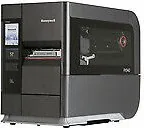
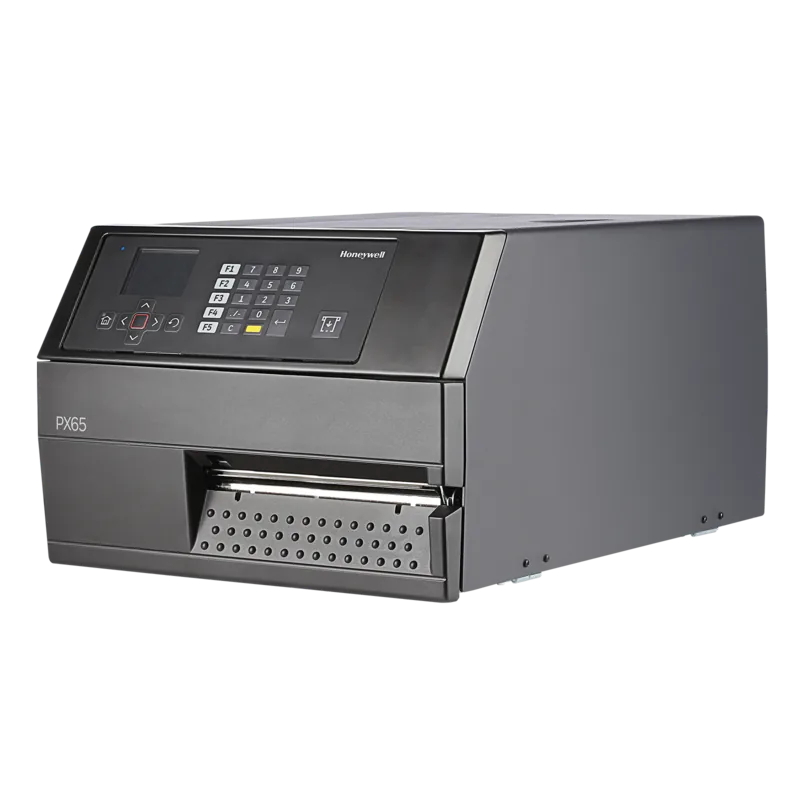
Honeywell PX940V (600 dpi) Industrial Label Printer with Peeler and Rewinder
The Honeywell PX940V, 600dpi, Peeler, Rewinder Direct thermal/thermal transfer manual experience is built around rugged, high-performance industrial labeling. This printer line is designed for demanding environments where labels must be consistent, readable, and quickly produced. With a rugged touchscreen front panel and an operator-friendly Print button, daily setup, calibration, and label testing become straightforward even on the factory floor.
A standout strength of the PX940V is its integrated barcode verification capability (PX940V only). During print and verification, the verifier checks barcode readability and quality, then records results for each label. If a label fails, you can use the configured failure action (such as void and reprint) and optionally save failed label images for later review.
For throughput-focused workflows, the device supports multiple print modes using the installed hardware. Tear-off media handling is supported, and for automated downstream processes, the printer also supports rewind mode and peel-off mode. When configured with a Peeler and Rewinder, you can route media for rewind take-up and then manage liner and label separation for peel-off applications. The printer setup includes guidance for media loading, sensor alignment (label gap and black mark), and choosing the correct printing mode from the menus.
Direct thermal and thermal transfer operation are both covered through the ribbon workflow. When thermal transfer is selected, the printer works with inked ribbon rolls and uses the appropriate ribbon orientation settings (ink in or ink out). The manual also walks through printhead pressure and toggle positioning to prevent common issues like uneven darkness, ribbon wrinkling, and side-to-side media movement, helping keep output reliable across different media types.
Notes
- Access to advanced configuration is available via the printer web page after network connection.
- Verification calibration and periodic maintenance help preserve grading accuracy.
- Unsupported barcode types or sizes can be flagged, so label formats should match supported symbologies.
Key results
- Integrated verification helps confirm barcode readability and quality during production.
- Rewind and peel-off media modes support automated handling for demanding processes.
- Thermal transfer ribbon setup enables durable labels when chemicals, heat, or sunlight are expected.
- Printhead pressure and toggle calibration reduce label defects and prevent media slip.
- Verification reports and optional saved failed images support fast root-cause analysis.
Pros and cons quick check
Pros: rugged industrial design, integrated verifier (PX940V), touchscreen control, multi-interface connectivity, flexible command language support, rewind and peel-off modes, quality-focused reporting.
Cons: web configuration requires network access, correct sensor alignment and pressure settings are critical, some verification actions depend on mode, and unsupported barcode types/sizes can trigger warnings.
Search for 67,706 Manuals online


Type-in Brand or Model