
Honeywell PM45c Manual
PDF manual · 110 Pages
English



Quick check
Incorrect answer, please try again.
Chat with your Honeywell PM45c manual using AI
Get instant AI answers from your Honeywell PM45c manual
Ask anything about the Honeywell PM45c. Answers come from this manual, with the pages they are based on.
Ask a Question
Do you recommend PM45c?
Yes NoFrequently Asked Questions
First, ensure you have installed the optional Wi-Fi module. Then access the Main Menu on the touchscreen, select Settings, navigate to Communications, and choose Wireless 802.11. Follow the on-screen wizard to find your network and enter the password. Alternatively, you can configure these settings via the printer's web page by entering its IP address.
Is this answer helpful?
Thermal Direct prints directly onto heat-sensitive paper, suitable for short-term labels like shipping receipts. Thermal Transfer uses a ribbon to melt ink onto the label, creating a more durable image resistant to heat, chemicals, and fading, which is better for asset tags or outdoor use.
Is this answer helpful?
Yes, the Honeywell PM45c supports Direct PDF Printing. This feature allows the printer to interpret and print PDF files without needing middleware or a host computer to convert the data first, streamlining workflows for documents sent directly to the printer.
Is this answer helpful?
You can restore defaults from the Printer Web Page under Services > Restore Defaults, or from the Main Menu using the Tools section. You can choose to restore network settings, system settings, or delete user-installed files. For Icon models without a screen, a hardware-based reset using the Print button during startup is also available.
Is this answer helpful?
No, the RFID capability is an optional module. If you need to print on RFID media, you must purchase and install the RFID module separately. Once installed, you can use the Calibration Wizard to align the tag position and set the output power.
Is this answer helpful?
If the prinhead temperature exceeds safe limits, the printer will display a 'Printhead Hot' error and pause printing. It will automatically resume once the component cools down. To prevent this, ensure the printer is in a well-ventilated area and check that the cooling vents are not blocked.
Is this answer helpful?
Advantages and Disadvantages
Advantages

- Supports multiple command languages including Fingerprint, DPL, and ZSim
- Fast print speeds up to 14 inches per second at 203 dpi
- Intuitive touchscreen interface with setup wizards for quick configuration
- Flexible connectivity options including Ethernet, USB, Bluetooth, and Wi-Fi
- Large collapsible ribbon core minimizes maintenance interruptions
Disadvantages

- RFID module requires an additional purchase and installation
- Wi-Fi functionality is optional and not included in the base unit
- Touchscreen calibration may be required after initial setup or transport
- Default web page login credentials must be changed for security
- Some advanced programming commands require specific user privileges
Product Specification
Type
Label Printer/Barcode Printer
Technology
Direct Thermal
Print Resolution
203 dpi
Roll Diameter
3 in
Print Width
4.25 in
Print Length
18700 in
Print Speed
13.78 in/s
Memory
256 MB (RAM), 512 MB (Flash)
Connections
USB 2.0, 1x USB-A 2.0 (Host), Serial
Network
Gigabit LAN
Display
Monochrome, Touchscreen
Emulation
DPL, IDP, ZSim II, XML, IPL, PDF
Power Consumption
270 W (max), 9.6 W (standby)
Dimensions
17x7.1x9.96 in
Weight
27.78 lbs
Features
Rewinder, Peeler
Manufacturer Warranty
1 year
Product Description
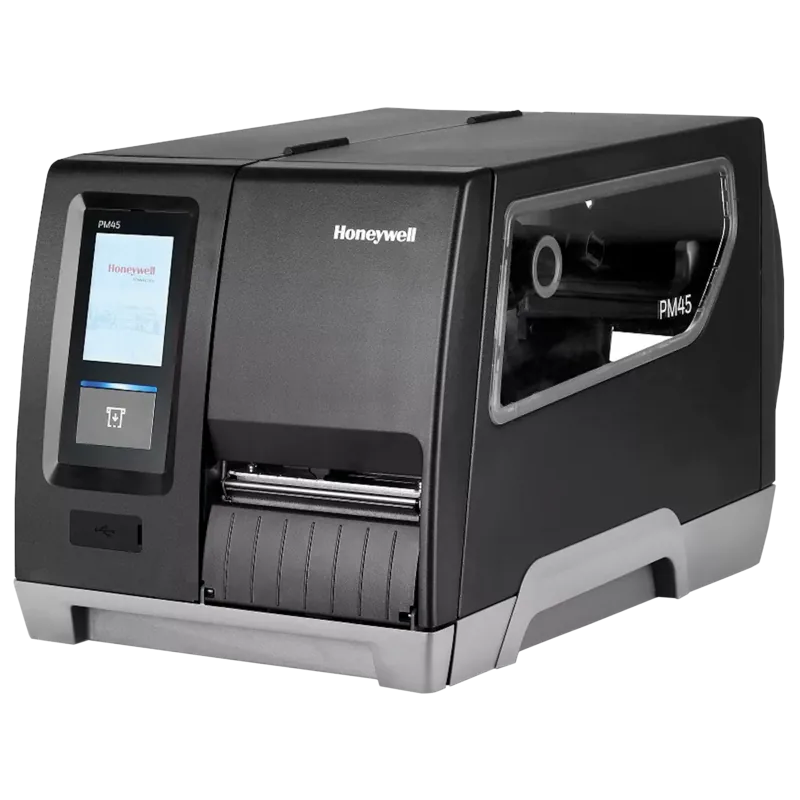
Honeywell PM45c Short Door: A Versatile Industrial Printing Solution
The Honeywell PM45c Short Door is a robust mid-range industrial printer designed for demanding environments where reliability and speed are paramount. This model features a compact short door design that simplifies media and ribbon loading, making it ideal for high-volume operations in logistics, manufacturing, and retail sectors. With a resolution of 203 dpi, the PM45c delivers crisp, clear text and barcodes essential for compliance and inventory management.
Equipped with both Thermal Direct and Thermal Transfer capabilities, this printer offers flexibility in material selection. Users can choose between durable thermal transfer ribbons for long-lasting labels or direct thermal media for temporary applications. The device supports a wide array of connectivity options including Ethernet, USB, Bluetooth, and optional Wi-Fi, ensuring seamless integration into existing network infrastructures. Its advanced touchscreen interface allows for intuitive navigation through wizards that guide users through complex setups like RFID calibration and sensor alignment.
Security is a core component of the PM45c architecture. It features secured flashing to protect firmware integrity and supports various command languages such as Fingerprint, Direct Protocol, and Zebra Simulation. This versatility means businesses can maintain their current software ecosystems without costly overhauls. Whether printing on RFID tags or standard adhesive labels, the PM45c handles diverse media types with precision, thanks to its smart media calibration features.
Key Features Overview
The printer includes a large collapsible ribbon core which reduces the frequency of ribbon changes. The front panel provides visual status indicators via LEDs for icon models or a full-color touchscreen for advanced monitoring. Maintenance is straightforward with accessible printheads and rollers, while the built-in diagnostics help identify issues before they cause downtime.
Important Notes
- Ensure proper grounding when connecting power to avoid electrical hazards.
- Always use the original packaging if shipping the unit to prevent internal damage.
- Regular cleaning of the printhead and media path extends the lifespan of the device.
Search for 67,706 Manuals online


Type-in Brand or Model