
Honeywell ES800 Manual
PDF manual · 9 Pages
English



Quick check
Incorrect answer, please try again.
Chat with your Honeywell ES800 manual using AI
Get instant AI answers from your Honeywell ES800 manual
Ask anything about the Honeywell ES800. Answers come from this manual, with the pages they are based on.
ES800 Maintenance Schedule
Empty stale water and refill with fresh water at least once a week to reduce mineral deposits in the cooling media.
Empty tank, rinse with clean water, remove and clean the water filter sponge if equipped, then dry and replace.
Remove media and wash under fresh water or with a damp cloth as needed to remove mineral deposits or dust.
Free maintenance reminders
Timed to your purchase date. Always free, unsubscribe anytime.
Ask a Question
Do you recommend ES800?
Yes NoFrequently Asked Questions
Connect the power adapter to the cooler and outlet, then press ON/OFF to start. To enable evaporative cooling, press the COOL button and confirm the water tank is filled above the minimum mark. The pump runs and you should feel cooled airflow once the honeycomb cooling media becomes fully wet.
Is this answer helpful?
When water drops below the minimum level in cooling mode, the unit beeps, the low water indicator flashes, and evaporative cooling automatically pauses. Refill the tank with water above the minimum level, then switch the unit off, unplug, refill, plug back in, and turn it on again to continue cooling.
Is this answer helpful?
Yes. If you switch the cooling function OFF, the unit continues to operate as a fan only. The low water alarm does not activate in fan-only mode, so it can still deliver airflow even when cooling is not possible.
Is this answer helpful?
The TIMER function can be set to program automatic shutoff for up to 7.5 hours. After the set time passes, the unit turns off and remains in standby until you unplug the power cord from the electrical socket.
Is this answer helpful?
Yes, if ice is available. You can add ice to the top ice compartment to enhance cooling performance. Use ice alongside properly filled water in the tank and avoid exceeding the Max water level.
Is this answer helpful?
Cleaning frequency depends on local air and water conditions. In areas with higher mineral content, deposits may build up, restricting airflow. The guide recommends draining and refilling with fresh water at least weekly, and cleaning the honeycomb media every two months or sooner as needed.
Is this answer helpful?
The Auto-Off Safety System turns the cooler off if the water tank is detached or incorrectly positioned. To restart, attach the tank correctly and then power the unit on.
Is this answer helpful?
Advantages and Disadvantages
Advantages

- Evaporative cooling with COOL mode and fan-only operation when cooling is switched off
- Multiple fan speeds plus Auto that balances TurboBlast and QuietSleep for comfort
- SWING louvers for wider air distribution and a TIMER that supports up to 7.5 hours
- Low water alarm pauses cooling to help protect the pump and maintain reliable operation
- Auto-Off safety system shuts down if the tank is detached or incorrectly positioned
Disadvantages

- Cooling performance depends on maintaining proper water level and fresh water in the tank
- Requires periodic cleaning of honeycomb media and optional filters to prevent mineral or dust buildup
- To avoid damage and droplets, users must respect the minimum and Max water markings carefully
- Remote operation depends on a CR2032 battery and requires keeping the signal path unobstructed
Product Specification
Operating Mode
Mains Operation (36W)
Color
grey, black
Speed Settings
4
Oscillation Range
horizontal oscillating (switchable)
Special Features
Remote control, Night mode, Automatic shut-off, Air filter, Switchable air cooler with 7l water tank
Dimensions
9.84x28.86x12.44in (WxHxD)
Product Description
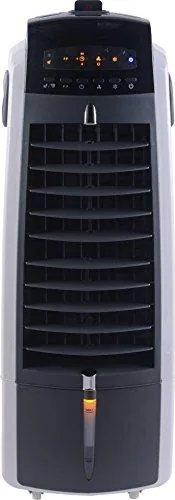
Honeywell ES800 Stand fan/air cooler Manual
Stay cool with portable evaporative comfort
The Honeywell ES800 Stand fan/air cooler brings airflow plus evaporative cooling in a convenient, portable format. With a detachable water tank and a cooling system that wets the honeycomb media, it helps create a refreshing breeze for everyday indoor or outdoor use. This guide-style overview walks through setup, modes, safety features, and practical care tips so you can get consistent performance.
Modes, controls, and airflow features
The control panel combines simple fan settings with cooling options. Use ON/OFF to start the unit (it begins at low speed) or press COOL to enable evaporative cooling, which activates the water pump once the honeycomb media is properly wet. When cooling is off, the unit still works as a fan only.
Fan speed can be selected among Low, Medium, High, and Auto. Auto gently varies wind speed between TurboBlast and QuietSleep for comfort that changes with your needs. QuietSleep mode reduces airflow for quieter, calmer evenings, while TurboBlast delivers stronger airflow.
For positioning, press SWING to move the louvers left to right automatically. You can also set TIMER for automatic shutoff up to 7.5 hours, after which the unit stays in standby until you unplug it.
A remote control supports key functions and requires a CR2032 (3V) coin battery. Point the remote toward the unit and keep the signal path clear.
Water filling, optional ice, and performance tips
Before using COOL, fill the tank above the minimum mark and avoid exceeding the Max level to prevent water droplets collecting on the louvers. The unit can be enhanced with ice placed in the top ice compartment when available.
Some models include a water filter to reduce dust and hair entering the tank. In cooling mode, low water triggers a beeping alarm and pauses evaporative cooling until the tank is refilled.
Cleaning and maintenance that keeps it running well
For best results, clean the water tank and filters regularly. Empty, rinse with clean water, and wipe the tank compartment if needed. For the rear components, remove the rear grill carefully and clean the carbon dust filter (if equipped) with clean water, then let it dry before reinstalling.
Also maintain the honeycomb cooling media. Depending on air and water conditions, it may need cleaning every two months or sooner in mineral-rich areas. To reduce residue, turn off the cool function about 15 minutes before powering down so the media can dry.
Key takeaways (most important results)
- Cooling works best when the tank is filled above minimum and you avoid overfilling past Max to limit droplets.
- Auto varies airflow between TurboBlast and QuietSleep, while SWING helps distribute airflow across the room.
- The TIMER can program shutoff up to 7.5 hours, and Auto-Off turns the unit off if the tank is detached or mispositioned.
- Low water alarm prevents cooling failures by pausing evaporative mode until the tank is refilled.
- Regular rinsing of tank, filters, and honeycomb media helps maintain airflow and reduces mineral buildup.
Notes
- Do not use dirty water or salt water, as it can damage the unit and honeycomb media.
- For extended storage, keep the cooler in a dry place away from direct sunlight and unplug when not in use.
Search for 67,706 Manuals online


Type-in Brand or Model
Virgie Borer
9 months ago
Does this device take up a lot of space, or is it compact enough for a small desk or shelf?
Manual.ly
9 months ago
It is designed to be compact and not take up much space. Based on user feedback, it fits easily on a desk or shelf and stays unobtrusive in everyday use, while still performing its intended function. If you have limited space, it should be a good fit.