
HiKOKI WR18DSHL Manual
PDF manual · 172 Pages
English



Quick check
Incorrect answer, please try again.
Chat with your HiKOKI WR18DSHL manual using AI
Get instant AI answers from your HiKOKI WR18DSHL manual
Ask anything about the HiKOKI WR18DSHL. Answers come from this manual, with the pages they are based on.
WR18DSHL Maintenance Schedule
Check hex or square-holed sockets periodically for wear. Replace if worn or deformed to maintain proper tightening torque.
Regularly inspect all mounting screws to ensure they are properly tightened. Retighten immediately if any are loose to prevent hazards.
Check carbon brushes regularly as they are consumable parts. Replace when worn to or near the wear limit and keep them clean and free-sliding.
Wipe stains with a soft dry cloth or soapy water. Do not use chloric solvents, gasoline, or paint thinner as they melt plastics.
Ask a Question
Do you recommend WR18DSHL?
Yes NoFrequently Asked Questions
It is a cordless impact wrench designed for tightening and loosening bolts and nuts, especially fasteners used to secure structural items.
Is this answer helpful?
It can tighten fasteners quickly, but the actual torque should be checked with a torque wrench when a specific tightening value is required. Fastener size, socket condition, battery charge, and working conditions can affect results.
Is this answer helpful?
The battery protection system may stop the motor when the battery is low, the tool is overloaded, or the battery becomes too hot. Release the switch, remove the cause of overload if applicable, and allow the battery to cool or recharge it.
Is this answer helpful?
Yes. It includes an LED light for improved visibility around the work area. The light automatically turns off after approximately 15 minutes to help avoid unnecessary battery consumption.
Is this answer helpful?
Wear eye protection and hearing protection. Hold the tool firmly, keep hands away from rotating parts, and use insulated gripping surfaces if a fastener could contact concealed wiring.
Is this answer helpful?
Inspect sockets for wear or deformation, check mounting screws, keep the exterior clean, and inspect carbon brushes as they wear. Use only approved replacement parts and have repairs performed by qualified service personnel.
Is this answer helpful?
Advantages and Disadvantages
Advantages

- Cordless 18V design supports mobile fastening work without a mains lead.
- Forward and reverse rotation helps with both tightening and loosening bolts and nuts.
- Built-in LED light improves fastener visibility and switches off automatically after about 15 minutes.
- Battery protection helps prevent damage from depletion, overheating, and overload.
- Battery level indication helps users plan charging before work is interrupted.
Disadvantages

- Actual tightening torque must be verified separately with a torque wrench when precision is required.
- Continuous operation can heat metal parts, requiring rest periods and careful handling.
- Battery, charger, sockets, and other accessories may vary by package or be sold separately.
- Noise and vibration levels require suitable hearing protection and safe working practices.
Product Specification
Type
Impact wrench
Bolt diameter
M22
Torque
480 Nm
Tool holder
1/2 in square drive
Weight
7.5 lb
Product Description
HiKOKI WR18DSHL Cordless Impact Wrench - Read, Download & Print Free
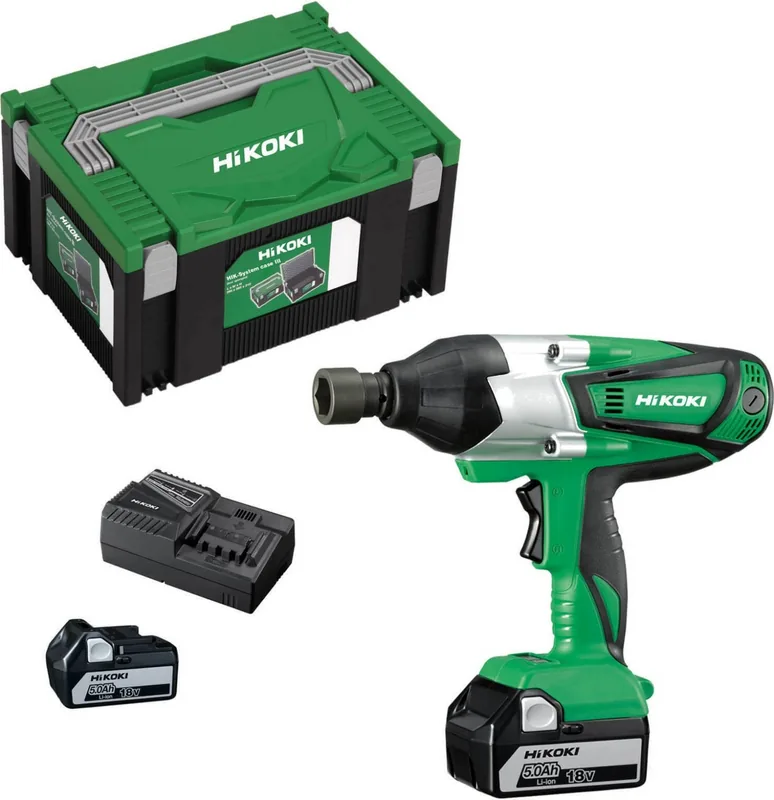
The HiKOKI WR18DSHL Cordless Impact Wrench is a portable tool designed for tightening and loosening bolts and nuts used in structural fastening work. Its cordless design supports flexible use around workshops, job sites, vehicles, and maintenance areas where access to mains power may be limited. Built for practical fastening tasks, it combines impact action with an 18V lithium-ion battery platform.
Designed for fastening work
This impact wrench is intended for a wide range of bolt and nut applications. The square-drive anvil accepts compatible sockets, which must be fitted securely before use. The tool features forward and reverse rotation, helping users tighten or remove fasteners efficiently. Because actual fastening force can vary with the fastener, socket condition, battery charge, and application, tightening torque should be checked with a torque wrench where accuracy is essential.
Battery-powered convenience
The WR18DSHL uses designated HiKOKI rechargeable batteries and includes battery protection functions. The motor may stop if the battery is depleted, overheated, or the tool is overloaded. These safeguards help protect the battery and tool during demanding work. Compatible chargers support charging at temperatures from 0 C to 50 C, while the tool and battery are specified for use between -5 C and 40 C.
A battery level indicator helps users monitor available power, while the integrated LED work light improves visibility around fasteners. To reduce unnecessary battery drain, the LED automatically switches off after approximately 15 minutes. This is a useful feature for repetitive tasks in dim work areas.
Safe handling and routine care
A firm grip is important during operation, especially when working with high-resistance fasteners. Use insulated gripping surfaces when there is a possibility of contact with concealed wiring. The socket, anvil, mounting screws, carbon brushes, and outer housing should be inspected regularly. Worn or deformed sockets can reduce tightening performance, while loose screws and worn brushes should be addressed promptly.
Notes
- Use only specified HiKOKI accessories and genuine battery packs.
- Wear eye and hearing protection during operation.
- Allow hot metal parts and batteries to cool after extended use.
- Store the tool below 40 C and away from children.
HiKOKI WR18DSHL Cordless Impact Wrench - Read, Download & Print Free offers a useful overview for users seeking a battery-powered solution for routine bolt and nut work, with emphasis on correct operation, battery care, and safe maintenance.
Search for 67,732 Manuals online


Type-in Brand or Model