
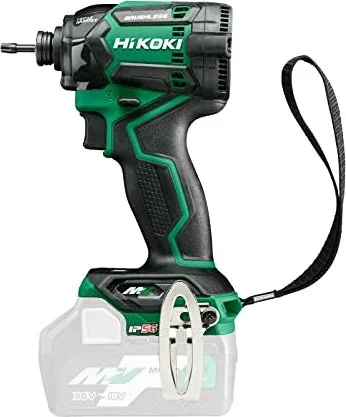
HiKOKI WH36DCW2Z Manual
PDF manual · 236 Pages
English



Quick check
Incorrect answer, please try again.
Chat with your HiKOKI WH36DCW2Z manual using AI
Get instant AI answers from your HiKOKI WH36DCW2Z manual
Ask anything about the HiKOKI WH36DCW2Z. Answers come from this manual, with the pages they are based on.
WH36DCW2Z Maintenance Schedule
Regularly inspect all mounting screws and ensure they are properly tightened. Retighten any loose screws immediately to prevent hazards.
Check tool and battery terminals to ensure no swarf or dust has collected. Remove debris before, during, and after operation to prevent short circuits.
Inspect the driver bit for breakage or worn tips. Replace the bit if damaged or worn to prevent slipping and ensure safety.
Wipe stains with a soft dry cloth or soapy water. Do not use chloric solvents, gasoline, or paint thinner as they may damage plastic parts.
Ask a Question
Do you recommend WH36DCW2Z?
Yes NoFrequently Asked Questions
It is designed for driving and removing machine screws, wood screws, tapping screws, bolts, and similar fasteners. It is especially useful where impact assistance and cordless mobility are beneficial.
Is this answer helpful?
No. The solo configuration is intended for users who already have compatible HiKOKI Multi Volt batteries and charging equipment. Check battery compatibility before buying.
Is this answer helpful?
The tool uses compatible 6.35 mm hex-shank driver bits. Bits are not included, so select the correct bit type and size for the screw or fastener being used.
Is this answer helpful?
Five modes are available: soft, power, bolt, bolt single, and self-drilling screw. These settings help match impact behavior to the fastener and material.
Is this answer helpful?
Bolt single mode automatically stops after a series of impacts. It is intended to provide more controlled fastening for work such as racks, fences, furniture, and other tasks where excessive tightening is undesirable.
Is this answer helpful?
With a battery installed, the main unit is rated IP56 for dust resistance and protection against powerful water jets. It should not be submerged, exposed to excessive dust, or left in rainwater.
Is this answer helpful?
Advantages and Disadvantages
Advantages

- Five tightening modes support delicate, standard, heavy-duty, bolt, and self-drilling screw applications.
- IP56-rated main unit with battery offers useful dust resistance and protection against powerful water jets.
- LED lighting, battery indicator, reversible rotation, and hook improve day-to-day usability.
- Solo kit with protective case suits users who already own compatible HiKOKI Multi Volt batteries.
- Protection circuits help prevent damage from overload, overheating, and low battery output.
Disadvantages

- Battery and charger are not included, so new users need to buy compatible power equipment separately.
- Driver bits are sold separately and must use the correct 6.35 mm hex shank format.
- The IP56 rating does not mean the tool can be submerged or left in rain.
- High noise and vibration levels mean suitable personal protective equipment is important.
- Final torque should be checked with a torque wrench for critical fastening work.
Product Specification
Type
Impact driver
Battery
36 V, lithium-ion
No-load speed
0-3,700 rpm
No-load impact rate
0-4,100 ipm
Screw diameter
0.20-0.71 in
Torque
56-159 lb-ft
Tool holder
1/4 in hex bit holder
Features
Forward/reverse rotation, variable speed, variable impact rate, torque preset, LED work light, soft grip, motor brake, brushless motor, belt clip
Weight
3.53 lb
Package contents
Without charger and battery, includes case (HSC II)
Product Description
HiKOKI WH36DCW2Z Cordless Impact Wrench solo incl. case - Read, Download & Print Free
The HiKOKI WH36DCW2Z Cordless Impact Wrench solo incl. case is a compact, professional-grade fastening tool designed for demanding screw, bolt, and nut work. Built around a cordless platform, it gives tradespeople and serious DIY users the freedom to work without a mains lead while retaining the control needed for precise fastening tasks. This solo version is supplied without a battery and charger, making it a practical choice for users who already own compatible HiKOKI Multi Volt batteries.
Built for controlled fastening
Despite the product title, the WH36DC is designed as a cordless impact driver with a 6.35 mm hex drive for suitable driver bits. It is intended for driving and removing machine screws, wood screws, tapping screws, and related fasteners. Its impact mechanism supports work where standard drills may struggle, while the variable trigger helps the user manage speed and engagement.
A key strength is the selectable tightening-mode system. Five modes allow the tool to be adjusted for delicate fastening, normal and heavier-duty work, bolt applications, controlled bolt fastening, and self-drilling screws. Soft mode is intended to reduce the risk of damage to thin materials and decorative surfaces. Bolt single mode can stop automatically after a set series of impacts, helping provide greater control for tasks such as racks, fences, and furniture.
Practical features for everyday work
The WH36DC includes an LED work light with always-on, trigger-linked, and off settings. A battery charge indicator helps users monitor remaining power, while the forward and reverse selector supports fast switching between driving and removal. A hook adds convenient carrying options between tasks, and the supplied case helps protect and organize the tool during storage or transport.
The main unit is rated to IP56 when fitted with a battery, offering resistance to dust ingress and powerful water jets. This makes it well suited to busy workshops and job sites, although it should not be immersed in water or left exposed to heavy rain. Built-in protection systems can stop operation when the tool is overloaded or overheated, helping safeguard the motor and battery.
Safe, reliable operation
For best results, use only approved accessories and compatible genuine batteries. Select the fastening mode with the trigger released, fit bits securely, and confirm final tightening torque with a torque wrench where accuracy is critical. Eye and hearing protection are recommended because impact fastening creates noise and vibration.
Notes
- This is a solo tool package, so battery and charger availability should be checked before purchase.
- The driver bit is sold separately.
- Test the selected mode on a spare piece of material before completing important work.
Search for 67,732 Manuals online


Type-in Brand or Model