
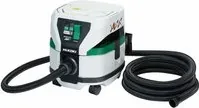
HiKOKI RP3608DBW4Z Manual
PDF manual · 144 Pages
English



Quick check
Incorrect answer, please try again.
Chat with your HiKOKI RP3608DBW4Z manual using AI
Get instant AI answers from your HiKOKI RP3608DBW4Z manual
Ask anything about the HiKOKI RP3608DBW4Z. Answers come from this manual, with the pages they are based on.
RP3608DBW4Z Maintenance Schedule
Empty the tank at least once a day to prevent suction power loss, motor failure, bad smell, or rusting. Turn off switch and disconnect battery first.
Once every month or two months, wash off any dust from the dust filter with water. Dry it sufficiently in the shade before reuse.
Frequently remove attached dust from the dust filter, prefilter, cloth filter, and filter damper by gently tapping or using compressed air.
Regularly inspect all mounting screws to ensure they are properly tightened. Retighten immediately if loose to prevent serious hazards.
Check tool and battery terminals prior, during, and after operation. Remove any collected swarf or dust to prevent malfunction or short circuits.
Free maintenance reminders
Timed to your purchase date. Always free, unsubscribe anytime.
Ask a Question
Do you recommend RP3608DBW4Z?
Yes NoFrequently Asked Questions
The solo specification is intended for users who already have compatible batteries and a charger. Standard equipment includes a 5 m hose, plastic bags, and connection joints. Batteries, charger, battery covers, and some accessories may be excluded from the solo package.
Is this answer helpful?
No. The listed specification identifies the unit as dry type, and the operating guidance states that water cannot be sucked. Avoid liquids, wet dust, foaming liquids, and other prohibited materials to prevent damage or safety risks.
Is this answer helpful?
It is designed for HiKOKI Multi Volt batteries. The vacuum uses two batteries for normal operation but can continue with one installed. Older specified BSL14xx, BSL18xx, and certain earlier 36 V battery series are not compatible.
Is this answer helpful?
Set the cleaner to Auto mode, connect it to a compatible tool with the hose, and pair both units using their wireless-link controls. The cleaner then starts with the tool and stops shortly after it, helping remove remaining dust from the hose.
Is this answer helpful?
The cleaner offers Eco, Standard, and Turbo modes. Eco is suited to lighter work and reduced energy use, while Standard and Turbo provide increased extraction for more demanding cleanup and tool-connected dust collection.
Is this answer helpful?
Regularly remove dust from the pre-filter, cloth filter, filter damper, and dust filter. The dust filter can be cleaned with a brush or compressed air and washed periodically with water. Allow it to dry fully in the shade before reuse.
Is this answer helpful?
Advantages and Disadvantages
Advantages

- Cordless Multi Volt operation supports flexible indoor work without a mains connection.
- Three suction modes help balance extraction performance and battery runtime.
- Bluetooth Auto mode can start the cleaner with compatible HiKOKI tools.
- Class L filtration and automatic filter dust removal support consistent dust collection.
- 5 m hose, joints, plastic bags, handle, and lockable casters improve jobsite usability.
Disadvantages

- The solo version excludes batteries and charger, requiring compatible HiKOKI Multi Volt equipment.
- Specified as dry type, so it is not intended for vacuuming water or wet dust.
- Wireless linking is limited to compatible HiKOKI tools and may be affected by obstructions.
- The 8 L tank requires regular emptying during high-volume dust collection.
Product Specification
Type
Floor vacuum cleaner
Operating mode
Battery powered (36 V, lithium-ion)
Suction power
Vacuum pressure 2.91 psi
Capacity
1.59 gal wet, 2.11 gal dry
Smart home
App control (Bluetooth)
Noise level
88 dB(A)
Dimensions
14.53 x 15.04 x 13.03 in (W x H x D)
Weight
22.93 lb
Package contents
Without charger and battery, includes hose (4.92 ft), suction tube, floor nozzle, crevice nozzle
Product Description
HiKOKI RP3608DBW4Z Cordless Wet/Dry Vacuum Cleaner solo
The HiKOKI RP3608DBW4Z Cordless Wet/Dry Vacuum Cleaner solo is a mobile extraction solution designed for workshops, renovation tasks, and professional indoor cleaning. Built around the HiKOKI Multi Volt battery platform, it offers cordless freedom for collecting fine dust created by drilling, cutting, sanding, and grinding wood or concrete. The solo version is intended for users who already own compatible batteries and a charger.
Cordless extraction for demanding work areas
With a maximum airflow of 3.5 m3/min and a maximum vacuum of 20.1 kPa, this compact cleaner provides capable dust collection without relying on a mains outlet. Its 8 L dry-use tank makes it suitable for regular cleanup around workstations, while the robust wheeled design and carry handle support convenient movement around indoor jobsites.
The unit uses two Multi Volt batteries, automatically drawing power from the battery with the lower remaining charge first. It can also operate with one battery installed. Battery indicators on the cleaner help users monitor available power before starting a task.
Adjustable power and smart tool connection
Three suction settings - Eco, Standard, and Turbo - let operators match performance to the material and job. Eco mode can help conserve battery power during lighter cleaning, while Turbo is available for more demanding extraction. Manual mode supports independent floor and workspace cleaning.
For compatible HiKOKI cordless power tools, Bluetooth wireless linking enables automatic vacuum operation. Once paired and set to Auto mode, the cleaner starts when the connected tool is switched on and continues briefly after the tool stops to clear residual dust from the hose. The effective wireless range is approximately 10 m, although walls and other obstructions can reduce it.
Filtration, maintenance, and practical handling
The HiKOKI RP3608DBW4Z uses a Class L filtration system with a dust filter, pre-filter, and cloth filter arrangement. A dust-removal mechanism activates when the power is switched off, helping maintain airflow between cleaning intervals. For best suction performance, filters should be cleaned regularly and the tank emptied frequently.
A 5 m, 28 mm diameter hose and connection joints are supplied for tool extraction. Plastic bags are also included to simplify dust disposal. Lockable casters help secure the vacuum during transport or stationary use.
Note: Despite the wet/dry wording often associated with this product category, the stated specification identifies this model as dry type. Do not vacuum water, wet dust, flammable materials, hot debris, or hazardous substances outside its intended Class L dust application.
The HiKOKI RP3608DBW4Z Cordless Wet/Dry Vacuum Cleaner solo is a practical choice for professionals seeking portable, battery-powered dust extraction with adaptable suction control and wireless tool activation.
Search for 67,732 Manuals online


Type-in Brand or Model