
HiKOKI G1813DVFW2Z Manual
PDF manual · 284 Pages
English



Quick check
Incorrect answer, please try again.
Chat with your HiKOKI G1813DVFW2Z manual using AI
Get instant AI answers from your HiKOKI G1813DVFW2Z manual
Ask anything about the HiKOKI G1813DVFW2Z. Answers come from this manual, with the pages they are based on.
G1813DVFW2Z Maintenance Schedule
Ensure the depressed center wheel is free of cracks and surface defects before every use.
Check all mounting screws to ensure they are properly tightened. Retighten immediately if loose.
Remove debris or dust adhered to the filter using a soft brush after each use.
Check the filter periodically for scratching, chipping, or tearing. Replace with a new one if damaged.
Periodically run the motor with no load to help expel debris and dust from inside the tool.
On occasion check the tool and battery terminals prior, during, and after operation to remove swarf and dust.
Wipe stains with a soft dry cloth or soapy water. Do not use chloric solvents, gasoline, or paint thinner.
Ask a Question
Do you recommend G1813DVFW2Z?
Yes NoFrequently Asked Questions
The documentation covers several models including G1812DE, G1813DE, G1813DF, G1813DVE, and G1813DVF.
Is this answer helpful?
Charge between 0°C and 40°C using the specified charger to avoid damage or fire risks.
Is this answer helpful?
Wear eye protection, hearing shields, and non-skid shoes. Dust masks are recommended for dusty environments.
Is this answer helpful?
No, dimensions must match the tool rating to prevent breakage and loss of control.
Is this answer helpful?
Release the switch and cool down. Overload protection may trigger automatically to prevent damage.
Is this answer helpful?
Yes, statutory guarantees apply but do not cover misuse or normal wear and tear.
Is this answer helpful?
Check periodically and clean debris to prevent dust accumulation affecting the motor.
Is this answer helpful?
Advantages and Disadvantages
Advantages

- Advanced electronic control systems including kickback and overload protection for enhanced safety during operation.
- Variable speed settings allow optimization for different materials ranging from stainless steel to brick and marble.
- Electric brake function ensures quick stopping of the accessory upon switch release for better control.
Disadvantages

- Tool only packaging requires separate purchase of battery and charger for immediate use.
- Strict maintenance needed for air vents and terminals to prevent overheating and electrical hazards.
- Requires specific wheel guards which may limit accessory compatibility if incorrect types are used.
Product Specification
Type
Angle Grinder
Battery
18V, Li-Ion
No-load Speed
3200-8000 rpm
Disc Diameter
4.92 in
Tool Mounting
Spindle Thread M14, Spindle Lock
Features
Variable Speed, Constant Electronics, Softgrip, Auxiliary Handle, Soft Start, Restart Protection, Vibration Dampening, Quick Stop, Motor Brake, Brushless Motor, Overload Protection
Weight
3.75 lbs
Scope of Delivery
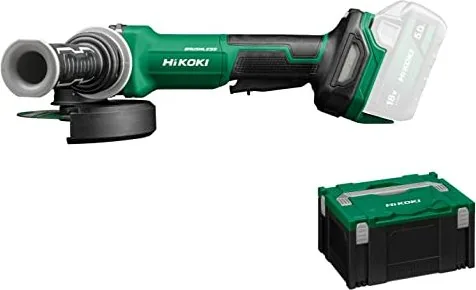
without charger and battery, incl. case (HSC III)
Product Description
Discover the Power of the Hikoki G1813DVFW2Z Cordless Angle Grinder Tool Only Incl. Case Manual
Welcome to our detailed analysis of the Hikoki G1813DVFW2Z Cordless Angle Grinder Tool Only Incl. Case Manual. This professional-grade power tool is engineered for heavy-duty construction and metalworking applications requiring precision and reliability. Designed for professionals who demand high performance, this unit handles diverse tasks such as removing casting fins, grinding welded joints, and finishing surfaces made from stainless steel, bronze, aluminum, castings, synthetic resins, slate, brick, and marble. Its versatility ensures it fits seamlessly into any workshop or job site workflow.
Performance is driven by an intelligent electronic control system that prioritizes both power and user safety. The soft start feature manages rotation numbers during startup to minimize recoil torque. Advanced protection systems monitor the motor continuously. Kickback protection immediately disconnects power if rotational speed drops unexpectedly due to binding. Overload protection halts the motor if excessive pressure is applied, while overheat protection activates if temperatures rise beyond safe limits. These features collectively extend the tool lifespan and protect the operator from injury.
Speed customization is another significant advantage. Operators can utilize the auto mode for efficient workload adaptation or switch to transmission mode to select fixed speeds between 3200 and 8000 minutes per minute. This range accommodates everything from light polishing to aggressive cutting. The integrated electric brake ensures rapid stoppage of the spinning disc after releasing the trigger. Dust extraction ports help maintain visibility and health standards during extended use, though external collectors may be required for full compliance.
Handling is optimized through insulated gripping surfaces and a dedicated side handle for secure two-handed operation. The tool lacks a permanent cable, offering unrestricted movement compared to mains-powered alternatives. However, users must ensure batteries are fully charged before commencing work. Charging occurs safely within temperature ranges of zero to forty degrees Celsius. The remaining battery indicator warns users when power is low, preventing mid-task interruptions.
Maintenance requirements focus on keeping terminals free of swarf and cleaning filters regularly to prevent overheating and electrical hazards. Safety guidelines mandate wearing face shields, gloves, and hearing shields. Correct wheel guarding is critical, with type A guards for cutting and type B for grinding. Never bypass safety mechanisms or use damaged accessories. This comprehensive approach ensures the Hikoki G1813DVFW2Z Cordless Angle Grinder Tool Only Incl. Case Manual remains a top-tier choice for industrial grinding needs.
Search for 67,732 Manuals online


Type-in Brand or Model