
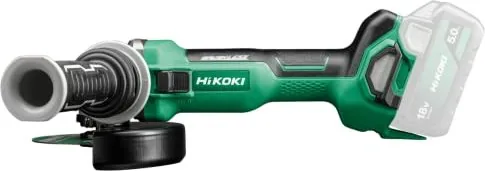
HiKOKI G1813DAW4Z Manual
PDF manual · 260 Pages
English



Quick check
Incorrect answer, please try again.
Chat with your HiKOKI G1813DAW4Z manual using AI
Get instant AI answers from your HiKOKI G1813DAW4Z manual
Ask anything about the HiKOKI G1813DAW4Z. Answers come from this manual, with the pages they are based on.
G1813DAW4Z Maintenance Schedule
Ensure the wheel is free of cracks and surface defects. Do not use chipped or cracked wheels.
Check all mounting screws to ensure they are properly tightened. Retighten immediately if loose.
Remove debris with a soft brush after use. Check periodically for damage and replace if torn or clogged.
Run the motor without load periodically to expel debris and dust from inside the tool.
Check tool and battery terminals before, during, and after operation to ensure they are clean.
Regularly clean the power tool's air vents to prevent excessive accumulation of powdered metal.
Ask a Question
Do you recommend G1813DAW4Z?
Yes NoFrequently Asked Questions
No, charging is restricted to between 0 degrees Celsius and 40 degrees Celsius. Charging outside this range can lead to danger or battery damage.
Is this answer helpful?
Kickback is a sudden reaction to a pinched or snagged rotating wheel. The tool has a kickback protection feature that cuts off power to the motor if speed drops suddenly.
Is this answer helpful?
Always wear eye protection such as face shields or goggles. Additionally, wear hearing protectors, dust masks, gloves, and workshop aprons capable of stopping fragments.
Is this answer helpful?
Only use specifically designated 18V lithium ion batteries. Using other types may create a risk of injury or fire and voids safety guarantees.
Is this answer helpful?
Use type A guard for cutting-off wheels and type B guard for grinding. Always ensure the guard is securely attached for maximum safety against broken fragments.
Is this answer helpful?
If the unit generates unusually high temperatures, operating poorly, or making abnormal noises, stop using and shut off the switch. Request an inspection immediately.
Is this answer helpful?
Store the battery fully charged in a cool dry place away from children. Repeated use and charge cycles recover performance if degradation occurs.
Is this answer helpful?
Advantages and Disadvantages
Advantages

- Electronic soft start reduces recoil during startup
- Kickback protection cuts power if wheel stalls
- Overload and overheat protection safeguards motor
- Compatible with 18V lithium ion battery systems
- Various battery capacities allow flexible power management
Disadvantages

- Requires strict wheel inspection before each use
- Charging limited to 0 C to 40 C temperature range
- Specific guards required for cutting versus grinding
- Terminals must be kept clean to prevent shorts
- Modifications void warranty and reduce safety
Product Specification
Type
Angle Grinder
Battery
18V, Li-Ion
No-load Speed
8000 rpm
Disc Diameter
4.92 inches
Tool Mounting
Spindle Thread M14, Spindle Lock
Features
Electronic Speed Control, Soft Grip, Auxiliary Handle, Soft Start, Restart Protection, Vibration Dampening, Quick Stop, Motor Brake, Brushless Motor, Overload Protection
Weight
3.75 lbs
Package Contents
Without charger and battery
Product Description
Discover the Power of the Hikoki G1813DAW4Z Cordless Angle Grinder Body Only
When working on precision metal tasks, you need a tool that delivers consistent performance without compromise. The Hikoki G1813DAW4Z Cordless Angle Grinder Body Only Manual provides comprehensive guidance for utilizing this robust machine effectively. Designed for professionals and serious DIY enthusiasts, this cordless disc grinder ensures safety and efficiency during grinding and cutting operations across various materials including steel and aluminum alloys used heavily in construction.
Advanced Safety Features
One of the standout aspects of this unit is its electronic control system which includes soft start technology. This feature reduces recoil against the operator during startup preventing sudden jerks that could injure the user. Kickback protection automatically cuts off power if the wheel speed drops suddenly, preventing dangerous accidents caused by pinching or snagging the abrasive wheel. Overload and overheat protection further safeguard the motor during heavy duty applications ensuring longevity for years of service. These features are crucial when reading through the Hikoki G1813DAW4Z Cordless Angle Grinder Body Only Manual to understand operational limits properly.
Battery Management and Specifications
Compatibility with the HiKOKI 18V lithium ion battery system allows for versatile power management solutions for diverse job sites. Users can utilize various battery capacities ranging from 1.5 Ah to 8.0 Ah depending on project needs and workload intensity. Charging times vary between 15 minutes for smaller packs to over 30 minutes for high capacity options available today. Temperature constraints apply during charging ideally between 0 C and 40 C to ensure safety standards are met. Ensure terminals remain clean to prevent short circuits or ignition risks from debris accumulation inside the housing area.
Safety Precautions and Usage
Always inspect wheels before use to check for cracks or surface defects that could cause breakage under stress levels. Wear appropriate personal protective equipment including eye shields and hearing protection whenever sparks are generated near operators. Maintain a firm grip with both hands to resist kickback forces during cutting actions effectively. Keep air vents clear of dust accumulation to prevent overheating the internal components during prolonged usage periods. Regularly check mounting screws for tightness to maintain structural integrity during operation cycles.
Operational Guidelines and Maintenance
Do not use separate reducing bushings or adapters to adapt large hole abrasive wheels for general use. For tools intended to be fitted with threaded hole wheels ensure thread length is sufficient. Always charge batteries at correct temperatures to avoid damage or explosion hazards. Never disassemble rechargeable batteries or charger units yourself as authorized service centers handle repairs. If noise or heat seems abnormal stop using immediately and request inspection.
Final Thoughts
Mastering the Hikoki G1813DAW4Z Cordless Angle Grinder Body Only Manual empowers users to achieve superior results safely every time. Whether removing casting fines or grinding welded sections this tool stands out among competitors. Adhering to guidelines ensures durability and user safety across various industrial environments today. Prioritize maintenance routines to extend the machine life significantly and keep your workspace secure for everyone involved in the process.
Search for 67,732 Manuals online


Type-in Brand or Model