
HiKOKI DV12DD Manual
PDF manual · 104 Pages
English



Quick check
Incorrect answer, please try again.
Chat with your HiKOKI DV12DD manual using AI
Get instant AI answers from your HiKOKI DV12DD manual
Ask anything about the HiKOKI DV12DD. Answers come from this manual, with the pages they are based on.
DV12DD Maintenance Schedule
Check moving parts for misalignment or binding, check for breakage, and ensure no other conditions affect operation.
Regularly inspect all mounting screws and retighten any that are loose immediately to prevent hazards.
Wipe stained areas with a soft dry cloth or cloth moistened with soapy water; do not use solvents.
Free maintenance reminders
Timed to your purchase date. Always free, unsubscribe anytime.
Ask a Question
Do you recommend DV12DD?
Yes NoFrequently Asked Questions
The DV12DD is ideal for driving and removing screws, drilling various woods and metals, and—when in impact mode—drilling into brick and concrete block. Use the correct mode and bit for each material for optimal results.
Is this answer helpful?
The lithium-ion battery includes protection that stops output if charge is depleted, the tool is overloaded, or the battery overheats. If the motor stops, release the trigger, remove the cause of overload, or allow the battery/tool to cool before resuming.
Is this answer helpful?
Operate the tool and battery between -5°C and 40°C; charge the battery at ambient temperatures between 0°C and 40°C. Charging or operating outside these ranges may reduce performance or prevent charging.
Is this answer helpful?
The charger pilot lamp shows states such as charging, charge complete, overheat standby, charging impossible and malfunction. For example, continuous red indicates charging; blinking red (1s intervals) indicates charge complete or other status per the manual’s lamp table.
Is this answer helpful?
Inspect mounting screws regularly, keep cutting tools sharp, clean the exterior with a soft cloth or soapy water (no solvents), and store the tool below 40°C out of children’s reach. Fully charge batteries before long storage; repeat charge/use cycles to recover capacity if needed.
Is this answer helpful?
Yes—always start at low speed with the bit tip contacting the workpiece, do not exceed the bit’s maximum speed rating, and apply pressure in line with the bit to avoid bending, breakage or loss of control.
Is this answer helpful?
Always wear eye protection, and use hearing protection during impact drilling. Keep hands clear of moving parts, avoid loose clothing, ensure proper footing, secure the workpiece, and use dust extraction where applicable.
Is this answer helpful?
Advantages and Disadvantages
Advantages

- Multi-mode: handles wood, metal and masonry with drill and impact functions.
- Integrated battery protection prevents overheating, overload and short circuits.
- Ergonomic features: optional auxiliary handle, insulated grips and tool hook.
- LED indicators provide battery level, protection alerts and brief work illumination.
- Detailed charger signals and temperature guidance support reliable recharging.
Disadvantages

- Higher noise levels during impact drilling; hearing protection recommended.
- Significant vibration when impact drilling into concrete; operator fatigue risk.
- Reduced torque and performance below 0°C; battery-dependent behavior in cold.
- Charger requires rest periods after continuous use, slowing turnaround times.
- Must use designated HiKOKI batteries; third-party packs not recommended.
Product Specification
Type
Impact drill driver
No-load speed
0-440/0-1700/min
No-load impact rate
0-6600/0-25500/min
Drilling capacity
Wood 1.14 in, Steel 0.39 in, Stone 0.31 in
Screw diameter
M6, 0.24 in wood screws
Torque
12.54/28.03 ft-lb soft/hard, 22 stages (20+2)
Chuck capacity
0.03-0.39 in keyless chuck
Features
Forward/reverse rotation, Speed regulation, Impact rate regulation, Multiple gears, Torque preselection, Impact stop, LED work light, Soft grip, Motor brake, Brushless motor, Belt clip
Weight
2.65 lb
Product Description
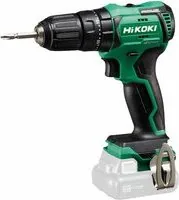
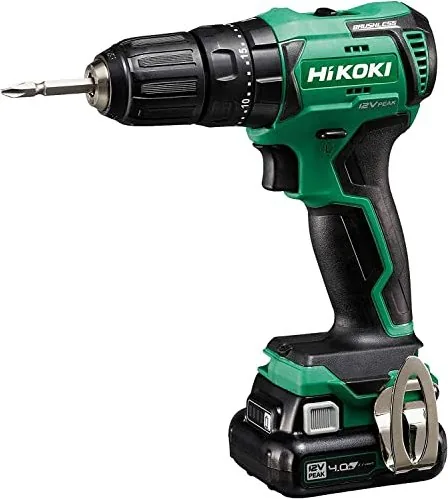
Hikoki DV12DD Cordless Impact Drill Driver Manual
The Hikoki DV12DD cordless impact drill driver is a compact, versatile tool designed for demanding DIY and professional tasks. With both drilling and impact-drilling modes, it handles wood, metal and masonry while offering variable speed, an adjustable clutch, and an LED work light for improved control in low-light conditions. The tool uses HiKOKI lithium-ion batteries with built-in protection features to prevent overheating, overcurrent and short circuits, and pairs with the UC12SL charger for reliable recharging within specified temperature ranges.
Ergonomics and safety are focal points: the DV12DD includes an auxiliary handle option for better leverage, insulated gripping surfaces for work near live wiring, and a hook for safe transport. Noise and vibration specifications are provided (notably higher noise for the DV12DD versus DS12DD) and users are advised to wear hearing protection during impact drilling. The drill’s LED indicates battery status and protection warnings; the light also flashes diagnostic patterns when overload or temperature protection engages.
Operational tips include starting drill operations at low speed—especially with long bits—applying pressure inline with the bit, and selecting the correct mode and clutch settings before use. The manual stresses correct battery handling: charge only with the specified charger, avoid shorting terminals, store batteries charged if unused for long periods, and observe the recommended temperature ranges for operation and charging.
Maintenance guidance covers routine inspection of mounting screws, keeping cutting tools sharp, cleaning the exterior with mild soap and water (avoid solvents), and storing the tool and batteries away from children and extreme temperatures. The manual also outlines charger pilot lamp signals and troubleshooting steps for charging anomalies, plus manufacturer warranty and servicing recommendations through authorized HiKOKI centers.
Notes:
- The DV12DD is intended for drilling brick and concrete in impact mode, as well as wood and metal drilling and screw driving.
- Built-in battery protection may cause the motor to stop under low charge, overload, or high battery temperature; follow cooling and recharging guidance before reuse.
- Always secure workpieces and use appropriate PPE (eye, ear, dust protection).
Pros and cons
Pros:
- Multi-mode: drills wood/metal and impact-drills masonry reliably.
- Battery protection: safeguards against overheat, overload and short circuits.
- Compact ergonomics: option for auxiliary handle and hook for secure handling.
- Clear indicators: LED shows battery level and diagnostic warnings.
- Well-documented charging: charger signals and temperature guidance reduce charging issues.
Cons:
- High noise: DV12DD rated notably louder than DS12DD during impact drilling.
- Vibration on concrete: impact drilling vibration is significant and requires caution.
- Temperature limits: performance reduced below 0°C and restricted charging/operation ranges.
- Charger rest time: recommended cooldowns between charges can slow workflow.
- Battery-specific: performance and safety require using designated HiKOKI batteries only.
Search for 67,732 Manuals online


Type-in Brand or Model