
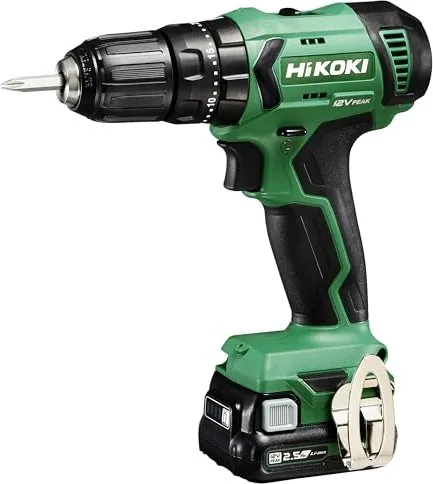
HiKOKI DV12DAWFZ Manual
PDF manual · 184 Pages
English



Quick check
Incorrect answer, please try again.
Chat with your HiKOKI DV12DAWFZ manual using AI
Get instant AI answers from your HiKOKI DV12DAWFZ manual
Ask anything about the HiKOKI DV12DAWFZ. Answers come from this manual, with the pages they are based on.
DV12DAWFZ Maintenance Schedule
Regularly inspect all mounting screws to ensure they are properly tightened. Retighten any loose screws immediately to prevent hazards.
Since using a dull tool degrades efficiency and may cause motor malfunction, sharpen or replace the tool as soon as abrasion is noted.
Ask a Question
Do you recommend DV12DAWFZ?
Yes NoFrequently Asked Questions
It is suitable for driving and removing screws, drilling wood and metal, and impact drilling into materials such as brick and concrete block when fitted with the correct drill bit.
Is this answer helpful?
The kit includes the HiKOKI DV12DA cordless impact drill driver, a carrying case, and two 2.5Ah lithium-ion batteries. Included accessories can vary by package, so confirm the retailer's contents before purchase.
Is this answer helpful?
Under the stated conditions, a 2.5Ah battery takes approximately 37 minutes to charge at 20 degrees C with the compatible UC12SL charger. Actual time can vary with temperature and power supply conditions.
Is this answer helpful?
Yes. The DV12DA impact drilling mode is intended for brick and concrete block. Use a suitable masonry bit, select impact mode, and wear appropriate eye and hearing protection.
Is this answer helpful?
Use the adjustable clutch and begin with a lower torque setting. Increase the setting gradually until the screw seats correctly. Low speed also offers improved control for fastening tasks.
Is this answer helpful?
The protection system may stop the motor when the battery is low, the tool is overloaded, or the tool and battery become too hot. Release the trigger, remove the cause, recharge, or allow cooling as needed.
Is this answer helpful?
Advantages and Disadvantages
Advantages

- Three operating modes support screwdriving, drilling, and impact drilling for wood, metal, brick, and concrete block.
- Two included 2.5Ah lithium-ion batteries help reduce interruptions during longer tasks.
- Adjustable clutch, two speed ranges, and reverse rotation provide useful control for fastening and drilling.
- Keyless chuck enables quick bit changes, while the LED light improves visibility in dark work areas.
- Protective systems monitor overload, temperature, and low battery conditions. The case supports tidy transport and storage.
Disadvantages

- Impact drilling produces more noise and vibration, so hearing protection is recommended.
- Battery performance and tightening torque may be reduced temporarily in temperatures below 0 degrees C.
- Continuous heavy use can activate thermal protection and require a cooling break.
- Charging time for each 2.5Ah battery is approximately 37 minutes under stated conditions.
- Impact drilling is intended for masonry materials and requires suitable bits and careful workpiece checks.
Product Specification
Type
Hammer drill driver
Battery
2x battery (12 V, 2.5 Ah, lithium-ion)
No-load speed
0-350/0-1,400 rpm
No-load impact rate
0-5,250/0-21,000 bpm
Drilling capacity
Wood 1.14 in, steel 0.39 in, masonry 0.31 in
Screw diameter
M6, 0.24 in wood screws
Torque
11.06/28.03 ft-lb soft/hard, 22 settings (20+2)
Tool holder
0.03-0.39 in keyless chuck
Features
Forward/reverse, variable speed control, variable impact rate control, multi-speed, torque preselection, impact stop, LED work light, soft grip, motor brake, brushless motor, belt clip
Weight
2.65 lb
Scope of delivery
Case, charger (UC12SL), 2x battery (BSL1225M)
Product Description
HiKOKI DV12DAWFZ Cordless Impact Drill Driver incl. Case + 2 Batteries 2.5Ah - Read, Download & Print Free
The HiKOKI DV12DAWFZ Cordless Impact Drill Driver incl. Case + 2 Batteries 2.5Ah - Read, Download & Print Free is a practical cordless solution for home improvement, workshop tasks, and everyday repair work. Designed as a compact combi drill, it combines screwdriving, standard drilling, and impact drilling functions in one portable tool. The included carrying case helps keep the drill, batteries, and accessories protected and organized between jobs.
Versatile drilling and driving performance
This model is made for common work in wood, metal, masonry, brick, and concrete block, using the appropriate bit and selected mode. The keyless chuck supports quick bit changes without requiring a separate chuck key. A mode selector lets the user move between screwdriving, drilling, and hammer drilling, making it easier to match the tool to the material and application.
For fastening work, the adjustable clutch helps control tightening force and can reduce the risk of overdriving screws into softer materials. Two mechanical speed ranges provide greater control: low speed is useful for controlled screwdriving and demanding drilling, while high speed suits lighter drilling tasks. Forward and reverse rotation also make it simple to install or remove screws.
Battery-powered convenience
The kit includes two 2.5Ah lithium-ion batteries, allowing one battery to be used while the other is charging. This is especially useful for longer projects where downtime needs to be minimized. The battery indicator helps users check remaining charge before starting a task, while built-in protection systems are designed to respond to low voltage, overload, and excessive temperature.
An integrated LED work light improves visibility around the bit and fastener point in cabinets, corners, and dim work areas. The light switches off automatically after a short period to help conserve battery power. A belt hook can also support convenient carrying when moving around a job site or completing repeated tasks.
Built for controlled everyday use
Safe operation begins with selecting the correct accessory, securing the workpiece, and checking for hidden cables or pipes before drilling. The impact function can produce higher noise and vibration levels, so suitable hearing and eye protection are important. For long drill bits, begin at low speed with the bit touching the workpiece and apply steady, straight pressure.
Notes
- Charge batteries within the recommended temperature range of 0 to 40 degrees C.
- Allow the tool and battery to cool if thermal protection stops operation.
- Use genuine designated HiKOKI batteries and compatible accessories for dependable performance.
- Keep battery terminals clean and free from metal debris, dust, and moisture.
Search for 67,732 Manuals online


Type-in Brand or Model