
HiKOKI CN18DSLW4Z Manual
PDF manual · 172 Pages
English



Quick check
Incorrect answer, please try again.
Chat with your HiKOKI CN18DSLW4Z manual using AI
Get instant AI answers from your HiKOKI CN18DSLW4Z manual
Ask anything about the HiKOKI CN18DSLW4Z. Answers come from this manual, with the pages they are based on.
CN18DSLW4Z Maintenance Schedule
Apply a suitable amount of machine oil or spindle oil to the sliding surfaces around the die and punch before using the tool.
Regularly inspect all mounting screws (M8, M3, M5) and ensure they are properly tightened. Retighten immediately if loose.
Check punch and die periodically for wear. Replace them promptly when service life is reached or if cutting efficiency decreases.
Inspect carbon brushes regularly. Replace with new ones when worn to or near the 'wear limit' mark to prevent motor trouble.
Ask a Question
Do you recommend CN18DSLW4Z?
Yes NoFrequently Asked Questions
It is intended for cutting and pocket cutting mild steel, stainless steel, copper, aluminium, corrugated plate, and trapezoidal plate. Always stay within the stated material capacity for safe, reliable operation.
Is this answer helpful?
The rated capacity is 1.6 mm for mild steel, 1.2 mm for stainless steel, and 2.3 mm for aluminium. Material grade, profile shape, and cutting conditions can affect real-world performance.
Is this answer helpful?
Yes. Its minimum cutting radius is 40 mm, allowing it to follow reasonably tight curves. It can also be used for pocket cutting when an appropriate starting opening is prepared.
Is this answer helpful?
The tool operates on Hikoki designated 18 V lithium-ion battery packs. Use genuine specified batteries and compatible charging equipment to support correct performance and safety.
Is this answer helpful?
The battery protection system may stop the motor when the battery is depleted, the tool is overloaded, or the battery overheats. Release the switch, remove the cause, recharge, or let the battery cool before continuing.
Is this answer helpful?
Inspect the punch, die, and mounting screws regularly. Lubricate the sliding surfaces around the punch and die with suitable machine or spindle oil, and replace worn punch and die parts together.
Is this answer helpful?
Advantages and Disadvantages
Advantages

- 18 V cordless operation improves mobility for roofing, fabrication, and site work.
- Cuts mild steel, stainless steel, aluminium, copper, corrugated, and trapezoidal sheet.
- 2,500 strokes per minute and a 40 mm minimum radius support controlled curved and pocket cuts.
- Rated capacities reach 1.6 mm mild steel, 1.2 mm stainless steel, and 2.3 mm aluminium.
- Battery protection helps prevent damage from low charge, overload, and overheating.
Disadvantages

- Solo configuration may require a separately owned or purchased compatible battery and charger.
- The 5 mm nibbling groove removes material and may not suit applications needing a zero-kerf cut.
- Punch and die need regular lubrication, inspection, and eventual replacement.
- Corrugated and trapezoidal mild steel can wear the punch and die much faster.
- Fresh cut edges and shavings are sharp and hot, requiring careful handling and PPE.
Product Specification
Battery
18 V, lithium-ion
No-load stroke rate
2,400/min
Cutting capacity
Steel 0.06 in, aluminum 0.09 in
Minimum radius
1.57 in
Features
Soft grip, soft start
Weight
3.09 lb
Package contents
Without charger and battery
Product Description
Hikoki CN18DSLW4Z Cordless Nibbler solo - Read, Download & Print Free
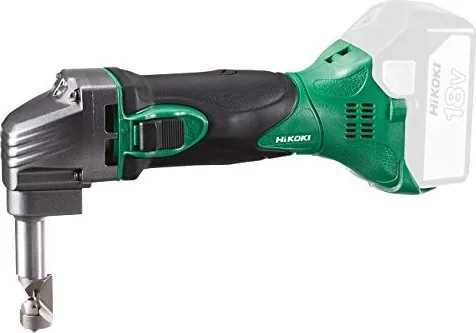
The Hikoki CN18DSLW4Z Cordless Nibbler solo is an 18 V metal-cutting tool designed for clean, controlled cuts without a trailing power cable. It is suited to trade professionals and capable DIY users working with sheet metal, including mild steel, stainless steel, copper, aluminium, corrugated sheets, and trapezoidal profiles. Its cordless format supports easier movement around roofs, workshops, fabrication areas, and installation sites.
Built for precise sheet-metal work
This nibbler uses a punch-and-die cutting system to create a 5 mm cutting groove. With a no-load stroke rate of 2,500 strokes per minute, it is made for steady progress through compatible metal stock while retaining control around curves and detailed cut-outs. The minimum cutting radius is 40 mm, helping users follow curved lines or create pocket cuts where a straight-cutting tool may be less practical.
The stated cutting capacities cover mild steel up to 1.6 mm, stainless steel up to 1.2 mm, and aluminium up to 2.3 mm. These figures make the tool a practical option for common cladding, ducting, roofing, fabrication, and repair tasks. For best results, match the material thickness to the rated capacity and avoid forcing the tool through oversized material.
Cordless convenience with essential care
At approximately 1.8 to 2.1 kg depending on the battery fitted, the CN18DSL is designed to remain manageable during repeated cutting work. It operates with designated Hikoki 18 V lithium-ion batteries. Battery protection can stop the motor when charge is low, the tool is overloaded, or the battery becomes too hot. Allowing the battery to cool, removing the overload, or recharging as needed helps restore normal operation.
Regular maintenance is important for consistent cutting quality. The punch and die should be kept lubricated and inspected for wear, damage, or loose mounting screws. Cutting oil along the intended line can reduce wear on these components. For normal use, punch-and-die life varies by material: mild steel can reach about 300 m, while corrugated or trapezoidal mild steel can cause substantially faster wear.
Safety notes
Always wear eye protection and use hearing protection where required. Freshly cut sheet edges and metal shavings can be sharp and hot, so avoid handling them with bare hands. Keep the work area clear of swarf, ensure the switch is off before fitting a battery, and maintain a secure grip on clean, dry handles. Store the tool and battery away from children, moisture, heat, and conductive debris.
Note: This solo configuration is intended for users who already have compatible Hikoki 18 V batteries and charging equipment. Check the supplied contents with the retailer before purchase.
Search for 67,732 Manuals online


Type-in Brand or Model