

Heusinkveld Sim Pedals Ultimate+ Manual
PDF manual · 28 Pages
English



Quick check
Incorrect answer, please try again.
Chat with your Heusinkveld Sim Pedals Ultimate+ manual using AI
Get instant AI answers from your Heusinkveld Sim Pedals Ultimate+ manual
Ask anything about the Heusinkveld Sim Pedals Ultimate+. Answers come from this manual, with the pages they are based on.
Ask a Question
Do you recommend Sim Pedals Ultimate+?
Yes NoFrequently Asked Questions
Mount the base to a rigid platform using M6 bolts. Solutions include aluminium beams or double MDF floorboards. Ensure the base is rigid to handle 140kg loads on the brake pedal.
Is this answer helpful?
Yes, but with specific settings. You must calibrate all axis to an output of 4095. Set the Brake Force Factor to 0 in iRacing to ensure SmartControl settings work correctly without conflict.
Is this answer helpful?
It allows setting non-linear pedal output curves and deadzones. You can adjust brake pedal force up to 140kg. Profiles can be saved and loaded instantly for different software.
Is this answer helpful?
You change the elastomer combinations in the rubber stack. There are 9 settings using hard and soft rubbers. Adjust the preload nut and ensure proper assembly for desired feel.
Is this answer helpful?
You need a 5mm hex key, 2.5mm torx key, 7mm wrench, and 10mm wrench. These are included in the package to adjust angles, travel, springs and rubber stacks.
Is this answer helpful?
Yes, pivot points may need preventive lubrication. Use PTFE Dry Spray every 100 hours. Check the manual for specific bearing locations on throttle and clutch pedals.
Is this answer helpful?
Yes, mount the product rigidly so it does not move. Wear shoes for safety. Use only in simulators, not on public roads. Follow recycling guidelines if disposing.
Is this answer helpful?
Advantages and Disadvantages
Advantages

- High max brake force of 140kg offers realistic resistance.
- SmartControl software offers deep customization of curves.
- Mechanical adjustments allow personalized pedal angles and travel.
- Pre-calibrated for immediate plug and play functionality.
- Durable design minimizes wear and tear over time.
Disadvantages

- Requires very rigid mounting base for stability.
- iRacing requires specific one-time in-game calibration steps.
- Rubber stack adjustments can be complex for beginners.
- Maintenance requires specific tools and PTFE lubricant.
- Maximum brake force can be too high for some users.
Product Specification
Type
Pedals
Compatibility
PC
Material
Steel
Mounting
Screw-on
Connection
Wired, USB
Power Supply
USB
Product Description
Heusinkveld Ultimate Pedals Review
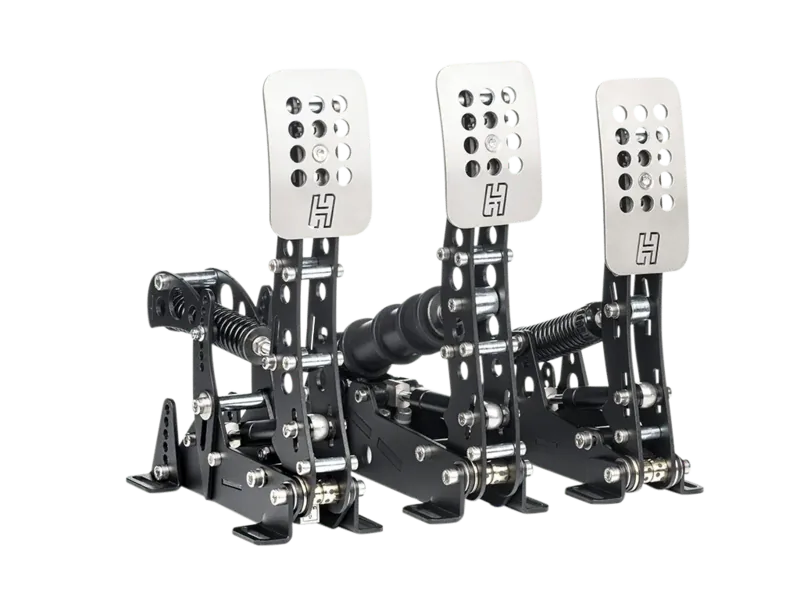
The Heusinkveld Ultimate+ Pedals represent a pinnacle in racing simulator hardware. This top-of-the-line product is designed for enthusiasts seeking authentic feedback. The manual guides users through a thorough setup process. You begin by mounting the base to a rigid platform like aluminium beams. Stability is crucial because the brake pedal can endure loads up to 140 kilograms without flexing. Proper mounting ensures the frame remains solid during heavy braking maneuvers. You must install the pedals on a very rigid base.
Once mounted, connecting the electronics is straightforward. The controller unit manages pre-calibrated pedals via RJ-plugs. This system ensures immediate plug and play functionality. You will find that assigning pedals in software is the final setup step. Users familiar with iRacing should note a specific calibration requirement. The software communicates with the controller to ensure accurate signal values. This integration ensures that your settings in SmartControl function correctly in any simulator software. You do not need to perform complex recalibration every time you switch titles. This makes the transition between games seamless and hassle-free.
Customization is where these pedals truly shine. The SmartControl software allows users to adjust non-linear pedal output curves. You can set specific deadzones for the throttle and clutch pedals. This helps prevent accidental slips or unwanted movements during intense racing sessions. The brake pedal feature is particularly impressive. It uses a two-stage system with coil springs and rubber stacks. You can manually adjust the resistance by altering the elastomer combinations. There are multiple options for hard and soft rubbers to match your preference. This flexibility ensures the force feels right regardless of the car you drive. You can save these settings into profiles for each specific racing series.
Mechanical adjustments offer further ergonomic tweaks. Pedal angles can be adjusted between negative ten degrees and positive five degrees. Pedal plate heights also have three positions to fit different shoe sizes. Throttle travel and spring preload are adjustable for individual driving styles. You can change the clutch force curve shape using a swing arm mechanism. Maintenance is minimal thanks to selflubricating bearings. You should apply PTFE Dry Spray every 100 hours of use to ensure longevity. This keeps the pivot points silent and smooth over time.
This manual emphasizes safety and reliability. It is for simulator use only and not for public roads. Proper recycling guidelines are provided for disposal. The product support team offers email assistance for any complex issues. The package includes specific tools needed for all mechanical changes. Overall, the Heusinkveld Ultimate+ Pedals offer exceptional build quality and control. They provide the necessary realism for competitive racing simulation. Whether you are a casual user or professional, this setup delivers performance. The durability ensures it will last for many years of serious use. It remains a top choice for those wanting the best simulation experience available today.
Search for 67,706 Manuals online


Type-in Brand or Model