


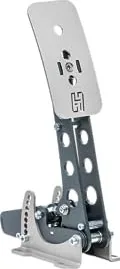
Heusinkveld Sim Pedals Sprint Manual
PDF manual · 28 Pages
English



Quick check
Incorrect answer, please try again.
Chat with your Heusinkveld Sim Pedals Sprint manual using AI
Get instant AI answers from your Heusinkveld Sim Pedals Sprint manual
Ask anything about the Heusinkveld Sim Pedals Sprint. Answers come from this manual, with the pages they are based on.
Ask a Question
Do you recommend Sim Pedals Sprint?
Yes NoFrequently Asked Questions
SmartControl is Heusinkveld’s configuration software that lets you set non-linear pedal curves, deadzones, and brake force, and save unlimited profiles. It applies settings at the controller level so most simulators use the adjusted outputs without further in-game calibration.
Is this answer helpful?
Yes. Pedals are pre-calibrated (approx. 30 kg brake) and are plug-and-play for most simulators. iRacing requires a one-time in-game calibration to RAW=4095 per axis and set Brake Force Factor to 0 for correct SmartControl integration.
Is this answer helpful?
Brake stiffness is adjusted by swapping elastomers, discs, and spacers in the rubber stack and altering knurled preload. Travel and force characteristics are tuned via spring preload, coil preload, and mechanical endstop positions. Recalibrate in SmartControl after mechanical changes.
Is this answer helpful?
Minimal maintenance: lubricate recommended pivot points of throttle and clutch with PTFE dry spray about every 100 hours, and lubricate the brake bearing only if noise appears. Inspect spring lengths and preload settings after adjustments and break-in.
Is this answer helpful?
Yes. SmartControl saves profiles as XML relative to personal calibration, allowing you to exchange profiles with other Sprint owners and apply them without re-calibrating.
Is this answer helpful?
Mount the pedals to a very rigid base—aluminium profiles, thick metal plates, or the optional Heusinkveld baseplate—using the supplied M5 hardware to ensure consistent feel and prevent movement during use.
Is this answer helpful?
The Sprint Pedals have a 65 kg maximum brake force; this suits many cars but may not exactly replicate very high-force race hydraulics. Use rubber stack and preload tuning plus SmartControl mapping to best approximate heavier brake systems.
Is this answer helpful?
Advantages and Disadvantages
Advantages

- Extensive hardware and software adjustability for realistic, tailored pedal feel.
- Force-based brake with up to 65 kg brake setting and multi-elastomer stack options.
- SmartControl supports non-linear mapping, deadzones, unlimited profiles, and direct pedal flashing.
- Robust build with included mounting hardware and comprehensive accessory kit.
- Pre-calibrated plug-and-play for most simulators; profiles transferable between users.
Disadvantages

- Maximum brake force (65 kg) may be insufficient to perfectly match top-level race car hydraulics.
- Complex setup and tuning curve options have a learning curve for new users.
- Requires a very rigid mounting base; suboptimal mounting can affect feel and safety.
- Some adjustments require tools and careful measurement to avoid damaging springs or over-preloading.
- iRacing requires a specific one-time calibration step and brake force factor set to 0.
Product Specification
Type
Pedals
Compatibility
PC
Material
Steel
Mounting
screwable
Connection
wired, USB
Power supply
USB
Product Description
Heusinkveld Sprint Pedals Manual — Heusinkveld Sprint Pedals Manual
The Heusinkveld Sprint Pedals are a high-end sim-racing pedal set engineered for realism, durability, and customization. Built around a force-based brake with integrated controller and modular throttle and clutch connections, the Sprint Pedals offer a wide range of mechanical and software adjustments to match driver preference and different car types. The set ships with multiple elastomers, spacers, bolts, hex keys and a USB cable, and connects to your PC for plug-and-play use with most simulators.
Key product features
The Sprint Pedals combine SmartControl software and detailed mechanical tuning. SmartControl enables non-linear pedal mapping, deadzone settings, per-pedal calibration, and brake force adjustment up to 65 kg. Mechanically, the pedals allow angle adjustment across eight positions, pedal plate height rotation, throttle travel settings, force-curve adjustments, spring preload changes, and a configurable rubber stack for brake stiffness. These options let you emulate everything from stiff, high-downforce formula pedals to softer road-car feel.
Usage and setup
Mounting requires a rigid base and standard M5 hardware (included). The brake houses the controller and accepts RJ9 connections for throttle and clutch; a USB cable plugs directly to your PC. Pedals are pre-calibrated for approximately 30 kg brake force and work immediately in most sims; iRacing requires a one-time in-game calibration to 4095 and brake force factor set to 0. SmartControl stores unlimited profiles as XML files tied to your calibration, allowing quick swaps between setups.
Customization and tuning
SmartControl’s five-zone mapping and preset curves let you tailor throttle, clutch, and brake response—useful for wet conditions, low-power cars, clutch bite-point tuning, or compensating for early wheel lock. The brake uses a two-stage system (coil spring for pad gap and elastomers for main loading) and offers six resistance configurations by changing elastomer size/hardness and stack length. Recommended setups are provided as starting points for F1, GT, road cars, and rally styles.
Maintenance and safety
Routine maintenance is minimal: periodic PTFE dry-spray lubrication on specified pivot points and occasional brake bearing lubrication if noise appears. Check spring length and preload limits after adjustments to avoid part damage. Mount pedals rigidly and follow basic safety guidance—use in simulators only, not on real vehicles.
Notes
- Includes multiple rubbers and spacers for tailored brake softness/stiffness.
- SmartControl applies settings system-wide; change profiles during sessions if your simulator allows.
- Heusinkveld offers tutorial videos and continued spare-part support; contact [email protected] for help.
Search for 67,706 Manuals online


Type-in Brand or Model