assembled by a qualified electrician. The accident
prevention recommendations applicable in the
country must be followed.
How to dispose of this product (electrical and
electronic equipment waste). (Applicable in
European Union countries and other European
countries with selective waste collection systems).
This symbol on the product or its documentation
indicates that it must not be disposed of with other
household waste at the end of its life cycle. As disposing
of waste inappropriately may harm the environment or
human health, please separate it from other types of
waste and recycle it responsibly. In this way you will
contribute to the sustainable re-use of material resources.
Individuals should contact the retailer who sold them the
product or contact their local council to nd out where
and how they can dispose of this product for recycling in
an environmentally friendly manner. Companies should
contact their suppliers and read the terms of their sales
contract. This product must not be disposed of with the
other commercial waste.
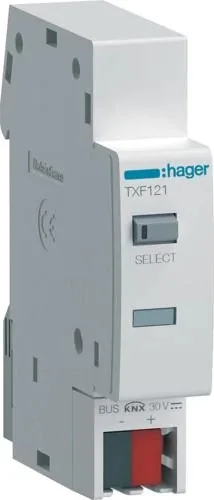
Presentation of the device
1 Localisation push-buttons
(Easy) + Status LED
2 IR Interface (on the side)
3 Illuminated physical
addressing push-button
4 KNX bus connection
terminals (-, +)
30V
-
+
SELECT
TXF121
Function
System information
This device is a product of KNX system and
complies with KNX guidelines. Detailed, specialised
knowledge obtained through specific KNX training
courses is required for full understanding of the
system. The device is programmed, installed and
started up with certified KNX software.
ETS startup
The functions of this device are software- and
configuration-dependent. The application software
is available in the product database. The product
database, technical descriptions and conversion
programmes as well a other up-to-date assistance
software are available on our website.
Easy startup
The functions of this device are software- and
configuration-dependent. It can also be configured
a tool specifically developed for easy set-up and
start-up.
This configuration method is only possible with
devices which are compatible with the Easy system.
The Easy configuration method allows for simple
set-up through a graphic interface. Preconfigured
standard functions are assigned to the inputs by
means of the TXA100 configuration tool.
Functional description
The KNX interface for TXF121 energy meters allows
remote reading of data and values from single-
phase and three-phase hager energy meters.
Through the infrared connection, the interface
receives data from a hager energy meter and
transmits it via the KNX installation bus. The KNX
installation bus directly powers the interface.
Typical scenario
• Communication module via the KNX bus
connection and connectable with energy meters
through infrared.
Product features
• Compatible with the new range of meters
integrating an infrared communication port:
- single-phase (except references ECM140D and
ECR140D)
- 3 x single-phase
- three-phase
• Bus connection with the KNX connection
terminals.
• The interface can manage up to two tariffs from
the meter. In the event a three-phase meter uses
another tariff, the interface gives an estimated
value of the energy consumed on each tariff for
each phase.
• The partial energy information of the interface (not
the meter) can be reset via the bus.
Signification of the status LED
Once the product is set up and configured via Easy
or ETS method, the status LED indicates:
LEDLED/Operation status
Off
OFF: LED deactivated/product off
Green
ON: LED activated/product on
energy metering:
1 x pulse/Wh
meter tariff 1
Red
meter tariff 2
White
meter tariff 3 to 8
Orange
energy meter incompatible with
the configuration
loss of communication
with energy meter
Orange
and red
incorrect phase sequence
(only three-phase)
Red
wrong application downloaded
Illuminated physical addressing button 3.
Press the illuminated button 3 to physically address
the product or check the presence of the bus
(LED lit = bus presence and product physically
addressed).
ETS startup
Loading the physical and application software
address:
• switch on the bus voltage,
• press the programming key,
• load the physical address in the device,
• download the application software to the device,
• note the physical address on the device label,
• stick the label to the device.
Easy startup
Refer to the detailed description of the easy
link service module for more information on the
configuration of the installation. The product must
be installed next to a powered meter to be detected
and recognized.
Technical features
Configuration method: S mode & Hager Easy link
controller
KNX communication media: TP1.
Power supply
KNX power supply voltage: 20 to 30 V SELV
Typical consumption on the KNX bus: 4 mA
Ambient conditions
Operating temperature: -10 °C to +55 °C
Storage temperature: -20 °C to +70 °C
Relative humidity: 95% at 25 °C
Pollution level: 2
Insulation class: 3 (SELV product)
Overvoltage category: 3
Protection rating (box): IP 20
Protection rating (box under faceplate): IP30
Impact resistance: IK04
Surge voltage: 4 kV
Max. altitude: < 2000 m
Box
Size: 18 mm / 1 module
Installation method: DIN rail according to EN 60715
easysystemeasysystem
a Consignes de sécurité
L’installation et le montage d’appareils électriques
doivent être effectués uniquement par un
électricien qualifié. Les prescriptions de prévention
contre les accidents en vigueur dans le pays
doivent être respectées.
Comment éliminer ce produit (déchets
d’équipements électriques et électroniques).
(Applicable dans les pays de l’Union Européenne et
aux autres pays européens disposant de systèmes
de collecte sélective). Ce symbole sur le produit ou sa
documentation indique qu’il ne doit pas être éliminé en n
de vie avec les autres déchets ménagers. L’élimination
incontrôlée des déchets pouvant porter préjudice à
l’environnement ou à la santé humaine, veuillez le séparer
des autres types de déchets et le recycler de façon
responsable. Vous favoriserez ainsi la réutilisation durable
des ressources matérielles. Les particuliers sont invités à
contacter le distributeur leur ayant vendu le produit ou à se
renseigner auprès de leur mairie pour savoir où et comment
ils peuvent se débarrasser de ce produit an qu’il soit
recyclé en respectant l’environnement. Les entreprises sont
invitées à contacter leurs fournisseurs et à consulter les
conditions de leur contrat de vente. Ce produit ne doit pas
être éliminé avec les autres déchets commerciaux.
Présentation de l’appareil
1 Boutons poussoirs de
localisation (Easy) + LED
d’état
2 Interface IR (sur le côté)
3 Bouton poussoir lumineux
d’adressage physique
4 Bornes de raccordement
du bus KNX (–, +)
30V
-
+
SELECT
Fonction
Informations système
Cet appareil est un produit du système KNX et est
conforme au standard KNX. Des connaissances
spécialisées détaillées dispensées par le biais
de formations KNX sont nécessaires pour la
compréhension du système. La programmation,
l’installation et la mise en service de l’appareil
s’effectuent à l’aide d’un logiciel certifié KNX.
Mise en service ETS
Les fonctions de cet appareil dépendent de
la configuration et du paramétrage. Le logiciel
d’application est disponible dans la base de
données produits. La base de données produit,
les descriptions techniques, les programmes de
conversion ainsi que d’autres logiciels d’assistance
à jour sont disponibles sur notre site Internet.
Mise en service Easy
Les fonctions de cet appareil dépendent de la
configuration et du paramétrage. La configuration
peut être réalisée par un outil de configuration
dédié qui permet un paramétrage et une mise en
oeuvre simplifiés.
Cette méthode de configuration ne peut être
utilisée qu’avec des produits compatibles Easy.
La méthode de configuration Easy permet, au
travers d’une interface graphique, une mise en
œuvre simplifiée. Ainsi, des fonctions de bases
préconfigurées sont affectées aux entrées via l’outil
de configuration TXA100.
Description fonctionnelle
L’interface KNX pour compteur d’énergie TXF121
permet la lecture à distance des données et des
valeurs des compteurs d’énergie hager de type
monophasé et triphasé. Grâce à la connexion
infrarouge, l’interface reçoit les données provenant
d’un compteur d’énergie hager et les transmet via le
bus d’installation KNX. L’alimentation électrique de
l’interface provient directement du bus d’installation
KNX.
Cas d’usage typique
• Module de communication via la connexion du
bus KNX et connectable par infrarouge avec les
compteurs d’énergie.
Caractéristiques du produit
• Compatible avec la nouvelle gamme de compteur
intégrant un port de communication infrarouge :
- de type monophasé (excepté les références
ECM140D et ECR140D),
- de type 3 x monophasé,
- de type triphasé.
• Raccordement du bus avec les bornes de
raccordement KNX.
• L’interface peut gérer jusqu’à 2 tarifs provenant du
compteur. Dans le cas où un compteur triphasé
utilise un autre tarif, alors l’interface donne une
valeur estimée de l’énergie consommée sur
chacun des tarifs pour chacune des phases.
• L’information d’énergie partielle de l’interface (pas
celle du compteur) est réinitialisable via le bus.
Signification de la LED d’état
Après la configuration et le paramétrage du produit
via le mode Easy ou ETS, la LED d’état indique :
LEDÉtat LED / Fonctionnement
Eteint
OFF : LED désactivée / produit
non alimenté
Vert
ON : LED activée / produit
alimenté
comptage de l’énergie :
1 x impulsion / Wh
tarif 1 du compteur
Rouge
tarif 2 du compteur
Blanc
tarif 3 à 8 du compteur
Orange
compteur d’énergie incompatible
avec la configuration
perte de communication
avec le compteur d’énergie
Orange
et rouge
ordre des phases incorrect
(uniquement triphasé)
Rouge
mauvais applicatif téléchargé
Bouton poussoir lumineux d’adressage
physique 3.
Appuyez sur le bouton poussoir lumineux 3 pour
réaliser l’adressage physique du produit ou vérifier
la présence du bus (voyant allumé = présence bus
et produit en adressage physique).
Mise en service ETS
Chargement de l’adresse physique et du logiciel
d’application :
• mettre sous tension l’alimentation bus,
• appuyer sur la touche de programmation,
• charger l’adresse physique dans l’appareil,
• télécharger le logiciel d’application dans l’appareil,
• noter l’adresse physique sur l’étiquette de
l’appareil,
• coller l’étiquette sur l’appareil.
Mise en service Easy
Référez-vous à la description détaillée du module
de service easy link pour obtenir des informations
sur la configuration de l’installation. Le produit doit
être installé à côté d’un compteur alimenté afin
d’être détecté et reconnu.
Caractéristiques techniques
Mode de configuration : S mode & Hager Easy link
controller
Média de communication KNX : TP1.
Alimentation
Tension d’alimentation KNX : 20 à 30 V TBTS
Consommation typique sur le bus KNX : 4 mA
Conditions ambiantes
Température de fonctionnement : -10 °C à +55 °C
Température de stockage : -20 °C à +70 °C
Humidité relative : 95 % à 25 °C
Degré de pollution : 2
classe d’isolation : 3 (produit TBTS)
Catégorie de surtension : 3
Indice de protection (boîtier) : IP 20
Indice de protection (boîtier sous plastron) : IP30
Résistance aux chocs : IK04
Tension de choc : 4 kV
Altitude max : < 2000 m
Boîtier
Encombrement : 18 mm / 1 module
Mode d’installation : rail DIN selon EN 60715
6LE007115B6LE007115B
6LE007115B
/2
%
Quick check
I'm not a robot
Incorrect answer, please try again.
Chat with your Hager TXF121 manual using AI
Get instant AI answers from your Hager TXF121 manual
Ask anything about the Hager TXF121. Answers come from this manual, with the pages they are based on.
Ask a Question
0/1000
Do you recommend TXF121?
YesNo
Frequently Asked
Questions
A
The TXF121 interface is compatible with new ranges of Hager meters featuring an infrared port. This includes single-phase units (excluding ECM140D and ECR140D), three times single-phase meters, and three-phase meters.
Is this answer helpful?
A
Data is received through a dedicated infrared interface located on the side of the device. The gateway reads values from the Hager meter and transmits them over the KNX installation bus for remote monitoring.
Is this answer helpful?
A
Yes, if you have devices compatible with the Easy system, you can use the TXA100 configuration tool. This method uses a graphic interface for simplified setup and preconfigured standard functions.
Is this answer helpful?
A
A solid red light indicates that the wrong application software has been downloaded to the device. An orange and red combination signals an incorrect phase sequence, which applies only to three-phase installations.
Is this answer helpful?
A
Yes, electrical devices must only be installed and assembled by a qualified electrician. You must also follow all local accident prevention recommendations applicable in your country during the installation process.
Is this answer helpful?
A
The interface is powered directly by the KNX installation bus. It operates on a voltage range of 20 to 30 V SELV and typically consumes 4 mA from the bus.
Is this answer helpful?
M: QW-35-FL
Advantagesand
Disadvantages
Advantages
Enables remote reading of single and three-phase Hager energy meters via infrared
Powered directly by the KNX bus, reducing wiring complexity
Supports dual tariff management with estimated values for additional phases
Offers flexible configuration using either ETS software or the user-friendly Easy tool
Clear multi-color LED status indicators simplify troubleshooting and commissioning
VS
Disadvantages
Requires certified KNX training for full system understanding and programming
Incompatible with specific older meter models like ECM140D and ECR140D
Physical address must be manually noted and labeled after configuration
Partial energy reset applies only to the interface, not the actual meter
Installation requires proximity to a powered meter for detection and recognition
M: QW-35-FL
Product
Specification
Type
Hardware Control Unit
Standard
KNX
Function
Gateway
Topology
Bus
M: QW-35-FL
Product
Description
Revolutionize Energy Monitoring with the Hager KNX Interface
The Hager KNX Schnittstelle für elektrische Energiezähler 2TE REG Gateway, specifically the TXF121 model, represents a significant leap forward in smart building automation. This device serves as a critical bridge between traditional energy meters and modern KNX installation buses, enabling seamless remote data reading and control. Designed for both single-phase and three-phase electrical systems, it allows facility managers to monitor consumption patterns in real-time without manual intervention.
At the heart of its functionality lies an infrared interface that communicates directly with compatible Hager energy meters. Once the meter transmits data via IR, the gateway converts this information into KNX bus protocols, making it accessible to any system controller or monitoring software within the network. The device draws its power directly from the KNX bus, eliminating the need for separate power supplies and simplifying installation. It supports up to two tariffs from the meter, providing detailed insights into energy usage across different time periods or pricing structures.
Installation is streamlined through two distinct configuration methods: ETS startup for professional integrators requiring deep customization, and Easy startup for those preferring a graphical interface. The physical addressing button allows for quick verification of bus presence and product identification. A multi-color LED status indicator provides immediate visual feedback on operation, communication status, and tariff activity, ensuring that technicians can quickly diagnose issues on-site. Whether managing a small commercial space or a large industrial complex, this gateway ensures accurate, reliable energy data flows efficiently through your building management system.