
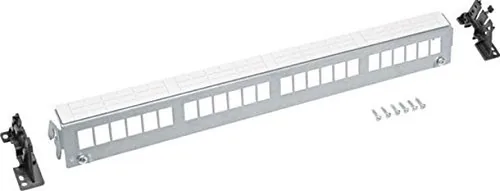
Hager FZ24MK Manual
PDF manual · 4 Pages
English



Quick check
Incorrect answer, please try again.
Chat with your Hager FZ24MK manual using AI
Get instant AI answers from your Hager FZ24MK manual
Ask anything about the Hager FZ24MK. Answers come from this manual, with the pages they are based on.
Ask a Question
Do you recommend FZ24MK?
Yes NoFrequently Asked Questions
It serves as a patch panel for organizing RJ-45 keystone modules in network racks.
Is this answer helpful?
The panel provides 24 ports for connecting network cables.
Is this answer helpful?
Yes, it is designed for 19-inch equipment racks.
Is this answer helpful?
It occupies 1HE (1 High Unit) of rack space.
Is this answer helpful?
No, modules must be purchased separately.
Is this answer helpful?
Apply a maximum of 2 Nm when securing the panel.
Is this answer helpful?
Yes, the instruction manual covers numerous European languages.
Is this answer helpful?
Advantages and Disadvantages
Advantages

- Compact 1HE design saves valuable rack space
- Supports 24 RJ-45 ports for high-density connections
- Durable black finish resists wear and tear
- Easy integration with standard 19-inch racks
Disadvantages

- Requires separate purchase of keystone modules
- Torque specifications must be strictly followed
- No built-in cable management arms included
- Limited color options available
Product Specification
Type
Patch panel
Features
rack-mountable
Product Description
Enhance Your Network Infrastructure with the Hager FZ24MK Patch Panel
The Hager FZ24MK Patch Panel for RJ-45 Keystone Module is a robust solution designed for modern network installations. This 19-inch, 24-port panel fits perfectly into standard equipment racks and occupies just 1HE of space, making it an ideal choice for data centers, server rooms, and structured cabling systems where space efficiency is critical. The sleek black finish not only looks professional but also helps in hiding dust and minor scuffs common in busy technical environments.
Designed specifically to hold RJ-45 keystone modules, this patch panel ensures organized cable management and reliable connectivity. The mounting instructions provided with the unit guide installers through a straightforward process, ensuring secure attachment to rack rails. With a maximum torque specification of 2 Nm for final assembly, users can achieve a sturdy connection without risking damage to the components. The panel supports high-density deployments, allowing technicians to manage dozens of connections in a compact footprint while maintaining easy access for troubleshooting and reconfiguration.
Key Features and Benefits
Installing the Hager FZ24MK simplifies the complexity of network wiring. Its modular design allows for flexibility, enabling users to customize port configurations as needs evolve. The build quality reflects Hager's commitment to durability, ensuring long-term performance even under demanding conditions. Proper cable routing reduces signal interference and improves airflow within the rack, contributing to overall system stability.
Installation Notes
Always verify rack compatibility before installation. Use appropriate tools to apply the correct torque during screw tightening to prevent stripping or loosening over time. Ensure that all cables are labeled clearly at both ends to streamline future maintenance tasks.
Pros and Cons
Pros
- Compact 1HE design saves valuable rack space
- Supports 24 RJ-45 ports for high-density connections
- Durable black finish resists wear and tear
- Easy integration with standard 19-inch racks
Cons
- Requires separate purchase of keystone modules
- Torque specifications must be strictly followed
- No built-in cable management arms included
- Limited color options available
Frequently Asked Questions
What is the primary use of the Hager FZ24MK? It serves as a patch panel for organizing RJ-45 keystone modules in network racks.
How many ports does this panel support? The panel provides 24 ports for connecting network cables.
Does it fit standard racks? Yes, it is designed for 19-inch equipment racks.
What is the height of the unit? It occupies 1HE (1 High Unit) of rack space.
Are keystone modules included? No, modules must be purchased separately.
What torque should I use for mounting? Apply a maximum of 2 Nm when securing the panel.
Is the manual available in multiple languages? Yes, the instruction manual covers numerous European languages.
Search for 67,706 Manuals online


Type-in Brand or Model