
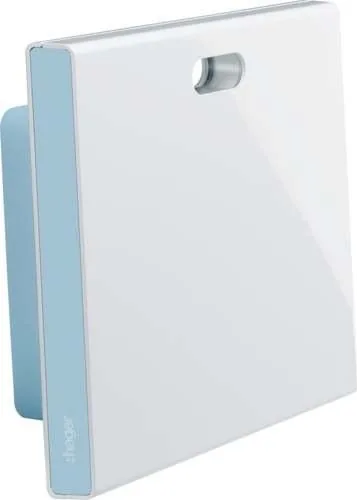

Hager coviva Smartbox TKP100A Manual
PDF manual · 6 Pages
English



Quick check
Incorrect answer, please try again.
Chat with your Hager coviva Smartbox TKP100A manual using AI
Get instant AI answers from your Hager coviva Smartbox TKP100A manual
Ask anything about the Hager coviva Smartbox TKP100A. Answers come from this manual, with the pages they are based on.
Ask a Question
Do you recommend coviva Smartbox TKP100A?
Yes NoFrequently Asked Questions
A central hub for intelligent building automation that connects via Ethernet or optional WLAN.
Is this answer helpful?
Connect to a router using a Cat 5e LAN cable and register via the myHager portal.
Is this answer helpful?
No, the USB port is reserved strictly for connecting Hager devices only.
Is this answer helpful?
The product comes with a two-year warranty valid across Europe and Switzerland.
Is this answer helpful?
Professional installation by a qualified electrician is required for electrical safety.
Is this answer helpful?
Scan the QR code on the rear or type the coviva ID into the app.
Is this answer helpful?
It operates at 5 volts using the included 230 V to 5 V power adapter.
Is this answer helpful?
Advantages and Disadvantages
Advantages

- Easy setup via mobile app for iOS and Android devices
- Secure myHager account login integration for data safety
- Long-range signal transmission exceeding 300 meters in open fields
- Compatible with Europe and Switzerland regions for international use
Disadvantages

- USB port not suitable for general device charging purposes
- Qualified electrician required for safe installation procedures
- Optional WLAN stick needed for wireless network connectivity
- Limited to 5 volt power supply requiring specific adapter
Product Specification
Type
Control Unit Hardware
Standard
KNX, LAN
Function
Gateway
Dimensions
7.03x6.14x1.91in
Features
IK04, IP30, controllable via App
Product Description
Revolutionize Your Building Control with Hager coviva Smartbox Gateway
Managing modern electrical systems requires precise control and seamless connectivity throughout the property. The Hager coviva Smartbox Gateway stands out as a central hub for intelligent building automation solutions. By integrating this device into your network infrastructure, users gain comprehensive oversight over their installations without needing complex wired setups everywhere. This gateway simplifies the configuration process through a dedicated mobile application available for both iOS and Android devices. It acts as the brain connecting your physical wiring to your digital interface efficiently.
Seamless Connectivity and Setup
Installation begins with connecting the gateway to a router via an Ethernet LAN cable which supports minimum Cat. 5e standards for stability. Once powered on, the unique ID located on the rear of the unit allows for quick registration using the myHager portal system securely. This process ensures every device is uniquely identified and secured within your home network environment. Optional wireless capabilities are significantly enhanced by the addition of the dedicated WLAN stick accessory found in the catalog. This flexibility means you can adapt the system to fit existing network constraints effortlessly without dragging cables across walls unnecessarily.
Technical Advantages and Performance
Operating at a safe voltage of five volts, the device consumes minimal power while maintaining robust performance levels consistently. The communication range exceeds three hundred meters in open fields, guaranteeing reliable signal transmission throughout large properties or estates easily. Safety is strictly prioritized in design; installation must be performed by qualified electricians following local standards and regulations always. The device features an RGB LED display and status indicators to visualize connectivity and power states instantly for troubleshooting needs. The radio transmission operates in specific frequency bands to avoid interference issues common in crowded urban areas.
User Experience and Versatility
The accompanying application allows users to manage devices, groups, and automated covigrams directly from their smartphones securely. Login credentials rely on your myHager account, adding an extra layer of security against unauthorized access attempts. For maintenance, physical buttons on the unit allow for resetting the system or acknowledging alerts directly on the hardware physically. The scope of delivery includes a protective cover, mounting plate, and power adapter for easy wall installation in various environments. Whether for residential upgrades or commercial automation projects, the Hager coviva Smartbox Gateway Manual provides clear guidance through every step of the integration process.
Important Considerations for Installation
Ensure your network infrastructure uses at least CAT 5e shielding for optimal data transfer rates during operation. Do not use the USB port for charging other gadgets as it is reserved strictly for Hager devices internally. The system is fully compatible across all European countries and Switzerland for international travelers or businesses. A two-year warranty covers defects ensuring long term reliability for your investment. This gateway ensures your building remains smart and connected for years to come safely.
Search for 67,706 Manuals online


Type-in Brand or Model