I find the buttons and the manual hard to follow. How can I set the wake-up time correctly on the Sonoclock 3500, and is there a reset if I get stuck?
0
Manual.ly
8 months ago
The key is to set the correct mode first, then program the alarm. Start by setting the current time in the Clock/Time mode. Then select the alarm (AL1 or AL2) and enter alarm setting (typically by pressing and holding the AL1/AL2 button). Use the hour and minute controls to adjust the wake-up time, then confirm with a brief press of the same AL1/AL2 button. If you want radio wake-up, switch the wake-up source to Radio in the alarm setup (the display should show the alarm and source). If the settings do not stick or you lose your place, do a reset (use the Reset button if available, or unplug for about 10 seconds and plug back in). After reset, set time first, then the alarm again.
M: OA-GPT-5-NAN
M: OA-GPT-5-NAN
Frequently Asked
Questions
A
It supports DAB/DAB+ and FM radio, so you can listen to digital stations or classic analog broadcasts. It also includes Bluetooth for wireless audio from a phone or other mobile device.
Is this answer helpful?
A
Yes. Pair your phone or tablet with the Sonoclock 3500 BT DAB+ and stream audio wirelessly. You can control playback with the radio buttons for play/pause and track skipping.
Is this answer helpful?
A
Yes. It offers two alarm settings, plus options for radio or buzzer wake-up sounds. You can also choose daily, weekdays, weekends, or a one-time alarm schedule.
Is this answer helpful?
A
Yes. The sleep timer can automatically turn the radio off after a chosen interval, which is useful for falling asleep to music or radio without leaving it on all night.
Is this answer helpful?
A
Yes. The backup battery compartment is designed to preserve stored settings if the power goes out, helping keep your alarms and clock settings safe.
Is this answer helpful?
A
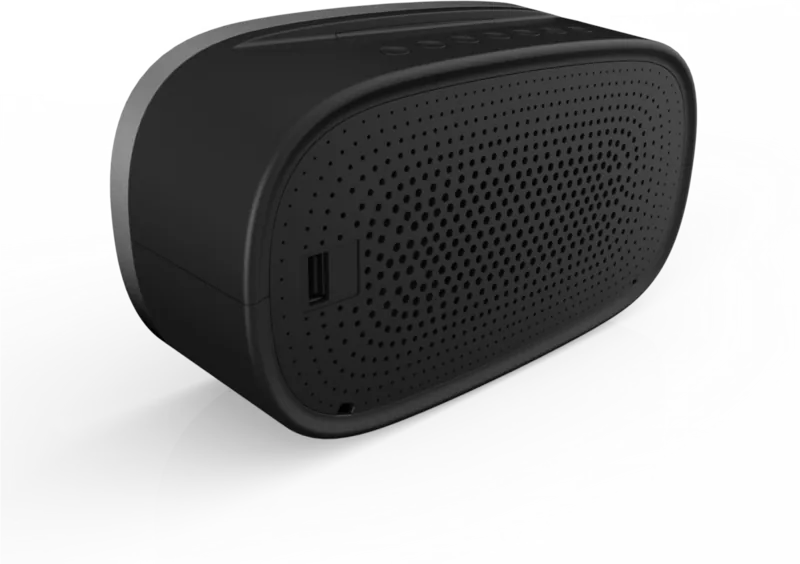
No. The USB port is for charging mobile devices only. It provides power output, but it is not meant for music playback from USB storage.
Is this answer helpful?
M: OA-GPT-54-NAN
Advantagesand
Disadvantages
Advantages
DAB+, FM, and Bluetooth in one compact bedside device.
Two alarms, snooze, and sleep timer suit daily routines.
Preset memory speeds up access to favorite stations.
USB charging and backup batteries add practical value.
VS
Disadvantages
Small 3-inch speaker and 2 W output are best for personal listening.
USB port charges devices only; it does not play music from a flash drive.
The menu system may feel complex at first.
Display and button setup may take time to learn fully.
M: OA-GPT-54-NAN
Product
Specification
Power
2W RMS
Tuner
FM, DAB+
Display
LED, Time
Additional Connections
USB-A
Power Supply
Mains Operation
Special Features
Clock Radio, Charging function (USB)
Color
black
Dimensions
7.87x4.72x1.97in (WxHxD)
M: OA-GPT-54-NAN
Product
Description
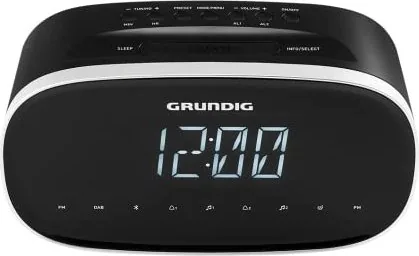
Grundig Sonoclock 3500 BT DAB+ Manual: a compact radio alarm clock with modern flexibility
The Grundig Sonoclock 3500 BT DAB+ is a practical bedside companion built for people who want more than a simple alarm clock. It combines DAB/DAB+, FM radio, and Bluetooth playback in one compact unit, making it easy to switch from morning news to streamed playlists without changing devices. For anyone searching for the Grundig Sonoclock 3500 BT DAB+ Manual, the standout message is clear: this model is designed for convenience, everyday reliability, and simple control.
At its core, the Sonoclock 3500 BT DAB+ focuses on listening quality and ease of use. The radio supports automatic station scanning, manual tuning, and preset storage, so favorite channels can be reached quickly. DAB mode brings access to digital stations with extra station details on screen, while FM mode remains available for traditional broadcasts. Bluetooth adds another layer of versatility, letting you connect a phone and use the radio as a small wireless speaker.
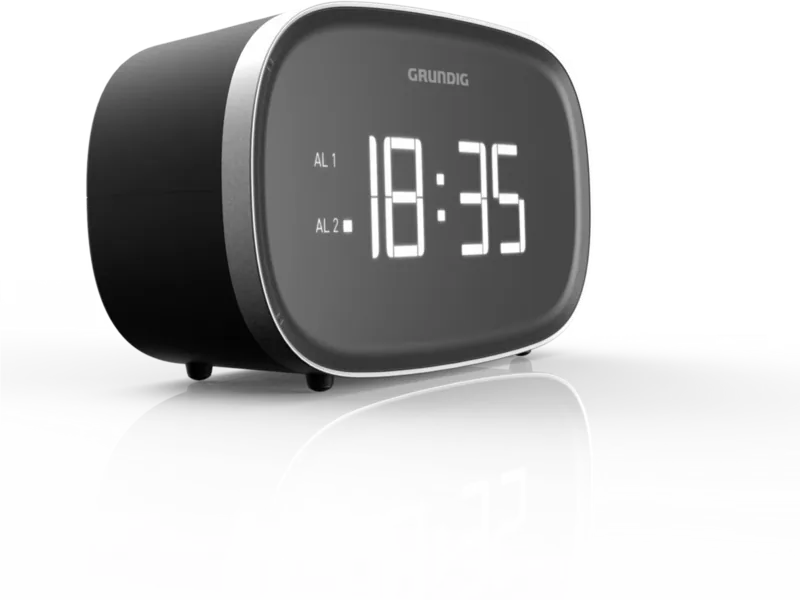
The alarm functions are especially useful. You can set two separate alarms, choose between radio or buzzer wake-up sounds, and adjust the schedule for weekdays, weekends, daily use, or a one-time alert. A snooze feature gives you a short extra sleep window, and the sleep timer is ideal for listening at night before the unit powers down automatically. Brightness settings also help the display fit different room conditions, from a dim bedroom to a brighter workspace.
Beyond playback and alarms, the Sonoclock 3500 BT DAB+ includes thoughtful extras such as time synchronization, manual time setting, and a USB charging output for a mobile phone. Backup batteries help preserve settings during power loss, which is a practical advantage for a clock radio meant to work around the clock. Its compact size and lightweight build make it easy to place on a nightstand or shelf without taking up much space.
Notes
DAB and FM presets make daily listening faster.
Bluetooth pairing is useful for podcasts and music streaming.
The USB port is for charging only, not music playback.
Backup batteries help protect stored settings during outages.
In short, this is a versatile bedside radio for users who value digital radio, wireless audio, and alarm-clock convenience in one affordable package.




Sven Krueger
8 months ago
I find the buttons and the manual hard to follow. How can I set the wake-up time correctly on the Sonoclock 3500, and is there a reset if I get stuck?
Manual.ly
8 months ago
The key is to set the correct mode first, then program the alarm. Start by setting the current time in the Clock/Time mode. Then select the alarm (AL1 or AL2) and enter alarm setting (typically by pressing and holding the AL1/AL2 button). Use the hour and minute controls to adjust the wake-up time, then confirm with a brief press of the same AL1/AL2 button. If you want radio wake-up, switch the wake-up source to Radio in the alarm setup (the display should show the alarm and source). If the settings do not stick or you lose your place, do a reset (use the Reset button if available, or unplug for about 10 seconds and plug back in). After reset, set time first, then the alarm again.