
Growatt MID 50KTL3-X2 Manual
PDF manual · 28 Pages
English



Quick check
Incorrect answer, please try again.
Chat with your Growatt MID 50KTL3-X2 manual using AI
Get instant AI answers from your Growatt MID 50KTL3-X2 manual
Ask anything about the Growatt MID 50KTL3-X2. Answers come from this manual, with the pages they are based on.
MID 50KTL3-X2 Maintenance Schedule
Turn the rotary switch of the DC Disconnect from On to Off position 5 times in succession to clean contacts and prolong electrical endurance.
Check for externally visible damage and discoloration of the DC Disconnect and cables. Contact installer if damage is found.
Free maintenance reminders
Timed to your purchase date. Always free, unsubscribe anytime.
Ask a Question
Do you recommend MID 50KTL3-X2?
Yes NoFrequently Asked Questions
The Growatt MID series achieves a maximum efficiency of 98.8 percent under standard operating conditions, ensuring optimal energy conversion from solar panels to grid power.
Is this answer helpful?
Yes, the unit has an IP66 protection degree rating, making it resistant to dust and water jets suitable for outdoor mounting environments.
Is this answer helpful?
The MID 50KTL3-X2 model includes four independent maximum power point trackers to maximize energy harvest from different panel orientations.
Is this answer helpful?
No, start by closing the AC circuit breaker, then close the DC switch. The self-check runs automatically before connecting to the grid.
Is this answer helpful?
Error codes appear on the OLED display. Users should note the code and serial number to contact support for troubleshooting assistance.
Is this answer helpful?
Yes, optional modules like Shine WIFI-X or 4G-X connect via USB ports for remote data access and system monitoring.
Is this answer helpful?
Yes, the inverter supports DRM modes via a 16-pin socket to regulate power generation based on grid requirements.
Is this answer helpful?
Advantages and Disadvantages
Advantages

- High conversion efficiency up to 98.8 percent
- Integrated OLED display with touch controls
- Four independent maximum power point trackers
- IP66 protection rating for outdoor use
- Supports multiple communication protocols including WiFi
Disadvantages

- Requires professional electrical installation
- Transformerless design needs careful grounding
- Arc Fault detection is an optional feature
- Specific wire sizes required for connections
- High voltage warning labels must be followed strictly
Product Specification
Note
Prices include partial 0% VAT rates for AT and DE
Type
Solar inverter, without transformer, with fan
Input Voltage
200-1100V DC
Max Input Current
32A
MPP Voltage Range
200-1000V DC
MPP Tracker Count
4
Max PV Generator Power
75kWp
Output Power
50kW
Output Phases
3-phase
Efficiency
98.8% max., 98.5% EU
Input
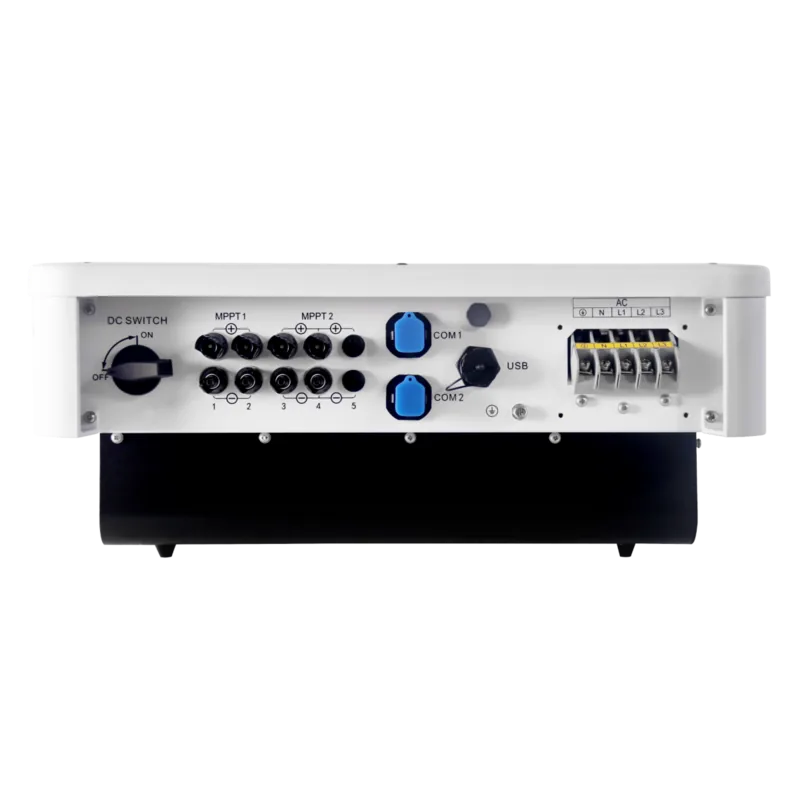
MC4
Output
Terminals
Interfaces
1x USB-A, 1x RS-485
Protection Class
IP66
Ambient Temperature
-13°F to 140°F
Dimensions
228.35x171.26x9.06 in (WxDxH)
Weight
81.57 lbs
Product Description
Revolutionize Your Solar Energy System with Growatt Innovation
Harnessing Power Efficiently
The Growatt MID series stands out in the renewable energy market, offering robust performance for residential and commercial projects. The Growatt MID 50KTL3-X2 serves as a powerhouse for installations requiring stable operation. When you consult the Growatt MID 50KTL3-X2 Manual, you discover a device engineered for maximum output stability. This inverter converts direct current generated by solar panels into usable alternating current seamlessly. It supports four independent maximum power point trackers for this model, ensuring that even partial shading does not significantly impact total yield. The input voltage range spans from 200V to 1000V, accommodating various panel configurations efficiently without compromising safety margins.
Installation and Durability
Safety remains paramount during deployment across diverse climates. The unit features an IP66 protection rating, allowing safe outdoor mounting despite harsh weather conditions and moisture. Its transformerless design reduces weight and size while maintaining high electrical efficiency reaching 98.8 percent peak. The compact dimensions make handling straightforward for qualified technicians. Weight typically stays around 38kg for larger units. During setup, users must adhere to specific grounding protocols to prevent insulation faults like PV ISO Low errors which can stop operation. Proper wiring on both AC and DC sides ensures longevity and compliance with local grid codes. Always disconnect switches before working on live terminals to avoid severe shock hazards.
Monitoring and Control
Connectivity is effortless thanks to built-in interfaces supporting modern demands. RS485 ports enable local data logging, while optional modules allow WiFi or 4G connectivity for remote monitoring. An integrated OLED display provides real time status updates accessible via intuitive touch buttons. This interface simplifies troubleshooting without needing external devices immediately after startup. Advanced functions like active power control help manage grid export limits effectively using smart meters. Demand response modes allow further integration with utility networks for load balancing. Whether adjusting settings or checking error codes, the system offers clear visual feedback through color coded LED indicators.
Maintenance and Support
Routine checks are minimal yet crucial for long term health. Keeping heat dissipation paths clean prevents thermal derating during peak summer months when ambient temperatures rise. Regular inspections of the disconnect switches ensure contacts remain functional over years of cycling. Arc fault detection protects against fire risks by tripping if arcs exceed 300W within specified timeframes. Should issues arise, the detailed troubleshooting guide assists in identifying root causes quickly. Contacting customer service with serial numbers and error messages expedites resolution for warranty claims. Ultimately, this hardware delivers sustained energy production when installed correctly.
Search for 67,706 Manuals online


Type-in Brand or Model