
Grandstream GWN7062 Manual
PDF manual · 79 Pages
English



Quick check
Incorrect answer, please try again.
Chat with your Grandstream GWN7062 manual using AI
Get instant AI answers from your Grandstream GWN7062 manual
Ask anything about the Grandstream GWN7062. Answers come from this manual, with the pages they are based on.
Ask a Question
Do you recommend GWN7062?
Yes NoFrequently Asked Questions
It supports IEEE 802.11ax (Wi-Fi 6) standards on both 2.4GHz and 5GHz bands to ensure high-speed connectivity.
Is this answer helpful?
The device supports up to 256 wireless concurrent clients which is suitable for dense device environments like offices.
Is this answer helpful?
Yes, it supports dual WAN port setup for load balancing and failover redundancy to maintain uptime during internet issues.
Is this answer helpful?
It includes WPA3, anti-hacking secure boot, firewall, and various VPN tunnel protocols like OpenVPN and IPSec for protection.
Is this answer helpful?
Yes, it features an embedded controller and supports cloud management platforms for remote oversight and configuration updates easily.
Is this answer helpful?
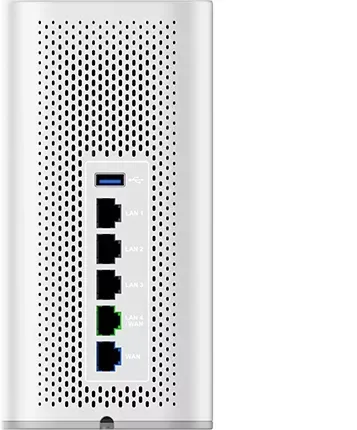
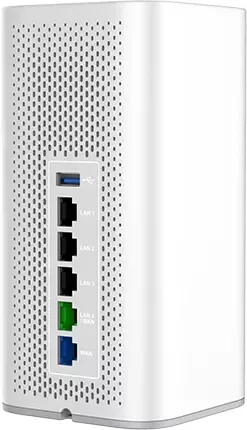
It includes Gigabit Ethernet LAN and WAN ports plus a USB 3.0 port for file sharing capabilities.
Is this answer helpful?
Advantages and Disadvantages
Advantages

- Dual-band Wi-Fi 6 support
- Supports up to 256 wireless devices
- 1.77 Gbps Wi-Fi speeds
- Built-in embedded controller
- OFDMA technology for capacity
Disadvantages

- Maximum power varies by country
- Requires specific power adapter
- Advanced security setup complexity
- Setup wizard required for initial config
- VLAN configuration requires attention
Product Specification
Modem
N/A
WAN
1x 1000Base-T, 1x 1000Base-T (shared)
LAN
1x 1000Base-T (shared), 3x 1000Base-T
Wireless
WLAN 802.11a/b/g/n/ac/ax (Wi-Fi 6), simultaneous
Transmission Speed
574Mbps (2.4GHz), 1201Mbps (5GHz)
Security
WPA, WPA2, WPA3, WPS
Antennas
Internal
Ports
N/A
Power Consumption
No spec (consumption, operation), 12V/1.5A/18W (max. power supply rating)
Dimensions
7.60 x 3.74 x 3.74 in
Features
IPv6, MU-MIMO, VPN passthrough (PPTP/L2TP/IPsec), Roaming, Mesh (shared band), VLAN
Band Capabilities
Dual Band (simultaneous), Mesh (shared band)
Transmission Speed 802.11n (Wi-Fi 4) 2.4GHz
300Mbps (Spatial Streams: 2x2, Bandwidth: 40MHz, Modulation: 64-QAM)
Transmission Speed 802.11n (Wi-Fi 4) 5GHz
300Mbps (Spatial Streams: 2x2, Bandwidth: 40MHz, Modulation: 64-QAM)
Transmission Speed 802.11ac (Wi-Fi 5) 5GHz
867Mbps (Spatial Streams: 2x2, Bandwidth: 80MHz, Modulation: 256-QAM)
Transmission Speed 802.11ax (Wi-Fi 6 / Wi-Fi 6E) 2.4GHz
574Mbps (Spatial Streams: 2x2, Bandwidth: 40MHz, Modulation: 1024-QAM)
Transmission Speed 802.11ax (Wi-Fi 6 / Wi-Fi 6E) 5GHz
1201Mbps (Spatial Streams: 2x2, Bandwidth: 80MHz, Modulation: 1024-QAM)
Note
Transmission rate information for 802.11ax at 2.4GHz and 5GHz. (802.11n 2x2 40MHz 64-QAM: 300Mbps, 802.11ac 2x2 80MHz 256-QAM: 867Mbps, 802.11ax (2.4GHz) 2x2 40MHz 1024-QAM: 574Mbps, 802.11ax (5GHz) 2x2 80MHz 1024-QAM: 1201Mbps)
Note #2
In some cases, the manufacturer's maximum power consumption specification only corresponds to the maximum output power of the power supply and is therefore not meaningful information for daily power consumption.
Product Description
Grandstream GWN7062 Overview
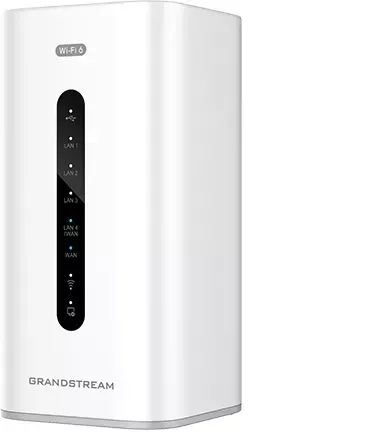
The Grandstream GWN7062 represents a significant leap forward in wireless networking designed for growing home and business environments. This dual-band router leverages the latest Wi-Fi 6 standards to deliver unprecedented performance. With a powerful 64-bit quad-core processor running at 1.2GHz, the device handles demanding tasks while maintaining blazing fast speeds up to 1.77 Gbps. This ensures smooth streaming of 4K Ultra HD content and seamless video conferencing without lag.
One of the standout features is its massive capacity to support up to 256 wireless devices simultaneously. This scalability makes it an ideal solution for smart offices where multiple users connect their laptops, phones, and tablets every single day. The GWN7062 utilizes DL and UL OFDMA technology to increase data capacity significantly compared to previous generations. Users will appreciate the robust security measures embedded directly into the hardware, including WPA3 encryption and anti-hacking secure boot capabilities. These features protect sensitive corporate data effectively against modern cyber threats trying to breach internal networks.
Network management has never been easier with the built-in controller accessible via the intuitive web interface. Administrators can manage access points and configure complex settings. The mesh networking support allows for extended coverage across large areas. Installation is straightforward with clear LED indicators. Configuration details are often found in the Grandstream GWN7062 Manual for optimal setup and maintenance.
Physical connectivity is robust, featuring multiple Gigabit Ethernet ports and an SFP WAN slot for fiber connections. Power options are flexible with a universal power supply included. The device supports advanced VLANs, QoS settings, and routing policies for granular traffic control. Whether you are a small business owner or a tech-savvy home user, this router provides enterprise-grade security and performance capabilities. It simplifies complex network administration while offering the flexibility needed for future expansion.
Security protocols extend beyond basic encryption with support for OpenVPN, IPSec, L2TP, and PPTP. This flexibility allows remote workers to access office resources securely. The device features a captive portal for guest networks, enhancing security by controlling access. Virtual Private Network tunnels ensure encrypted data transmission. The embedded controller integrates seamlessly with cloud management platforms for oversight.
The unit is equipped with a USB 3.0 port that enables file sharing capabilities for clients using Windows, Mac, or Linux operating systems. This allows easy access to files stored on external drives connected directly to the router. Users can set passwords for added security when accessing shared data across the local network. The physical design fits both desktop and wall mounting configurations for versatile placement options throughout the office environment.
Search for 67,706 Manuals online


Type-in Brand or Model