
GIGABYTE Z490 Series Manual
PDF manual · 48 Pages
English



Quick check
Incorrect answer, please try again.
Chat with your GIGABYTE Z490 Series manual using AI
Get instant AI answers from your GIGABYTE Z490 Series manual
Ask anything about the GIGABYTE Z490 Series. Answers come from this manual, with the pages they are based on.
Ask a Question
Do you recommend Z490 Series?
Yes NoFrequently Asked Questions
It supports 10th Generation Intel Core processors in the LGA1200 package including i9, i7, i5, and i3 models.
Is this answer helpful?
The motherboard supports up to 128 GB of DDR4 system memory across four DIMM sockets.
Is this answer helpful?
It includes an Aquantia 10GbE LAN chip and an Intel 2.5GbE LAN chip for fast internet speeds.
Is this answer helpful?
Yes, it supports RAID 0, RAID 1, RAID 5, and RAID 10 configurations for SATA and M.2 drives.
Is this answer helpful?
You can use the onboard Q-Flash Plus button or the @BIOS utility within the operating system.
Is this answer helpful?
Yes, it features Intel Thunderbolt 3 connectors supporting DisplayPort and USB Type-C output.
Is this answer helpful?
Intel Core i9/i7 processors support speeds up to 3200 MHz with XMP profiles enabled.
Is this answer helpful?
Advantages and Disadvantages
Advantages

- Includes Dual BIOS technology for system recovery and stability during updates easily.
- Features high end audio components like ESS DACs for exceptional sound quality throughout.
- Supports Intel 10th Gen CPUs with robust power phases for overclocking sessions.
- Provides extensive M.2 slots supporting RAID and fast NVMe storage options effectively.
- Includes 10Gb LAN and 2.5Gb LAN for superior network speeds compared to standard.
Disadvantages

- Large E-ATX size requires a compatible chassis for proper installation and cooling.
- Multiple complex connectors can make cable management challenging for novice builders.
- High cost relative to mid range boards limits budget allocation elsewhere for parts.
- Requires LGA1200 CPU which means limited upgrade path to future new generations.
- Advanced BIOS settings require research for optimal configuration without errors.
Product Specification
Socket
Intel 1200
Chipset
Intel Z490
CPU Compatibility
Core i-11000, Core i-10000, Pentium Gold G6000, Celeron G5000
Graphics
iGPU
RAID Level
0/1/5/10 (Z490)
Manufacturer Warranty
3 Years (from production date, claims handled by authorized retailer)
USB Designation
Link
Product Description
Exploring the Power of the GIGABYTE Z490 Platform
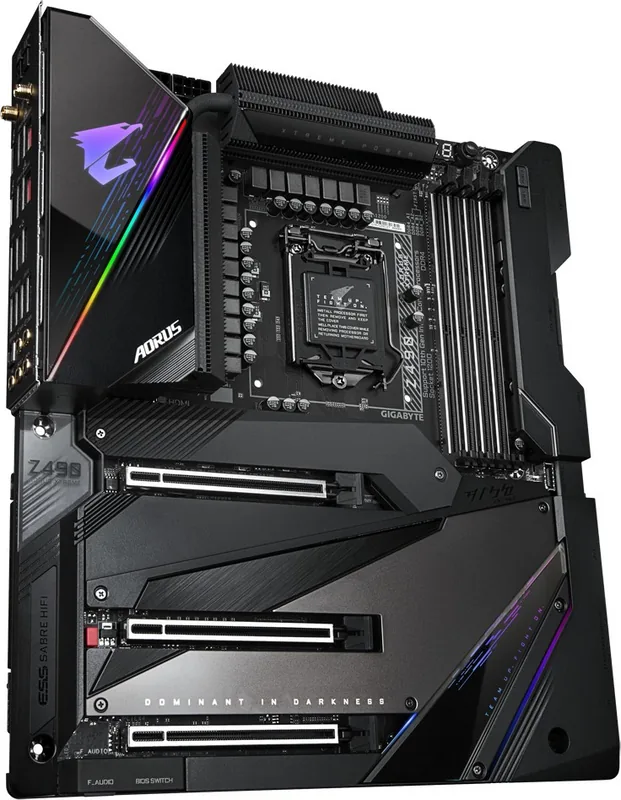
Building a high performance system requires precision and extensive knowledge regarding hardware compatibility standards for stability. The GIGABYTE Z490 AORUS series stands out for enthusiasts who demand top tier speeds and absolute stability from all their core components daily. When diving into the specific details of this motherboard model, users encounter a wide array of features designed for extreme performance and versatile connectivity options that satisfy rigorous testing environments for modern applications effectively.
Audio and Connectivity Excellence
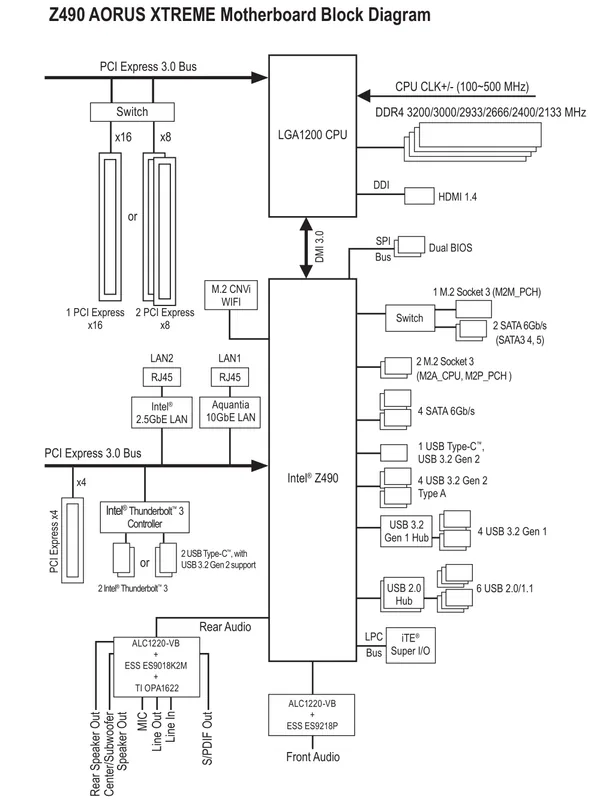
Sound quality matters significantly for content creators and serious gamers alike who want immersive experiences during sessions without compromise. This board integrates high end audio codecs with operational amplifiers for crystal clear output across all frequency ranges without interference or noise. Connectivity is equally robust and versatile for heavy data users who need throughput. The inclusion of dual LAN ports allows for faster internet speeds and dedicated networking without sacrificing valuable ports on the rear panel. Users can enjoy lightning fast data transfers through multiple USB interfaces including Thunderbolt 3 support for external storage solutions and high resolution displays easily.
Installation and Expansion Capabilities
Expanding your system capability and graphical power is straightforward with this specific layout design for builders. The board supports multiple graphics cards for advanced rendering tasks and gaming simulations requiring heavy GPU loads simultaneously without bottlenecks. Memory channels are configured to maximize bandwidth potential for complex computing tasks and multitasking scenarios. Installing components requires care and attention to the guidelines provided to ensure safety and prevent hardware damage entirely. Proper thermal management and airflow ensure longevity during intense workload scenarios involving heavy loads over long periods.
System Management and BIOS Features
Keeping your system stable involves firmware updates and precise BIOS configuration settings regularly to maintain performance. The onboard buttons simplify these tasks significantly without needing a fully functioning operating system to access menus remotely. Dual BIOS technology provides a crucial safety net against corruption during risky update processes that might occur. This ensures your machine remains operational even if one system file fails during critical maintenance windows without data loss for the user.
Conclusion and Final Thoughts
Every component within this platform works together to deliver a unified and powerful computing experience overall for the user. From the initial power up to the final benchmark test, every step counts towards overall system performance and reliability in daily tasks. Owners appreciate the comprehensive nature of the prebuilt features and the software suite included for monitoring and tuning settings easily without third party tools. It truly represents a significant step forward for desktop computing power in its current generation of technology available today for purchase.
Search for 67,706 Manuals online


Type-in Brand or Model