
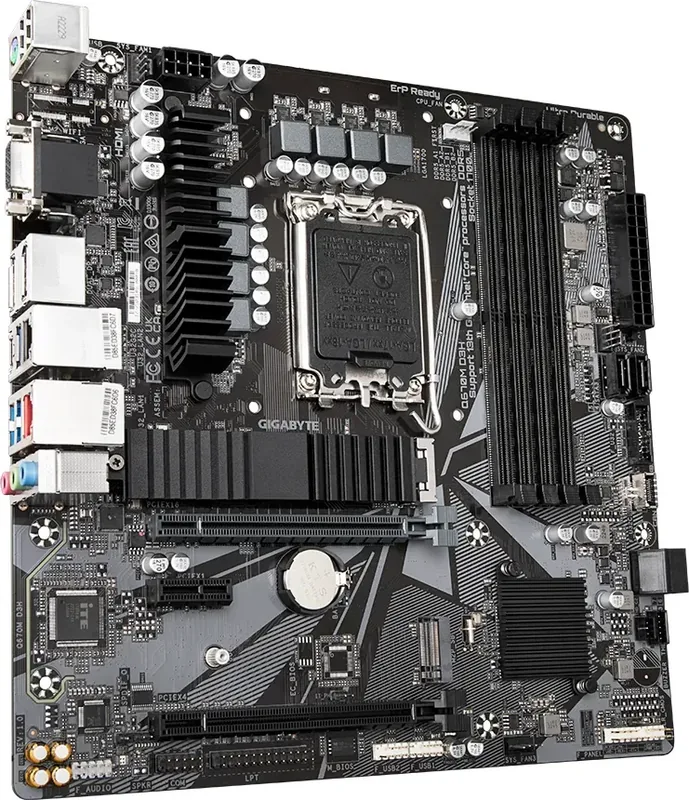
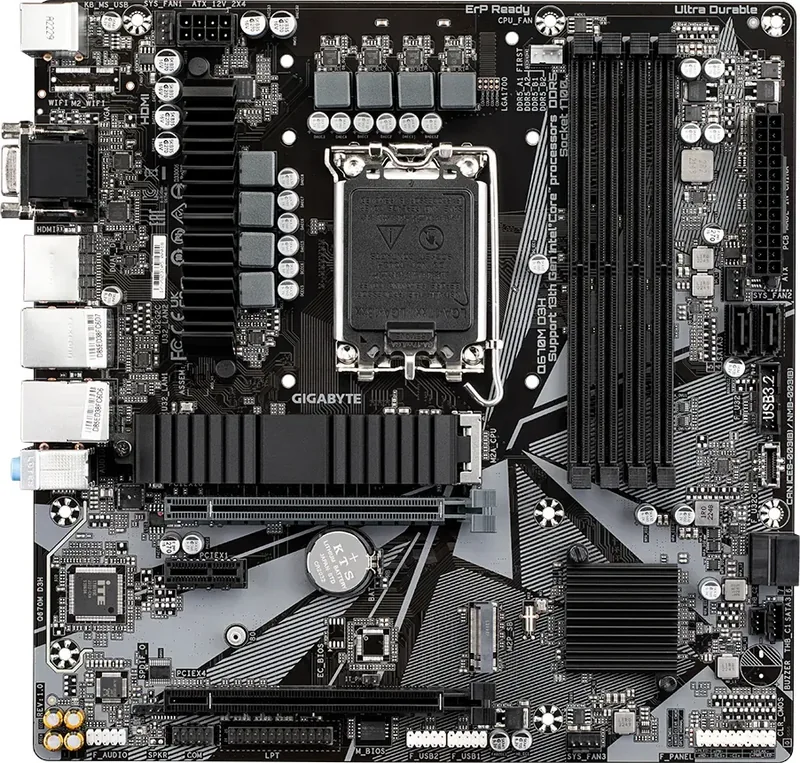
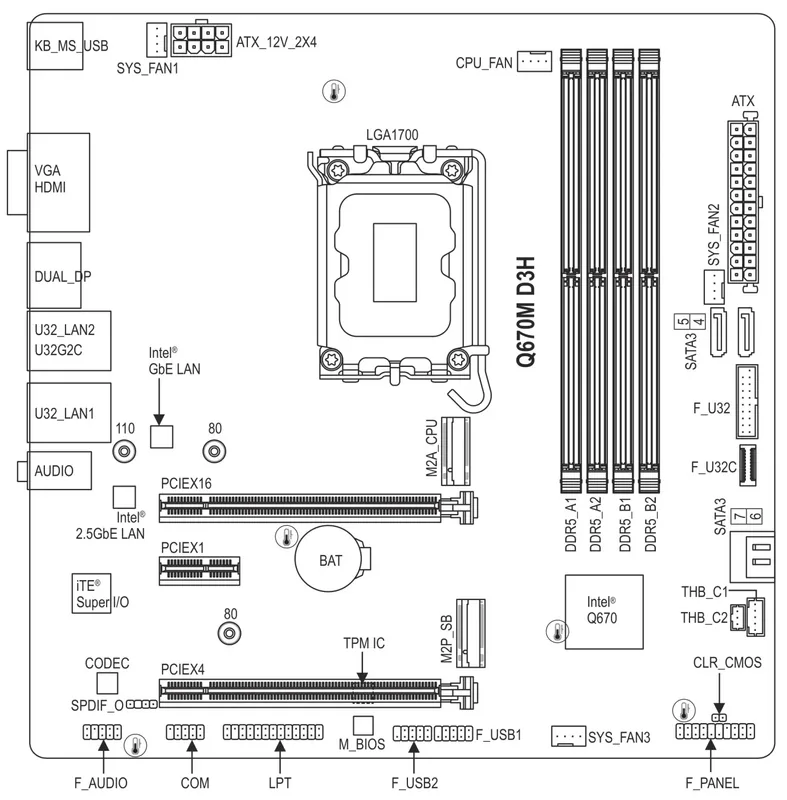
GIGABYTE Q670M D3H Manual
PDF manual · 33 Pages
English



Quick check
Incorrect answer, please try again.
Chat with your GIGABYTE Q670M D3H manual using AI
Get instant AI answers from your GIGABYTE Q670M D3H manual
Ask anything about the GIGABYTE Q670M D3H. Answers come from this manual, with the pages they are based on.
Ask a Question
Do you recommend Q670M D3H?
Yes NoFrequently Asked Questions
Yes, the Q670M series supports DDR5 memory up to 5600 MT/s with high-end processors. It also supports DDR4 memory up to 3200 MT/s for i5/i3 and older Intel Core processors.
Is this answer helpful?
The motherboard features two M.2 Socket 3 connectors. One supports PCIe x4 speeds and the other supports both SATA and PCIe 4.0 configurations.
Is this answer helpful?
The system natively supports Windows 11 64-bit and Windows 10 64-bit operating systems. Drivers are available for both platforms through APP Center software.
Is this answer helpful?
Yes, you can configure RAID 0, RAID 1, RAID 5, and RAID 10 using the SATA storage devices. Note that M.2 PCIe SSDs cannot be mixed with SATA HDDs in a single RAID set.
Is this answer helpful?
The board includes one 2.5GbE LAN chip and one Gigabit Ethernet LAN chip. This provides flexible networking speeds from 10 Mbps to 2.5 Gbps depending on the port.
Is this answer helpful?
Locate the pin one marking on the socket and align it with the CPU triangle marking. Gently insert the CPU without force, then secure the load plate and lever to lock it in place.
Is this answer helpful?
Yes, there are Thunderbolt add-in card connectors available. You can connect a compatible Thunderbolt card to expand high-speed peripheral options on the motherboard.
Is this answer helpful?
Advantages and Disadvantages
Advantages

- Dual Ethernet ports for flexible networking options
- Support for DDR5 and DDR4 memory modules
- M.2 slots with PCIe 4.0 storage support
- Robust USB Type-C and USB 3.2 Gen 1 connectivity
Disadvantages

- Integrated graphics only without discrete GPU
- M.2 RAID limited based on SSD type
- VRM cooling specifics not detailed in text
- DDR5 speed depends heavily on CPU used
Product Specification
Form Factor
mATX
Socket
Intel 1700
Chipset
Intel Q670
CPU Compatibility
Core i-14000, Core i-13000, Core i-12000, Pentium Gold G7000, Celeron G6000
Expansion Slots
2x PCIe 4.0 x16 (1x x16, 1x x4), 1x PCIe 3.0 x1, 1x M.2/M-Key (PCIe 4.0 x4, 22110/2280), 1x M.2/M-Key (PCIe 4.0 x4, 2280)
External Connectors
1x VGA (iGPU), 1x HDMI 2.0 (iGPU), 2x DisplayPort 1.2 (iGPU), 1x USB-C 3.1 (10Gb/s), 3x USB-A 3.0 (5Gb/s), 2x USB-A 2.0 (480Mb/s), 1x 2.5GBase-T LAN (Intel I225-LM), 1x Gigabit LAN (Intel I219-LM), 3x Audio Jack, 1x PS/2 Combo
Internal Connectors
1x USB-C 3.0 Key-A Header (5Gb/s), 1x USB 3.0 Header (5Gb/s, 2x USB 3.0), 2x USB 2.0 Header (480Mb/s, 4x USB 2.0), 4x SATA 6Gb/s (Q670), 1x Serial, 1x Parallel, 1x Thunderbolt Header 5-Pin, 1x RTD3 Header, 1x SPDIF Header
Cooling Headers
1x CPU Fan 4-Pin, 3x Fan 4-Pin
Lighting Headers
N/A
Buttons/Switches
N/A
Audio
7.1 (Realtek ALC897)
Graphics
iGPU
Wireless
N/A
RAID Level
0/1/5/10 (Q670)
Multi-GPU
N/A
Power Connectors
1x 24-Pin ATX, 1x 8-Pin EPS12V
VRM
7 Virtual Phases (6+1+1)
Lighting
N/A
BIOS
1x 32MB (256Mb)
Features
Audio + solid capacitors, 1x M.2 Passive Cooler, TPM Module (TPM 2.0, Infineon), Remote Management with Compatible CPU (Intel vPro), Onboard TPM 2.0 Support (Intel PTT)
Manufacturer Warranty
3 Years (from Production Date, Claims via Authorized Retailer)
USB Layout
Left
Product Description
Discover the Performance of the GIGABYTE Q670
Welcome to the world of powerful computing where the GIGABYTE Q670 motherboard stands out as a key component for modern PCs. Designed for professionals and enthusiasts who demand reliability, this board offers robust features tailored for the latest processors. The board supports the current Intel processors with its LGA1700 socket, ensuring compatibility with 12th and 13th Generation Core CPUs. This flexibility allows users to customize their system based on performance needs without compromising stability or longevity.
Expandable Memory Options for Every Use Case
One of the standout features is the memory flexibility designed for various user requirements. Users can choose between DDR5 or DDR4 modules depending on their specific needs and budget constraints. The DDR5 configuration supports speeds up to 5600 MT/s with high-end processors, while the DDR4 version provides reliable performance up to 3200 MT/s for cost-effective builds. With four dimm slots, you can build a system capable of handling heavy workloads, from video editing to complex simulations and data processing tasks.
Connectivity and Expansion Capabilities
Connectivity does not stop at the back panel of the chassis. The board includes dual Ethernet ports for networking flexibility and redundancy. You get one 2.5GbE port and one Gigabit Ethernet port for robust internet speeds. For high-speed storage, there are M.2 slots supporting PCIe 4.0 NVMe SSDs, alongside standard SATA connectors for traditional hard drives. RAID support is available for data security and performance optimization across multiple drives. Internal headers provide USB Type-C and USB 3.2 Gen 1 access, along with front panel audio and power controls for easy system management.
Installation and Setup Guide
Setting up your hardware is straightforward with clear guidelines provided by the manufacturer. The documentation guides you through CPU installation, ensuring proper alignment to avoid physical damage to the socket. Cooler mounting is explained with step-by-step visuals and safety precautions. Memory installation requires attention to dual channel slots for maximum bandwidth and efficiency. Expansion cards fit securely into PCIe slots, and internal connectors like the power sockets and fan headers are well-labeled for a clutter-free build experience.
BIOS and Operating System
The BIOS setup allows for detailed configuration of system parameters. Users can perform Power-On Self-Test checks to ensure hardware health at startup. Installing the operating system requires specific driver configurations if using RAID volumes. The system supports Windows 11 and Windows 10 64-bit natively. APP Center software simplifies driver updates and application management after the OS installation process is complete. This ensures you get the most out of your hardware investment. Consult the GIGABYTE Q670 Manual for additional troubleshooting and advanced configuration tips.
Notes
Always check the memory support list on the official website before purchasing RAM modules. Ensure your power supply meets the wattage requirements for stable operation under load. Regular BIOS updates are recommended for compatibility with new hardware components and security patches.
Search for 67,706 Manuals online


Type-in Brand or Model