

GIGABYTE MZ72-HB0 Manual
PDF manual · 68 Pages
English



Quick check
Incorrect answer, please try again.
Chat with your GIGABYTE MZ72-HB0 manual using AI
Get instant AI answers from your GIGABYTE MZ72-HB0 manual
Ask anything about the GIGABYTE MZ72-HB0. Answers come from this manual, with the pages they are based on.
Ask a Question
Do you recommend MZ72-HB0?
Yes NoFrequently Asked Questions
You need a system processor of 2 GHz or higher and a minimum of 4 GB RAM. Free disk space of at least 1000 GB is required. The system supports up to 255 node servers maximum.
Is this answer helpful?
Supported browsers include Internet Explorer 9 or later, Google Chrome 39.0.2171.65 m or later, and Mozilla Firefox 33.1.1. Use a standard web browser to access the interface.
Is this answer helpful?
Yes, the platform allows remote control including power cycles, rebooting, and BIOS changes. You can launch iKVM consoles and mount virtual media from a distance.
Is this answer helpful?
Yes, it supports Ubuntu, Debian, CentOS 7, RHEL, and Fedora. Installation steps vary slightly for Linux distributions regarding package managers and database setup.
Is this answer helpful?
Use the Update function to configure a TFTP server. You can then push updates for BMC, BIOS, or firmware packages to all nodes in a defined group or IP range.
Is this answer helpful?
Roles include ROLE_ADMIN for full control, ROLE_OSADM for OS commands, ROLE_OPERATORS for limited BMC access, and ROLE_USER for basic monitoring only.
Is this answer helpful?
Yes, LDAP configuration is supported. You must set the LDAP Host and Port in advance. This allows centralized authentication management for the enterprise environment.
Is this answer helpful?
Advantages and Disadvantages
Advantages

- User-friendly browser interface allows easy management without specialized software installation.
- Cross-platform support enables deployment on Windows and various Linux distributions seamlessly.
- Remote access functions include power control, KVM, and virtual media mounting for full control.
- Integrated Group Manager simplifies bulk operations for multiple server nodes simultaneously.
- Comprehensive alerting via SNMP and email ensures rapid response to system health issues.
Disadvantages

- Requires minimum 4 GB RAM which may be high for older hardware resources.
- Installation involves complex database setup and firewall configuration adjustments initially.
- Java JDK dependency might introduce compatibility issues with older browser versions.
- Some firmware update functions rely on TFTP server availability within the network.
- PostgreSQL database configuration needs careful tuning before stable operation begins.
Product Specification
Form Factor
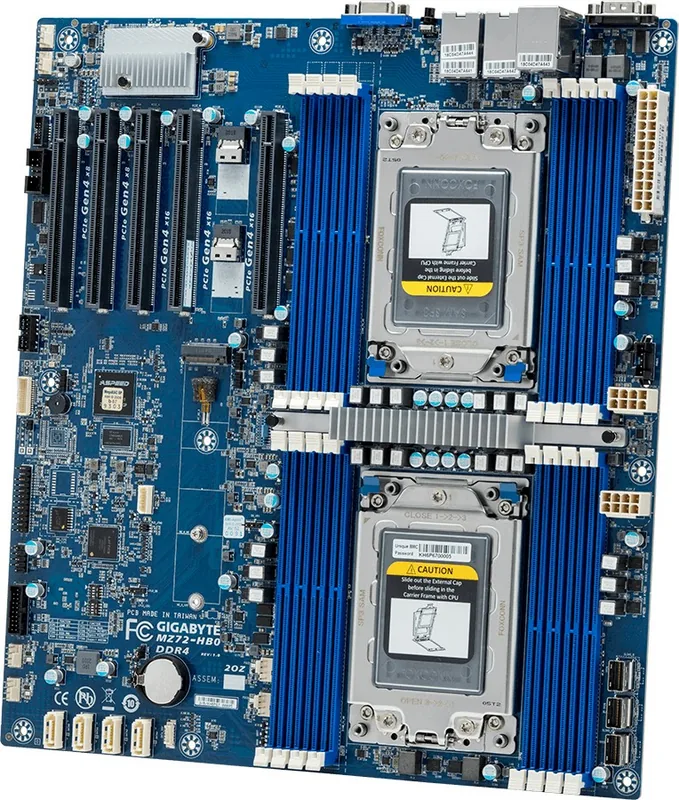
E-ATX (SSI EEB)
Socket
2x AMD SP3
Chipset
System-on-Chip (SoC)
CPU Compatibility
Epyc 7003, Epyc 7002
RAM
16x DDR4 DIMM, octa PC4-25600L/DDR4-3200, max. 2TB (RDIMM), 2TB (LRDIMM)
Expansion Slots
5x PCIe 4.0 x16 (3x x16, 2x x8), 1x M.2 / M-Key (PCIe 4.0 x4, 22110 / 2280), 2x Slim SAS SFF-8654 4i (PCIe 4.0 x4), 3x Mini SAS SFF-8087 (PCIe 4.0 x4 / SATA)
External Ports
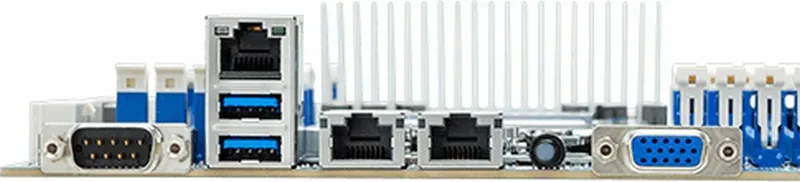
1x VGA (AST2500), 2x USB-A 3.0 (5Gb/s), 2x 10GBase-T (Broadcom BCM57416), 1x serial, 1x Management Port (RJ-45)
Internal Headers
1x USB 3.0 Header (5Gb/s, 2x USB 3.0), 1x USB 2.0 Header (480Mb/s, 2x USB 2.0), 4x SATA 6Gb/s (SoC), 12x SATA 6Gb/s (via Mini SAS SFF-8087, SoC), 1x serial, 1x TPM Header
Cooling Headers
2x CPU Fan 4-Pin, 4x Fan 4-Pin
Lighting Headers
N/A
Buttons / Switches
ID Button (External)
Audio
N/A
Graphics
ASPEED AST2500 - Onboard
Wireless
N/A
Multi-GPU Support
N/A
Power Connectors
1x 24-Pin ATX, 2x 8-Pin EPS12V
Lighting
N/A
Features
All solid capacitors, IPMI 2.0
Manufacturer Warranty
3 years (from manufacturing date, claims via authorized dealer)
USB Notation
Link
Product Description
Master Server Management with GSM Technology
Managing enterprise infrastructure requires precision and reliability. The GIGABYTE MZ72-HB0 Manual provides insight into powerful tools designed here. This suite ensures administrators can maintain control over their hardware without needing physical access. It simplifies complex tasks into actionable steps through an intuitive interface.
Comprehensive Remote Capabilities
The core of this technology lies in its GSM Server platform. It offers a user-friendly Graphics User Interface that runs within standard web browsers. Administrators can monitor system health, manage power states, and access remote consoles instantly. This eliminates the need for dedicated hardware management cards. You can perform power cycles and reboot systems remotely. Virtual media mounting allows OS installation from a remote source, streamlining maintenance significantly.
Supported Platforms and Installation
Deployment is streamlined across major operating systems. Whether running on Windows or various Linux distributions like Ubuntu, Debian, CentOS, or RHEL, the software integrates seamlessly. The installation wizard guides users through setting up the backend database and network configurations. System requirements are modest, needing at least 4 GB of RAM and a processor running at 2 GHz or higher. Disk space requirements allow for extensive logging and database retention.
Monitoring and Alerts
Real-time monitoring is crucial for uptime and performance analysis. The system tracks CPU, memory, disk drive health, and sensor data across all nodes. Alerts can be configured via SNMP traps or email notifications to ensure issues are addressed before they impact operations. Power consumption metrics help optimize energy usage within the data center and prevent overload conditions.
Group Management and Scalability
The Group Manager function allows you to organize multiple servers logically. This simplifies bulk operations like firmware updates or reboot cycles across a cluster of machines simultaneously. You can filter nodes by type or location to perform targeted maintenance tasks quickly. This scalability ensures the tool grows with your infrastructure needs.
Security and Access Control
Robust account management features allow for multiple privilege levels within the management console. You can define roles such as full Administrators, Operators with limited access, or standard monitoring Users. LDAP integration supports existing directory services for centralized authentication across the enterprise. Network configuration settings allow fine-tuning of IP ranges and discovery protocols for efficient node detection and secure communication.
Firmware Maintenance and Support
Updating software components remains a critical task. The platform supports remote firmware updates for BMC, BIOS, and other system components via TFTP protocols. This ensures systems remain secure and compatible with the latest standards without manual intervention. Regular updates keep users informed of best practices. For further assistance, dedicated support channels are available through their online portal.
Search for 67,706 Manuals online


Type-in Brand or Model
Stefan Weber
8 months ago
I have read about USB interference issues. Does this board work well with USB 3.0 devices and Bluetooth dongles without conflicts?
Manual.ly
7 months ago
Some users have reported interference between USB 3.0 ports and Bluetooth dongles, likely due to shielding issues. Additionally, initial BIOS configurations might display incorrect component data, such as wrong processor listings. This usually resolves after updating the BIOS. We strongly advise checking the manufacturers official compatibility list before installation to ensure your RAM and storage work correctly. If you experience issues, verify your hardware against the supported list first.