
GIGABYTE GC-MAPLE RIDGE Manual
PDF manual · 20 Pages
English



Quick check
Incorrect answer, please try again.
Chat with your GIGABYTE GC-MAPLE RIDGE manual using AI
Get instant AI answers from your GIGABYTE GC-MAPLE RIDGE manual
Ask anything about the GIGABYTE GC-MAPLE RIDGE. Answers come from this manual, with the pages they are based on.
Ask a Question
Do you recommend GC-MAPLE RIDGE?
Yes NoFrequently Asked Questions
The card supports a maximum resolution of 8K (7680x3840) at 60 Hz through its Thunderbolt 4 and DisplayPort outputs, subject to the capabilities of the connected graphics card and monitor.
Is this answer helpful?
It requires a motherboard with a free PCIe x4 slot and specific Thunderbolt headers. It supports Windows 10 64-bit (RS3 or later). Check the GIGABYTE website for a list of compatible motherboards.
Is this answer helpful?
Yes, you can connect up to two external displays simultaneously via the Thunderbolt 4 and DisplayPort outputs. For more monitors, the card supports Mini-DisplayPort inputs linked to a separate graphics card.
Is this answer helpful?
Yes, you must install the driver after setting up the hardware. You can use the included disc or download the latest version from the GIGABYTE support and downloads section on their website.
Is this answer helpful?
The GC-MAPLE RIDGE requires two 6-pin PCIe power connectors from your power supply unit to operate correctly.
Is this answer helpful?
Absolutely. The card supports daisy-chaining up to five Thunderbolt-enabled devices, provided those devices have both Thunderbolt input and output ports.
Is this answer helpful?
Yes, GIGABYTE uses recyclable and reusable packaging materials to reduce environmental impact and comply with RoHS directives regarding hazardous substances.
Is this answer helpful?
Advantages and Disadvantages
Advantages

- Supports 8K resolution at 60 Hz via Thunderbolt 4 and DisplayPort
- Delivers 40 Gbps bi-directional bandwidth for rapid data transfers
- Enables daisy-chaining of up to five Thunderbolt devices
- Includes comprehensive cabling for flexible motherboard connections
- Built with environmentally friendly recyclable packaging materials
Disadvantages

- Requires a discrete graphics card with DisplayPort output for full functionality
- Dependent on specific motherboard Thunderbolt header availability
- Compatible only with Windows 10 64-bit (RS3 or later)
- May require BIOS updates for full feature activation
- Dual display output limitation due to hardware constraints
Product Specification
Extern
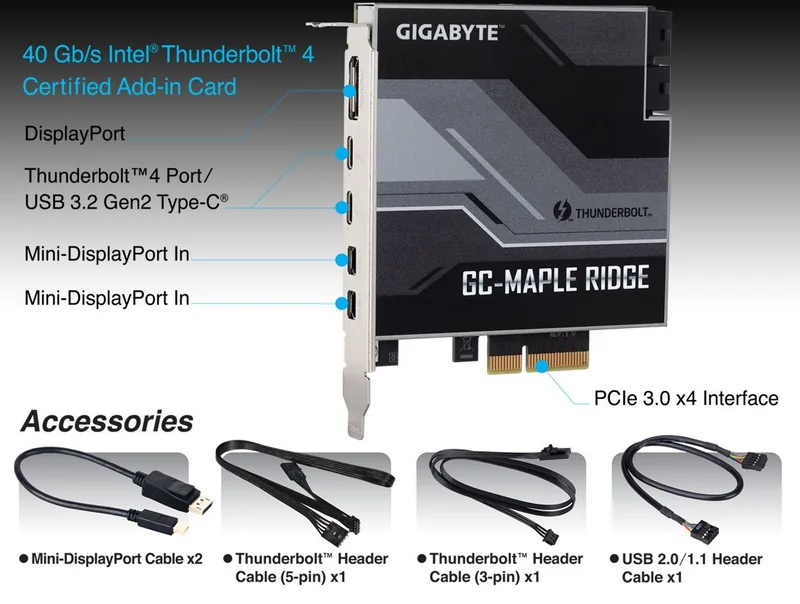
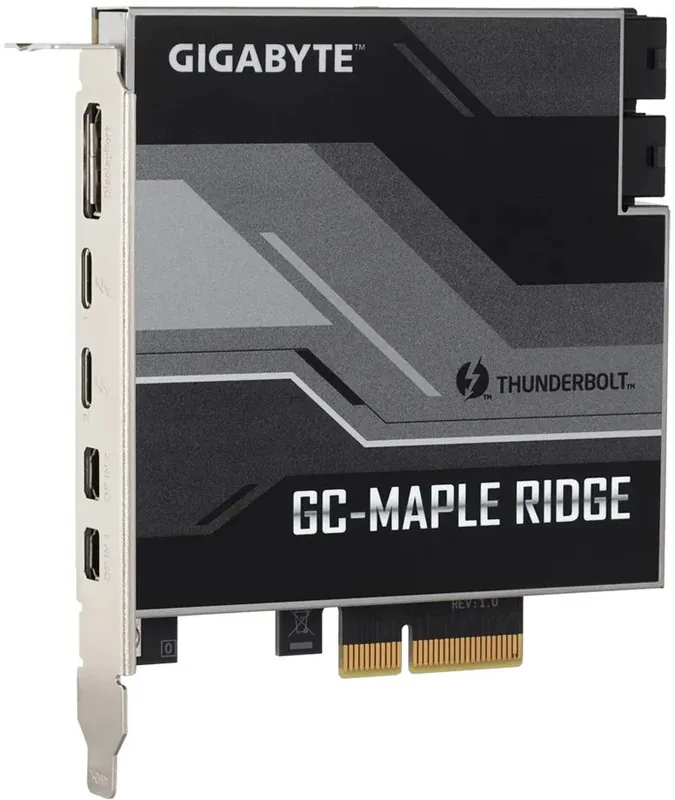
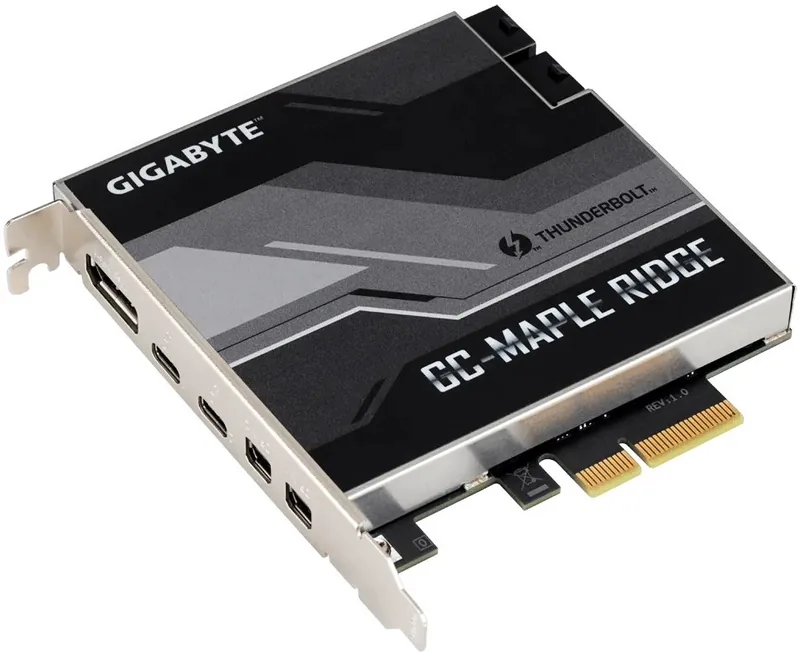
2x Thunderbolt 4, 1x DisplayPort 1.4, 2x Mini DisplayPort-In 1.4
Intern
1x Thunderbolt-Header 5-Pin, 1x RTD3-Header, 1x USB 2.0 Header (480Mb/s, 2x USB 2.0)
Interface
PCIe 3.0 x4
Chipset
Intel JHL8540 (Maple Ridge)
Power Supply
2x 6-Pin PCIe
Features
USB-C Power Delivery (97W), incl. TB-Header cable (5-Pin), incl. RTD3-Header cable (3-Pin), incl. USB-Header cable (9-Pin), incl. Mini DisplayPort cable
USB Spelling
Link
Product Description
Unlock High-Speed Connectivity with the GIGABYTE GC-MAPLE RIDGE
The GIGABYTE GC-MAPLE RIDGE is a premium PCIe 3.0 x4 add-in card designed to revolutionize your desktop connectivity by leveraging the power of Intel's JHL8540 Thunderbolt 4 controller. This expansion card transforms a standard PCIe slot into a high-performance hub, offering unparalleled data transfer speeds and versatile display capabilities for professionals and enthusiasts alike.
At the heart of this device lies the robust Intel JHL8540 chip, which enables bi-directional data rates of up to 40 Gbps per port. Whether you are transferring massive video files or connecting high-speed storage arrays, the GC-MAPLE RIDGE ensures minimal latency and maximum throughput. The card features two Thunderbolt 4 output ports on the back panel, each capable of driving displays at resolutions as high as 8K (7680x3840) at 60 Hz. It also includes a dedicated DisplayPort output supporting HDR, HDCP 2.2, and DisplayPort 1.4 standards, making it an ideal choice for creators working with ultra-high-definition content.
Installation is straightforward yet flexible. The card requires connection to a PCIe x4 slot and draws power from two 6-pin PCIe connectors. To activate the Thunderbolt features, users must connect included header cables to compatible motherboard headers, with support for both 3-pin and 5-pin configurations depending on the system board. Additionally, the card provides Mini-DisplayPort input ports that allow direct connection to a graphics card, enabling daisy-chaining of up to five Thunderbolt devices while simultaneously supporting multiple native DisplayPort monitors.
GIGABYTE has engineered this product with sustainability in mind. The packaging materials are recyclable and reusable, reflecting a commitment to reducing global warming impacts. The card is fully compatible with Windows 10 64-bit systems running RS3 or later, though users should verify specific motherboard compatibility on the official GIGABYTE website. Updating the motherboard BIOS to the latest version is recommended to ensure optimal performance and stability.
Key Installation Notes
- Ensure your motherboard supports Thunderbolt headers before purchase.
- Use the provided Mini-DisplayPort cables to link the card to a discrete GPU for multi-monitor setups.
- Always update drivers from the GIGABYTE support page after installation.
Pros and Cons
Pros
- Supports 8K resolution at 60 Hz via Thunderbolt 4 and DisplayPort.
- Delivers 40 Gbps bi-directional bandwidth for rapid data transfers.
- Enables daisy-chaining of up to five Thunderbolt devices.
- Includes comprehensive cabling for flexible motherboard connections.
- Built with environmentally friendly recyclable packaging materials.
Cons
- Requires a discrete graphics card with DisplayPort output for full functionality.
- Dependent on specific motherboard Thunderbolt header availability.
- Compatible only with Windows 10 64-bit (RS3 or later).
- May require BIOS updates for full feature activation.
- Dual display output limitation due to hardware constraints.
Search for 67,706 Manuals online


Type-in Brand or Model