

GIGABYTE GA-SBCAP3350 Manual
PDF manual · 34 Pages
English



Quick check
Incorrect answer, please try again.
Chat with your GIGABYTE GA-SBCAP3350 manual using AI
Get instant AI answers from your GIGABYTE GA-SBCAP3350 manual
Ask anything about the GIGABYTE GA-SBCAP3350. Answers come from this manual, with the pages they are based on.
Ask a Question
Do you recommend GA-SBCAP3350?
Yes NoFrequently Asked Questions
It is best for compact and embedded systems such as kiosks, industrial PCs, signage, and custom control platforms. Its mix of small size, low power use, and broad I/O makes it practical for specialized builds.
Is this answer helpful?
It uses an Intel Celeron N3350 SoC with dual-core Apollo Lake architecture. This chip is designed for efficient everyday computing rather than high-performance gaming or heavy workstation tasks.
Is this answer helpful?
The board includes one DDR3L SO-DIMM slot and supports up to 8 GB of system memory. It works with DDR3L modules at 1866, 1600, and 1333 MHz, depending on compatibility.
Is this answer helpful?
It provides HDMI and D-Sub outputs on the back panel. It also supports LVDS and flat panel-related headers internally, which is useful for embedded displays and custom screen integration.
Is this answer helpful?
Yes. The board includes two Realtek Gigabit Ethernet controllers, giving it dual LAN support. This is useful for networking, redundancy, or separating traffic in specialized applications.
Is this answer helpful?
It includes AMI UEFI BIOS with DualBIOS support, boot configuration, secure boot options, power management settings, hardware monitoring, and device control features. These help with stability and system tuning.
Is this answer helpful?
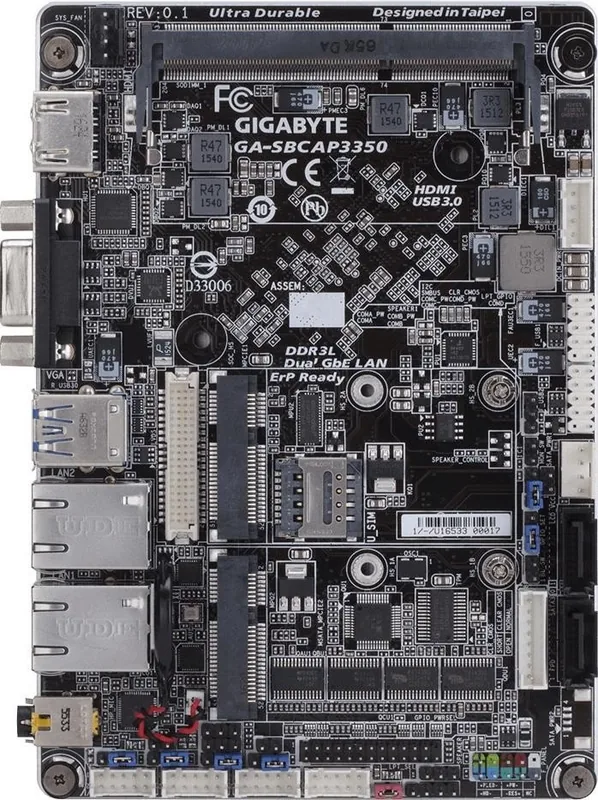
It offers several internal connectors for serial ports, USB headers, GPIO, LPT, LVDS, audio, and fan control. That makes expansion possible, but the board is better suited to users comfortable with hardware integration.
Is this answer helpful?
Advantages and Disadvantages
Advantages

- Compact SBC design with strong connectivity for embedded and industrial systems.
- Dual Gigabit LAN, HDMI, D-Sub, USB 3.1, SATA, and mSATA improve deployment flexibility.
- Wide range of internal headers supports displays, serial devices, GPIO, audio, and control features.
- DualBIOS, hardware monitoring, and detailed BIOS settings improve reliability and maintenance.
Disadvantages

- Single SO-DIMM slot limits memory expansion to 8 GB.
- Low-power Apollo Lake hardware is better for lightweight tasks than demanding workloads.
- Many features are geared toward integrators, so setup may feel complex for beginners.
Product Specification
Chipset
System-on-Chip (SoC)
Header Lighting
N/A
Wireless
N/A
RAID Level
N/A
Multi-GPU
N/A
Lighting
N/A
Manufacturer's Warranty
three years (from production date, processing via specialist dealer)
USB Naming Convention
Link
Product Description
GIGABYTE Apollo Lake: A Compact Motherboard Built for Practical Embedded Builds
The GIGABYTE Apollo Lake board is designed for users who need a small, reliable platform with versatile connectivity and low-power performance. Powered by an Intel Celeron N3350 SoC, it brings together everyday computing efficiency, embedded-friendly expansion options, and a layout that suits kiosks, industrial systems, compact desktops, and digital signage projects.
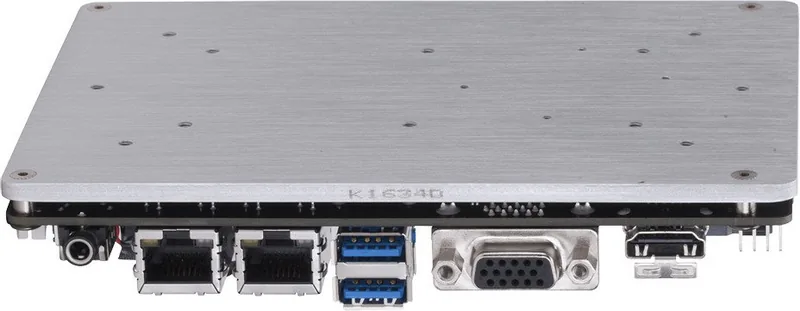
What stands out first is its balance of size and capability. Despite its SBC form factor, the board includes dual Gigabit LAN, HDMI and D-Sub outputs, USB 3.1 Gen 1, SATA 6Gb/s, and mSATA support. That combination makes it flexible for systems that need wired networking, local storage, and display output without consuming much space. Support for LVDS, flat panel display headers, GPIO, COM ports, and other internal connectors also makes it a strong fit for custom hardware integrations.
The memory configuration is straightforward, with a single DDR3L SO-DIMM slot supporting up to 8 GB. Integrated graphics handled by the Apollo Lake platform allow decent output options for lightweight workloads and dual-display setups. For builders who value BIOS control, the board offers a broad set of tuning and protection tools, including boot options, secure boot settings, power behavior controls, and hardware monitoring.
This board also reflects GIGABYTE’s focus on reliability and maintenance. DualBIOS support adds a safety layer, while the internal headers and jumper-based configuration make it easier to adapt the system to different use cases. The manual guidance around installation, CMOS reset, fan connection, and memory handling shows that the platform is built for careful deployment rather than casual consumer upgrading.
If you are looking at the GIGABYTE Apollo Lake Manual for setup guidance, the product itself appears tailored to developers, system integrators, and advanced users who need predictable performance in a compact design. It is not trying to be flashy; instead, it focuses on connectivity, stability, and practical hardware control.
Notes
- Best suited for embedded, industrial, and compact computing projects.
- Check motherboard revision before updating BIOS, drivers, or support files.
- Follow ESD and power-safety precautions during installation.
- Use GIGABYTE’s support resources for compatibility and BIOS updates.
Search for 67,706 Manuals online


Type-in Brand or Model