
GIGABYTE GA-AX370-Gaming K7 Manual
PDF manual · 48 Pages
English



Quick check
Incorrect answer, please try again.
Chat with your GIGABYTE GA-AX370-Gaming K7 manual using AI
Get instant AI answers from your GIGABYTE GA-AX370-Gaming K7 manual
Ask anything about the GIGABYTE GA-AX370-Gaming K7. Answers come from this manual, with the pages they are based on.
Ask a Question
Do you recommend GA-AX370-Gaming K7?
Yes NoFrequently Asked Questions
Use the Q-Flash utility within the BIOS to update without entering the OS or the Windows-based @BIOS utility for online searching.
Is this answer helpful?
The motherboard supports up to 64 GB of DDR4 RAM installed across four DIMM sockets supporting dual channel architecture.
Is this answer helpful?
Yes, RAID 0, RAID 1, and RAID 10 configurations are supported for SATA controllers and NVMe drives via the AMD chipset.
Is this answer helpful?
DualBIOS allows users to switch between Main and Backup BIOS chips using onboard switches to recover from failed updates.
Is this answer helpful?
The Realtek ALC1220 codec is used providing high definition audio with support for 7.1 channel output configurations.
Is this answer helpful?
It is compatible with AMD Ryzen processors utilizing the AM4 socket as specified in the official CPU support list.
Is this answer helpful?
Yes, Smart Fan 5 allows manual or automatic control of CPU and system fan headers for thermal management optimization.
Is this answer helpful?
Advantages and Disadvantages
Advantages

- Dual BIOS protects against corruption ensuring system recovery without replacing hardware parts.
- Killer E2500 LAN chip optimizes network traffic to minimize lag and improve gaming experience significantly.
- Multiple M.2 and U.2 slots allow for high-speed NVMe storage configurations with RAID support options.
- USB 3.1 Gen 2 Type-C and Type-A ports provide fast data transfer speeds for modern peripherals.
- RGB Fusion header support enables customized lighting schemes for aesthetic PC builds and case integration.
Disadvantages

- BIOS settings are complex for inexperienced users requiring detailed manual study for overclocking tasks.
- M.2 connector bandwidth sharing can disable specific SATA ports depending on storage device usage.
- Onboard Wi-Fi is not included requiring separate expansion cards for wireless connectivity options.
- Revision number verification is mandatory for compatibility making initial setup slightly more involved.
- Dual BIOS switch location requires case access for manual toggling between backup and main BIOS.
Product Specification
Socket
AMD AM4
Graphics
iGPU
Wireless
N/A
RAID Level
0/1/10 (X370)
Power Connectors
1x 24-Pin ATX, 1x 8-Pin EPS12V
Manufacturer Warranty
3 years (from production date, handled via specialist retailers)
USB Type
Link
Product Description
GIGABYTE X370 Platform Overview
The GIGABYTE X370 platform offers a robust foundation for high-performance computing enthusiasts and gamers seeking versatility. Built upon the AMD X370 chipset, this motherboard supports the powerful AM4 socket, accommodating the latest AMD Ryzen processors. Users looking to maximize their system potential will appreciate the extensive memory options, supporting up to 64 GB of DDR4 RAM across four DIMM slots. This architecture ensures seamless handling of heavy multitasking and demanding applications without compromise in performance or stability during extended sessions.
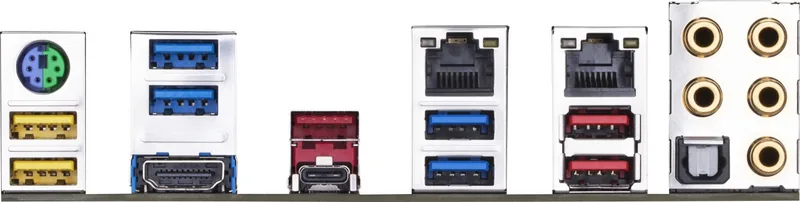
Connectivity is a major highlight, featuring numerous USB 3.1 Gen 2 ports for rapid data transfer speeds at optimal frequencies. The inclusion of the Killer E2500 LAN chip prioritizes gaming traffic, reducing lag during competitive matches significantly by managing network packets effectively. Storage options are equally impressive with support for M.2 and U.2 NVMe configurations alongside traditional SATA drives. This flexibility allows users to prioritize speed for the operating system while retaining ample space for data archiving on traditional hard drives for large media libraries.
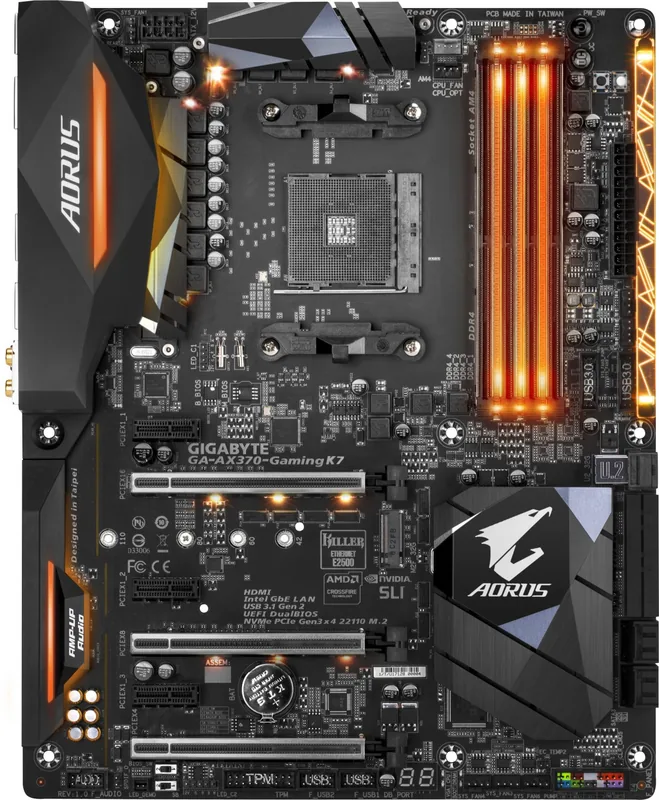
System stability is maintained through the DualBIOS technology, which provides a backup BIOS option in the event of corruption during updates. Onboard headers facilitate advanced cooling solutions and RGB lighting customization through the Fusion software suite integrated into the BIOS. Navigating the hardware installation is straightforward with clear labeling on the board itself for easy identification of power and data ports. Referencing the GIGABYTE X370 Manual helps in understanding specific connector layouts and BIOS configurations essential for optimal performance and system longevity in any build environment.
The onboard buttons provide quick access to critical functions like resetting the system or clearing CMOS settings without opening the case for emergency recovery. Debug LEDs indicate hardware status during boot, simplifying troubleshooting processes for new users looking to identify errors quickly without diagnostic software tools. Audio quality is enhanced by the Realtek ALC1220 codec, delivering immersive sound for multimedia consumption and professional audio work with high dynamic range. Whether you are building a gaming rig or a workstation, this board delivers reliability and expandability for professional and personal use cases alike.
Ensure you verify the revision number on your motherboard before updating drivers or BIOS to avoid compatibility issues that could affect system stability and performance metrics. Following installation guidelines ensures warranty validation and prevents hardware damage during the initial assembly phase of your new computer build. The combination of high-speed interfaces and solid power delivery makes this a compelling choice for the modern PC builder who demands quality and value. Always consult the provided resources to leverage every feature this platform has to offer effectively and safely for future upgrades.
Note: Revision numbers vary by manufacturing batch. Always confirm REV status against official specifications.
Note: DualBIOS switching is accessible via onboard switches for advanced recovery options.
Note: Fan headers require specific PWM connections for full speed control functionality.
Search for 67,706 Manuals online


Type-in Brand or Model