
GIGABYTE G6X Manual
PDF manual · 205 Pages
English



Quick check
Incorrect answer, please try again.
Chat with your GIGABYTE G6X manual using AI
Get instant AI answers from your GIGABYTE G6X manual
Ask anything about the GIGABYTE G6X. Answers come from this manual, with the pages they are based on.
Ask a Question
Do you recommend G6X?
Yes NoFrequently Asked Questions
Turn off the laptop and restart while holding the F9 key. Select Troubleshoot from the menu, then choose Reset This PC or Smart Recovery depending on your needs.
Is this answer helpful?
You need a USB drive with at least 32 GB free space. All data on the drive will be deleted during the creation of the recovery disk.
Is this answer helpful?
Yes. You can choose to keep files while reinstalling Windows to retain personal documents. Alternatively, select the complete reset option to wipe everything.
Is this answer helpful?
Use Fn plus Exclamation mark keys to switch between automatic control and maximum fan speed manually via the Control Center application.
Is this answer helpful?
Warranty details are located on the official Gigabyte support website under the laptop support section. Consult the card provided with the package for specifics.
Is this answer helpful?
No. The recovery feature is only available on devices that came with an operating system installed from the factory.
Is this answer helpful?
Advantages and Disadvantages
Advantages

- - Extensive Fn key combinations for immediate hardware control without extra software
- - Control Center app allows dynamic fan speed adjustment for thermal management
- - Built-in hidden partition simplifies Windows recovery without external media initially
Disadvantages

- - Factory reset option permanently deletes all personal data and files if selected
- - Smart USB Backup requires 32 GB minimum space and wipes existing USB data
- - System recovery process takes approximately 30 minutes and cannot be interrupted
Product Specification
Type
Notebook
Display
16", 1920x1200 (WUXGA), 16:10, 142ppi, 165Hz, non-glare (matte), 250cd/m^2
CPU
Intel Core i7-13650HX, 6C+8c/20T, 2.60-4.90GHz, 24MB+20MB Cache, 55-157W TDP (PBP/MTP), Codename "Raptor Lake-HX" (Raptor Cove + Gracemont, Intel 7)
RAM
16GB DDR5-4800 (2x 8GB SO-DIMM Module, 2 Slots, max. 64GB)
SSD
1TB M.2 PCIe 4.0 x4
HDD
N/A
Flash
N/A
Graphics
NVIDIA GeForce RTX 4060 - 8GB GDDR6 - Mobile, 24SM/3072SP, Codename "AD107" (Ada Lovelace, TSMC 5nm "NVIDIA 4N"), 2370MHz, 105W Total Graphics Power (TGP)
Ports
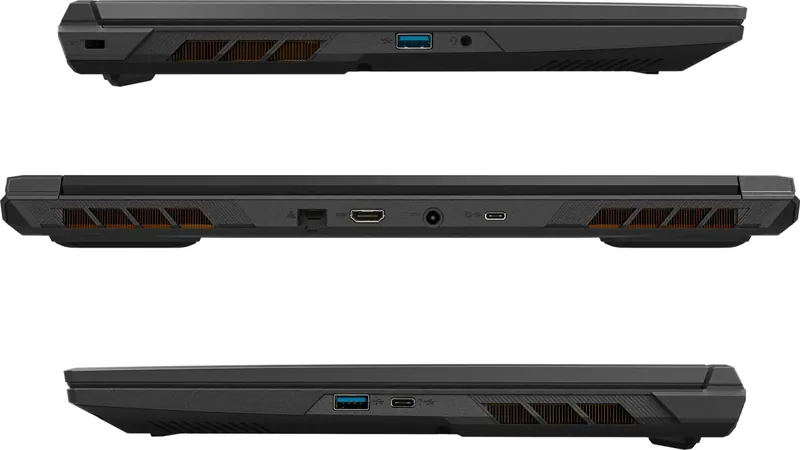
1x USB-C 3.1 (10Gb/s, Power Delivery), 1x USB-C 3.1 (10Gb/s), 2x USB-A 3.0 (5Gb/s), 1x HDMI 2.1, 1x 3.5mm Jack (Line-In), 1x RJ-45 1Gb LAN, 1x DC-In Barrel Jack (Power Input)
Wireless
Wi-Fi 6E (WLAN 802.11a/b/g/n/ac/ax, 2x2), Bluetooth 5.2
Authentication
TPM 2.0
Camera
0.9 Megapixels
Optical Drive
N/A
Battery
Integrated, Li-Ion, 73Wh
AC Adapter
1x Barrel Plug (180W), optional 1x USB-C Power Plug (100W)
Features
Security Lock (Kensington Security Slot), MUX-Switch (Advanced Optimus)
Weight
5.51 lbs
Dimensions
14.21x10.20x1.14in (WxDxH)
Color
Black
SSD/HDD Slots
2x M.2 PCIe 4.0 x4
USB Naming
Left
Product Description
Experience High Performance with the GIGABYTE G6X (2024)
The GIGABYTE G6X (2024) represents a significant leap in portable technology designed for gamers and professionals alike. Users diving into this system discover a robust suite of controls intended for immediate optimization without needing extra software. The keyboard layout supports extensive functionality through dedicated hotkeys. These shortcuts allow seamless adjustment of screen brightness, volume levels, and power modes without interrupting workflow efficiency. Fans operate at maximum speed or auto-adjust via the Control Center application to maintain thermal stability during intense gaming sessions.
Customization extends to visual elements with the programmable LED keyboard. Owners can toggle lighting effects or adjust intensity using specific key combinations involving the Fn key. Flexikey macro capabilities further enhance automation for repetitive tasks, allowing personalized scripts to run instantly. For data safety, the device includes a Smart USB Backup feature integrated into the driver suite. This utility creates a full image of the original system on an external drive, ensuring recovery options exist even if internal storage fails catastrophically. Creating this recovery disk requires a USB drive with at least 32 GB capacity, and note that it wipes existing data on the stick, so preparation is vital before starting the process.
System recovery remains straightforward thanks to a hidden partition installed directly at the factory during manufacturing. If Windows encounters critical errors or becomes unbootable, users can initiate restoration directly from the boot menu by pressing F9 repeatedly. There are distinct paths available depending on whether personal files need preservation. Choosing to reset completely restores factory settings but removes individual data permanently. Conversely, keeping files while reinstalling offers a balance between troubleshooting system integrity and retention of personal assets. Advanced options include startup repair and command prompts for specialized diagnostic scenarios.
Managing the GIGABYTE G6X (2024) Manual resources helps owners understand these complex systems better. Detailed instructions explain how to access advanced startup settings for diagnostics when standard fixes fail. Warranty support is accessible through official online portals linked in the support section. Ensuring the AC adapter stays connected during restoration prevents corruption which could damage the device. Battery life management is crucial during these long processes. Whether tuning fan speeds or managing backups, this machine empowers users with granular control over hardware performance metrics effectively. Regularly checking status lights confirms operational health.
Final Maintenance Insights
Ownership involves understanding maintenance routines thoroughly. Regular updates and careful usage of built-in tools extend longevity. Always verify connectivity before major operations begin. Enjoy the full capability of your setup by mastering these internal utilities. The interface is intuitive once the basic shortcut patterns become familiar habits. Security and performance go hand in hand with proper configuration. Keep drivers updated to avoid compatibility issues with newer software. By following guidelines found within the GIGABYTE G6X (2024) Manual, owners maximize their investment return. Proper care leads to sustained high performance over years of daily use.
Search for 67,706 Manuals online


Type-in Brand or Model