Lernen Sie ihr Geräts kennen / Découvrez votre unité / Conozca su disposivo / Conhecendo a sua unidade / Scopri la tua unità / Первое знакомство с устройством / Prezentacja zestawu / Cihazınızı daha iyi tanıyın
BRIXs Ultrakompaktes PC Kit / Kits PC ultra compact BRIX s
PC Kit Ultra compacto BRIXs / BRIXs Kit PC Ultra Compacto
Kit PC Ultra Compao BRIXs / Ультракомпактный ПК BRIXs: Комплект для самостоятельной сборки
GB-BL 系列超微型電腦 / GB-BL 系列超微型台式计算机
BRIXs ウルトラ・コンパクト PC キット / BRIX s 울트라 컴펙트 PC 키트
Quick Start Guide
Schnellstartanleitung / Guide de démarrage rapide / Guía de inicio rápido / Guia de Início Rápido
Guida Rapida / Руководство по быстрой сборке / Skrócona instrukcja obsługi
Hızlı Başlangıç Kılavuzu / 快速入門使用者手冊 / 快速入门用户手册
クイック・スタート・ガイド / 빠른 시작 설명서
A) Wireless Module: How to Safely Remove the Module
Wireless-Modul: Das sichere enernen des Moduls / Module sans fil : Comment rerer le module en toute sécurité / Módulo Inalámbrico: Cómo eliminar de forma segura el módulo
Módulo Wireless: Como remover o módulo com segurança / Modulo Wireless: Come rimuovere con sicurezza il modulo
Модуль беспроводной связи: Как безопасно удалить модуль / Moduł bezprzewodowy: Jak bezpieczne usunąć moduł / Kablosuz Modülü : Modülü Nasıl Güvenli Kaldırabilirim
移除隨機搭配的無線模組 / 移除随机搭配的无线模块 / ワイヤレスモジュール:安全にモジュールを取り外す方法 / 무선 모듈: 모듈을 안전하게 제거하는 방법
Safety and Regulatory Informaon
Sicherheitshinweise und Normen / Informaon sur la Sécurité et Réglementaon / Seguridad y Normava / Informações Regulatórias e de Segurança / Informazioni di Sicurezza e Regolamen
Меры безопасности и нормативная информация / Bezpieczeństwo i zgodność z przepisami / Güvenlik ve Yasal Bilgiler / 安全規範 / 安全规范 / 安全性と規制に関する情報 / 안전 및 규제 정보
Risk of explosion if the baery is replaced with an incorrect type. Baeries should be recycled where possible. Disposal of used Baeries
must be in accordance with local environmental regulaons.
Failure to use the included Model GB-BL Power Adapter may violate regulatory compliance and may expose the user to safety hazards.
Es besteht Explosionsgefahr, wenn die Baerie durch einen falschen Typ ersetzt wird. Baerien müssen recycelt werden, sofern möglich.
Gebrauchte Baerien müssen gemäß den örtlichen Umweltschutzvorschrien entsorgt werden.
Die Nichtbenutzung des mitgelieferten Netzteils Modell GB-BL könnte eine Einhaltung gesetzlicher Vorschrien nicht mehr gewährleisten
und für den Benutzer zu einem Sicherheitsrisiko werden.
Risque d’explosion si la baerie n’est pas dcompable. Les piles doivent être recyclées quand cela est possible. Le rejet des baeries
usagées doit être effectué en foncon des réglementaons locales.
Si vous n'ulisez pas le modèle d'alimentaon GB-BL fournit, vous pouvez transgresser la conformité réglementaire et peut exposer
l'ulisateur à des risques de sécurité.
Riesgo de explosión si se reemplaza la batería por una incorrecta. Las baterías deben ser reciclados donde sea posible. Eliminación de
baterías usadas debe ser de acuerdo con las regulaciones ambientales locales.
Si no se uliza el adaptador de corriente incluido modelo GB-BL pueda violar el cumplimiento normavo y puede exponer al usuario a
riesgos de seguridad.
IRisco de explosão caso a bateria seja substuída por po errado. Baterias devem ser recicladas. O descarte de baterias usadas devem ser
feitas em locais de acordo com o regulamento ambiental.
O não cumprimento na ulização da fonte de energia modelo GB-BL incluso, pode violar o regulamento e pode expor o usuário à riscos de
segurança.
Il mancato ulizzo della dotazione del modello GB-BL Power Adapter può violare la conformità normava e può esporre l'utente a rischi
per la sicurezza.
Użycie innego zasilacza niż dostosowany do modelu GB-BL może spowodować uszkodzenie sprzętu, a także być niebezpieczne dla
zdrowia.
Güvenlik Uyarısı: GB-BK Güç Adaptörünün kullanılmaması kullanıcıya ve cihaza zarar verebilir.
Применение стороннего блока питания отличного от устройства из комплекта поставки модели GB-BL может повлечь за собой
нарушение нормативных требований и правил техники безопасности.
Rischio di esplosione della baeria se sostuita con una non correa. Le baerie devono essere riciclate dove possibile. Lo smalmento
delle baerie usate deve essere svolto in accordo con la regolamentazione locale.
배터리를 잘못된 타입으로 교체하면 폭발 위험이 있습니다. 가능한한 배터리를 재활용하십시오. 수명이 다한 배터리는 현지의
● For a list of tested memory, M.2 SSD, 2.5” HDD, wireless adapters and OS supported, go to: hp://www.gigabyte.com ● To download the latest drivers and BIOS updates, go to: hp://www.gigabyte.com ● For product support, go to:
hp://www.gigabyte.com
● Pour obtenir une liste de mémoire, M.2 SSD, disques 2.5” HDD, adaptateurs sans fil et systèmes d'exploitaon compable, veuillez vous rendre sur : hp://www.gigabyte.fr● Télécharger la dernier version de mis à jour du bios et des pilotes, veuillez vous rendre sur:
hp://www.gigabyte.fr ● Pour l'assistance produit, veuillez vous rendre sur : hp://www.gigabyte.fr
● Para obtener una lista de memorias probadas, M.2 SSD, HDD 2.5", adaptadores inalámbricos y sistemas operavos compables, visite: hp://es.gigabyte.com● Para descargar los úlmos controladores y actualizaciones de BIOS, vaya a: hp://es.gigabyte.com
● Para el soporte del producto, visite: hp://es.gigabyte.com
● Para a lista de memórias testadas, M.2 SSD, HDD 2.5", adaptadores wireless e Sistemas Operacionais suportados, acesse: hp://br.gigabyte.com● Para baixar os drivers mais recentes e atualizações de BIOS, acesse: hp://br.gigabyte.com
● Para suporte ao produto, acesse: hp://br.gigabyte.com
● Per una lista di compabilità di HDD 2,5", M.2 SSD, memorie, adaori Wireless e OS supporta visita: hp://www.gigabyte.com● Per scaricare gli ulmi Driver e BIOS visita: hp://www.gigabyte.com ● Per supporto visita: hp://www.gigabyte.com
● Eine Liste mit geprüem Arbeitsspeicher, M.2 SSD, 2.5” HDD, drahtlosen Adaptern und unterstützten Betriebssystemen finden Sie bie unter: hp://www.gigabyte.com● Für den Download aktuellster Treiber und BIOS-Updates gehen Sie bie zu:
hp://www.gigabyte.com ● Unterstützung zu Produkten finden Sie bie unter: hp://www.gigabyte.com
● Подробная информация о протестированных модулях ОЗУ, M.2 SSD, 2.5” HDD и модулях беспроводной связи под управлением совместимой ОС размещена по адресу: hp://www.gigabyte.com● Для загрузки актуальных драйверов и обновлений
версии BIOS воспользуйтесь ссылкой: hp://www.gigabyte.com ● Информация о технической поддержке продукта размещена по адресу: hp://www.gigabyte.com
● Test edilen haza listesi için, M.2 SSD, 2.5” HDD, kablosuz adaptörler ve desteklenen OS için, ilgili adrese gidiniz: hp://www.gigabyte.com● En son sürücüleri ve BIOS güncellemelerini indirmek için, ilgili adrese gidiniz: hp://www.gigabyte.com
● Ürün desteği için, ilgili adrese gidiniz: hp://www.gigabyte.com
● Listę kompatybilnych komponentów (pamięć, M.2 SSD, 2.5” HDD, karty rozszerzeń) oraz systemów operacyjnych można znaleźć pod adresem: hp://gigabyte.com● Najnowsze wersje sterowników oraz BIOSu można pobrać ze strony:hp://www.gigabyte.com
● Aby uzyskać wsparcie dotyczące produktów proszę wejść na stronę internetową: hp://www.gigabyte.com
● 如需已測試記憶體、M.2 SSD、2.5" SATA HDD、無線介面卡和支援的作業系統清單,請前往 hp://www.gigabyte.com● 若要下載最新驅動程式和 BIOS 更新,請前往:hp://www.gigabyte.com● 如需產品支援資訊,請前往:
hp://www.gigabyte.com
● 如需已测试内存、M.2 SSD、2.5" SATA HDD、无线适配卡和支持的操作系统列表,请前往:hp://www.gigabyte.com● 若要下载最新驱动程序和 BIOS 更新,请前往:hp://www.gigabyte.com● 如需产品支持信息,请前往:
Chat with your GIGABYTE Brix GB-BLPD-5005 manual using AI
Get instant AI answers from your GIGABYTE Brix GB-BLPD-5005 manual
Ask anything about the GIGABYTE Brix GB-BLPD-5005. Answers come from this manual, with the pages they are based on.
Ask a Question
0/1000
Do you recommend Brix GB-BLPD-5005?
YesNo
0
eleonora65
9 months ago
Does the Brix support HyperX 8GB DDR4-2400 CL14 SO-DIMM HX424S14IBK28, or do I need a different RAM kit?
0
Manual.ly
9 months ago
Some buyers report that the HX424S14IBK28 (HyperX 8GB DDR4-2400 CL14, 2-stick kit) may not work reliably. In the same reviews, the system did work well with a 2x8GB G.Skill RipJaws DDR4-2400 SO-DIMM CL16 kit (F4-2400C16D-8GRS). For best results, match the required spec from our documentation or the device memory QVL: DDR4-2400 SO-DIMM, 1.2V, non-ECC, and timings within the supported range. If the RAM is not detected or causes instability, try another compatible kit or update the BIOS, then re-test.
M: OA-GPT-5-NAN
M: OA-GPT-5-NAN
Frequently Asked
Questions
A
It is well suited for compact home PCs, office desktops, media setups, and mounted displays where a small footprint and flexible configuration are important.
Is this answer helpful?
A
No. It is a bare-bone system, so RAM and storage are typically purchased separately. You can add compatible DDR4 SO-DIMM memory and an M.2 2280 SSD.
Is this answer helpful?
A
Yes. The package includes a VESA mounting bracket, which allows the unit to be installed behind a VESA-compatible display or TV for a cleaner setup.
Is this answer helpful?
A
The system includes front USB ports, audio jacks, and rear connections such as HDMI 2.0, Mini DisplayPort, RJ-45 Ethernet, DC-in, and a Kensington lock slot.
Is this answer helpful?
A
USB Power On lets you turn the device on using a connected USB keyboard or mouse. It is especially useful when the mini PC is hidden behind a display.
Is this answer helpful?
A
Yes. Windows may require an additional GIGABYTE patch for USB Power On to work properly. The feature can then be enabled in BIOS settings.
Is this answer helpful?
M: OA-GPT-54-NAN
Advantagesand
Disadvantages
Advantages
Ultra-compact design fits cleanly behind a monitor or in tight workspaces.
Supports user-selected DDR4 SO-DIMM memory and M.2 2280 SSD storage.
Includes modern I/O such as USB-C, HDMI 2.0, Mini DisplayPort, and Gigabit Ethernet.
VESA mount support and USB Power On make it practical for office or kiosk setups.
VS
Disadvantages
Bare-bone configuration means you must buy RAM and storage separately.
Wireless module inclusion may vary by market, so features can differ by region.
USB Power On in Windows may require an extra patch from GIGABYTE.
Only the included GB-BL power adapter should be used for safety and compliance.
1x M.2/E-Key (PCIe, 2230, occupied with WiFi+BT module)
Wireless
Wi-Fi 5 (WLAN 802.11a/b/g/n/ac), Bluetooth 4.0
Audio
2.0 (Realtek ALC255)
Card Reader
N/A
Power Supply
external, 1x DC barrel connector (40W/19V/2.1A)
VESA Mount
2.95x2.95/3.94x3.94 (included)
Dimensions (WxHxD)
4.45x1.85x4.69in
Volume
0.63 qt
CPU Cooler
included
Special Features
Security Lock (Kensington)
USB Nomenclature
Link
M: OA-GPT-54-NAN
Product
Description
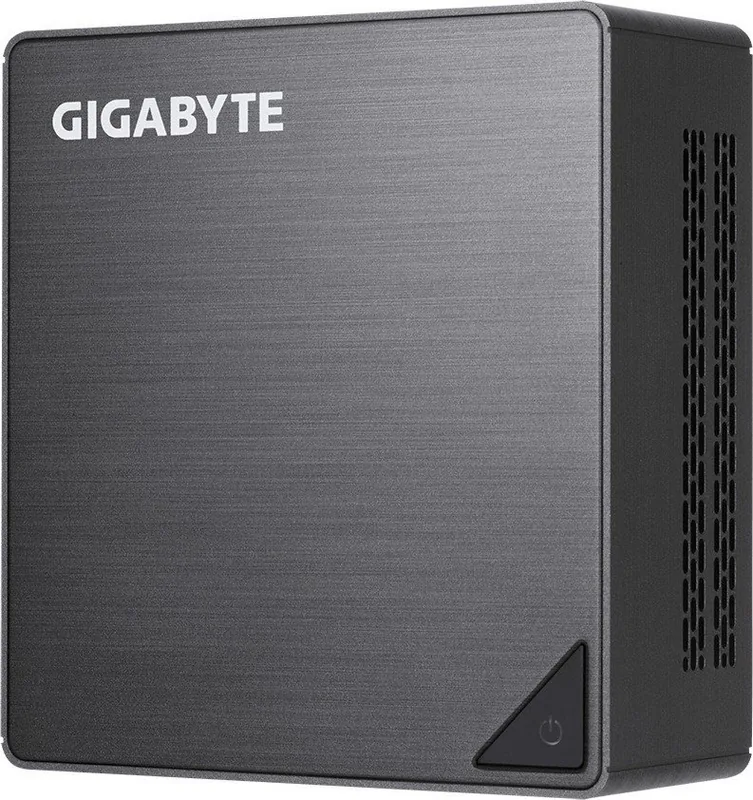
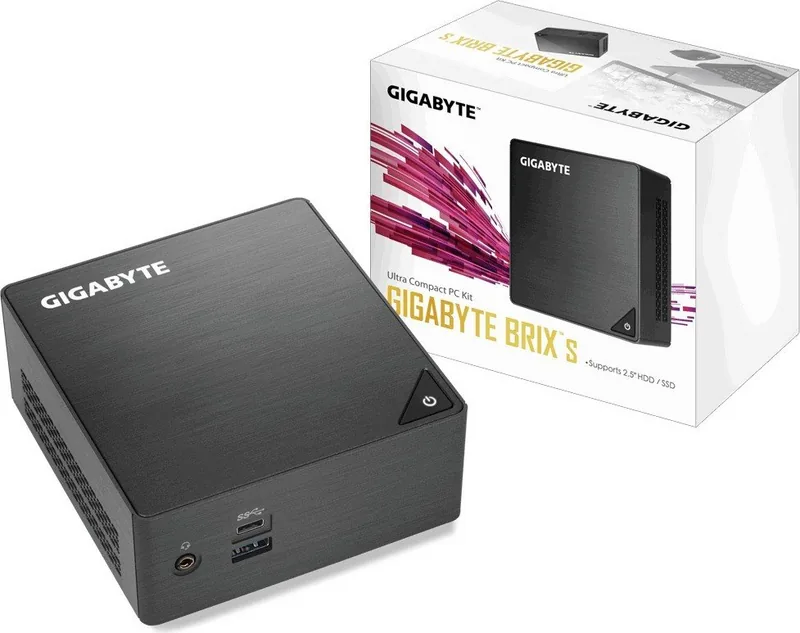
GIGABYTE Brix GB-BLPD-5005: Compact Power in a Bare-Bone Mini PC
The GIGABYTE Brix GB-BLPD-5005 is a small-form-factor PC kit built for users who want flexibility without taking up desk space. If you have been searching for the GIGABYTE Brix GB-BLPD-5005 Manual, you will quickly notice that this model is all about customization: it arrives as a bare-bone system, ready for you to add your own memory and storage.
A compact system built around choice
This BRIX design is ideal for offices, home setups, digital signage, and media stations where size matters. Its ultra-compact chassis supports DDR4 SO-DIMM memory and M.2 2280 SSD storage, giving you a straightforward path to build a system that matches your workload. Depending on the BRIX variant, there may also be support for an additional 2.5-inch SATA HDD, adding even more storage flexibility.
Practical connectivity for daily use
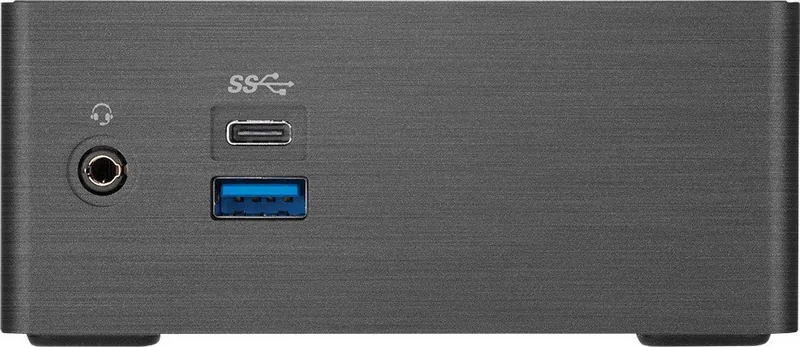
Despite its small footprint, the GB-BLPD-5005 offers useful connectivity for modern computing. The front panel includes USB 3.0 Type-A, USB 3.0 Type-C, and audio connections, while the rear side provides HDMI 2.0, Mini DisplayPort, Gigabit Ethernet, and a Kensington lock slot. This makes it easy to connect a display, network, and peripherals without needing extra adapters in most setups.
Designed for easy placement and expansion
One of the most appealing features is the included VESA mounting bracket, which lets you attach the unit behind a monitor or TV for a cleaner workspace. The system also supports USB Power On, a handy option for users who want to start the PC using a connected keyboard or mouse. For many installations, that means a more convenient everyday experience.
What to keep in mind
Since this is a bare-bone kit, the system does not include RAM, SSD, or a 2.5-inch drive by default. It also ships with a 65W power adapter, and GIGABYTE notes that using the proper included adapter is important for safety and compliance. Wireless module availability may vary by region, so it is worth checking local specifications before buying.
Notes
Confirm compatibility for memory, SSDs, and wireless adapters before installation.
Install updates, drivers, and BIOS files from GIGABYTE for the best experience.
Follow battery, recycling, and safety guidance during setup and disposal.
Check regional product differences if you need a preinstalled wireless module.




eleonora65
9 months ago
Does the Brix support HyperX 8GB DDR4-2400 CL14 SO-DIMM HX424S14IBK28, or do I need a different RAM kit?
Manual.ly
9 months ago
Some buyers report that the HX424S14IBK28 (HyperX 8GB DDR4-2400 CL14, 2-stick kit) may not work reliably. In the same reviews, the system did work well with a 2x8GB G.Skill RipJaws DDR4-2400 SO-DIMM CL16 kit (F4-2400C16D-8GRS). For best results, match the required spec from our documentation or the device memory QVL: DDR4-2400 SO-DIMM, 1.2V, non-ECC, and timings within the supported range. If the RAM is not detected or causes instability, try another compatible kit or update the BIOS, then re-test.