
GIGABYTE B450 Series Manual
PDF manual · 42 Pages
English



Quick check
Incorrect answer, please try again.
Chat with your GIGABYTE B450 Series manual using AI
Get instant AI answers from your GIGABYTE B450 Series manual
Ask anything about the GIGABYTE B450 Series. Answers come from this manual, with the pages they are based on.
Ask a Question
Do you recommend B450 Series?
Yes NoFrequently Asked Questions
This motherboard supports AMD Socket AM4 CPUs, including 1st, 2nd, and 3rd Generation Ryzen processors, Ryzen with Radeon Vega Graphics, and Athlon with Radeon Vega Graphics. Always check the official website for the latest CPU support list before purchasing.
Is this answer helpful?
To configure RAID, enter the BIOS Setup during startup by pressing Delete. Navigate to the Chipset section, enable Chipset SATA Port Enable, and set SATA Mode to RAID. You can then create RAID 0, 1, or 10 arrays using the RAIDXpert2 Utility or legacy RAID ROM depending on your boot mode settings.
Is this answer helpful?
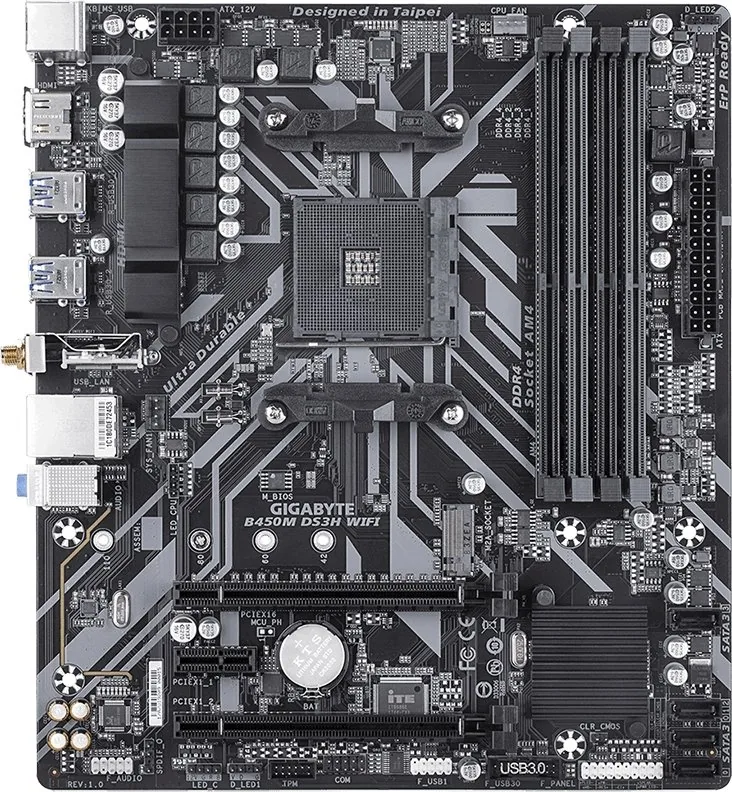
Yes, the board has two M.2 sockets. However, installing an M.2 PCIe SSD may disable specific SATA ports due to shared bandwidth. Refer to the motherboard layout diagram in the manual to see which SATA ports become unavailable based on your M.2 installation.
Is this answer helpful?
The motherboard supports up to 128 GB of system memory using four DDR4 DIMM sockets. It utilizes dual-channel memory architecture and supports non-ECC un-buffered DIMMs with speeds ranging from 2133 MHz to 2933 MHz.
Is this answer helpful?
You can update the BIOS using the Q-Flash utility within the BIOS setup menu, which allows flashing without entering the operating system. Alternatively, you can use the @BIOS Windows-based application to download and install the latest version from the internet.
Is this answer helpful?
Yes, the motherboard includes extensive overclocking features in the M.I.T. menu. Users can adjust CPU base clocks, voltage, memory multipliers, and timing parameters. Careful adjustment is required to maintain system stability.
Is this answer helpful?
Advantages and Disadvantages
Advantages

- Supports AMD Ryzen 1st, 2nd, and 3rd Generation processors
- Four DDR4 DIMM slots with XMP support up to 2933 MHz
- Dual M.2 connectors for fast NVMe and SATA SSD storage
- Comprehensive RGB Fusion lighting customization
- Robust power delivery and smart fan control features
Disadvantages

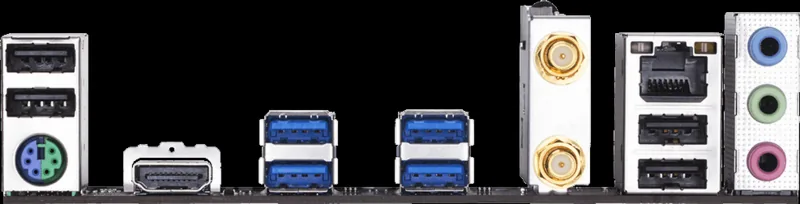
- Onboard graphics limited to DVI-D and HDMI without DisplayPort
- M.2 slot bandwidth may conflict with certain SATA ports depending on configuration
- BIOS overclocking requires technical knowledge to avoid instability
- No built-in Wi-Fi connectivity requiring separate adapter
- Lacks USB Type-C port on the rear I/O panel
Product Specification
Socket
AMD AM4
Chipset
AMD B450
Buttons/Switches
N/A
Graphics
iGPU
RAID-Level
0/1/10 (B450)
Power Connectors
1x 24-Pin ATX, 1x 8-Pin EPS12V
Manufacturer Warranty
three years (from production date, handled via authorized dealer)
USB Layout
Left
Product Description
Elevate Your Build with the GIGABYTE B450 Motherboard
The GIGABYTE B450 AORUS ELITE V2 stands as a robust foundation for AMD-based computing systems, designed to deliver exceptional performance and reliability for enthusiasts and gamers alike. This motherboard leverages the powerful AMD B450 chipset to support a wide array of 1st, 2nd, and 3rd Generation Ryzen processors, ensuring that your system remains future-proof and capable of handling demanding workloads. Whether you are engaging in high-end gaming, content creation, or heavy multitasking, this board provides the necessary architecture to maximize your hardware potential.
One of the standout features of this platform is its comprehensive memory support. Equipped with four DDR4 DIMM sockets, it accommodates up to 128 GB of system memory while supporting dual-channel architecture. Users can take advantage of speeds up to 2933 MHz and utilize Extreme Memory Profile (XMP) modules for enhanced performance without complex manual tuning. The onboard graphics capabilities, including HDMI 2.0 and DVI-D ports, offer versatile display options, making it easy to connect monitors for both productivity and entertainment purposes.
Connectivity is at the heart of the design, featuring an extensive array of USB ports including USB 3.1 Gen 1 on the rear panel and internal headers for front panel expansion. Storage flexibility is further enhanced with two M.2 connectors supporting PCIe 3.0 x4/x2 SSDs and six SATA 6Gb/s ports, allowing for rapid data transfer speeds and RAID configurations. The inclusion of RGB Fusion technology empowers users to synchronize lighting effects across their entire build, creating a visually stunning aesthetic that matches their personal style.
For advanced users, the BIOS offers deep customization through the M.I.T. menu, enabling precise control over CPU clock ratios, voltages, and memory timings. Features like Q-Flash allow for seamless BIOS updates directly from the utility interface, reducing the risk associated with flashing procedures. The board also integrates smart fan controls, monitoring sensors, and protection against overheating to ensure stable operation under load. With its ATX form factor and durable construction, the GIGABYTE B450 is built to withstand the rigors of daily use while providing a stable platform for years to come.
Search for 67,706 Manuals online


Type-in Brand or Model