
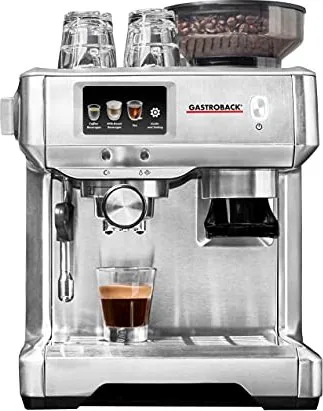
Gastroback 42623 Design Espresso Barista Touch Manual
PDF manual · 39 Pages
English



Quick check
Incorrect answer, please try again.
Chat with your Gastroback 42623 Design Espresso Barista Touch manual using AI
Get instant AI answers from your Gastroback 42623 Design Espresso Barista Touch manual
Ask anything about the Gastroback 42623 Design Espresso Barista Touch. Answers come from this manual, with the pages they are based on.
42623 Design Espresso Barista Touch Maintenance Schedule
Empty and refill the water tank at least daily to ensure fresh water quality and prevent stagnation.
Run the descaling cycle approximately every two weeks or at the latest when the message appears to prevent damage from lime deposits.
Replace the water filter every two months for daily use or every three weeks for rare use to protect the water system from scale and particles.
Wipe the steam wand with a moist cloth after every use to remove milk residues and prevent clogging.
Give off hot water via the group head after each extraction to remove coffee powder residues from the shower screen.
Empty the drip tray when the red filling indicator appears to avoid overflow and potential hazards.
Free maintenance reminders
Timed to your purchase date. Always free, unsubscribe anytime.
Ask a Question
Do you recommend 42623 Design Espresso Barista Touch?
Yes NoFrequently Asked Questions
It offers espresso, espresso pod, cafe crema, Americano, espresso macchiato, cappuccino, latte macchiato, milk coffee, flat white, and hot milk. It also dispenses hot water at settings intended for white, green, oolong, and black tea.
Is this answer helpful?
Yes. The integrated grinder processes dry whole coffee beans directly into the filter basket. You can also fill a suitable filter basket with espresso-ground coffee manually. The dedicated pod filter is intended only for a single E.S.E. espresso pod.
Is this answer helpful?
The machine provides 12 memory spaces for personal drink profiles. You can save adjusted settings such as coffee quantity, beverage volume, and milk foam level, and you can also define new default settings.
Is this answer helpful?
Yes. The hot-water function provides separate temperature settings for white tea at about 65 C, green tea at about 75 C, oolong tea at about 80 C, and black tea at about 85 C.
Is this answer helpful?
The removable water tank holds from 0.5 to 2.5 liters. Use fresh, cold drinking water and keep the level between the minimum and maximum markings. Low-mineral still water may reduce limescale buildup.
Is this answer helpful?
Clean the steam wand after use, empty the drip tray as needed, and regularly clean the brew head, filter holder, and grinder. Use the built-in cleaning and descaling programs, replace the water filter as recommended, and respond promptly to descaling reminders.
Is this answer helpful?
Advantages and Disadvantages
Advantages

- Touchscreen interface guides drink preparation, settings, cleaning, and maintenance.
- Pre-programmed coffee, milk, tea, and hot-water options support varied daily drinks.
- Integrated adjustable grinder accepts whole beans; the machine also supports ground coffee and E.S.E. pods.
- Customizable dose, volume, foam level, and coffee temperature can be saved in up to 12 profiles.
- Large 2.5-liter water tank, cup warmer, steam wand, and guided cleaning functions improve convenience.
Disadvantages

- Milk frothing requires manual handling of the steam wand and a suitable metal milk pitcher.
- The machine cannot grind, brew, and dispense steam or hot water at the same time.
- Regular cleaning, filter replacement, and descaling are essential, especially with hard water.
- Hot water, pressurized steam, portafilter, and brew head require careful handling to avoid burns.
Product Specification
Design
Thermoblock
Power
1,600 W
Color
silver
Pump pressure
217.56 psi
Coffee system
Coffee beans, ground coffee, E.S.E. coffee pods
Milk system
no
Grinder
Conical grinder (11 settings)
Brewing temperature
adjustable (4 settings)
Water tank capacity
84.54 fl oz
Bean container capacity
7.76 oz
Special features
2-cup function, steam nozzle, hot water function, pre-brewing system, removable water tank, heated cup tray
Smart home
no
Dimensions
11.34 x 15.55 x 12.01 in (W x H x D)
Weight
18.3 lb
Product Description
Gastroback 42623 Design Espresso Barista Touch - Read, Download & Print Free
The Gastroback 42623 Design Espresso Barista Touch is a versatile home espresso machine designed for coffee enthusiasts who want barista-style control with an approachable touchscreen experience. Its durable construction, integrated grinder, steam wand, and intuitive drink selection make it suitable for preparing a broad range of hot beverages in a modern kitchen.
Coffee, Milk, and Tea in One Machine
A key strength of this model is its selection of pre-programmed drinks. Users can choose from espresso, cafe crema, Americano, espresso macchiato, cappuccino, latte macchiato, flat white, milk coffee, and hot milk. It also provides dedicated hot-water settings for white, green, oolong, and black tea. Each tea option uses an appropriate temperature, helping preserve flavor without requiring a separate kettle.
The built-in grinder holds up to 220 g of whole beans and delivers ground coffee directly into the portafilter. Its grind setting is continuously adjustable, while the dose can be tailored to one or two cups. The machine also supports pre-ground espresso coffee and E.S.E. espresso pods through the matching filter basket, offering flexibility for different routines and preferences.
Touchscreen Control and Personal Settings
The responsive touchscreen guides users through drink selection, brewing, grinding, milk frothing, cleaning, and maintenance. It provides practical prompts for preparation steps, filter selection, water levels, and troubleshooting. Four coffee temperature ranges are available, while beverage volume, grinding dose, and milk foam level can be adjusted to suit individual taste.
Personalization goes further with memory functions. Alongside its factory drink options, the Gastroback 42623 can retain new standard settings and up to 12 custom profiles. This makes it convenient for households where several people enjoy different coffee strengths, cup sizes, or milk textures.
Designed for Daily Use
The machine has a removable 2.5-liter water tank, cup-warming surface, detachable drip tray with level indicator, and a swiveling steam wand. With up to 15 bar pressure and 1600 W maximum power, it is built to produce espresso with pre-infusion, allowing coffee grounds to bloom before full extraction. This supports richer aroma and more balanced results.
Maintenance is integrated into the interface. Guided programs help clean the brew head, portafilter, steam wand, and water system. A water filter can reduce limescale and particles, while water-hardness settings help identify when descaling is needed.
Notes
For best results, use fresh cold water, dry whole coffee beans, and preheated cups. Clean the steam wand after every use, empty the drip tray regularly, and follow descaling reminders to protect performance over time.
Search for 67,706 Manuals online


Type-in Brand or Model