
Garmin quatix 6 Manual
PDF manual · 58 Pages
English


Quick check
Incorrect answer, please try again.
Chat with your Garmin quatix 6 manual using AI
Get instant AI answers from your Garmin quatix 6 manual
Ask anything about the Garmin quatix 6. Answers come from this manual, with the pages they are based on.
quatix 6 Maintenance Schedule
Rinse the device with clear water after each training to remove sweat and salt.
Thoroughly clean and dry the contacts and surrounding area before charging or connecting to a computer to protect against corrosion.
Use a soft cloth for cleaning; do not use sharp objects, chemical cleaners, solvents, or insect repellents that could damage plastic parts.
Ask a Question
Do you recommend quatix 6?
Yes NoFrequently Asked Questions
Install the Garmin Connect app and follow the on-screen instructions to pair via Bluetooth. Ensure the device is within range during setup.
Is this answer helpful?
Yes it supports surface swimming but scuba diving may damage the product and void the warranty. Follow depth limits strictly.
Is this answer helpful?
Yes you can download audio from providers. You must connect to a Wi-Fi network or use a computer to load files.
Is this answer helpful?
Only the X Solar model has a transparent solar charging lens. The standard model relies solely on the battery for charge.
Is this answer helpful?
The device detects falls or high acceleration impacts. It sends an alert with your location to emergency contacts if you cannot cancel.
Is this answer helpful?
Yes Garmin Pay allows secure payments. You must add a card via the app and set a passcode for transactions.
Is this answer helpful?
The device tracks activities only while the timer is running. Save completed activities to view them in Garmin Connect later.
Is this answer helpful?
Advantages and Disadvantages
Advantages

- Advanced marine navigation with solar charging available for extended battery life.
- Robust safety features including incident detection and live tracking for peace of mind on expeditions.
- Comprehensive fitness metrics like VO2 Max and body battery for optimized training.
- Durable construction built to withstand extreme diving and tactical conditions without failure.
- Versatile music and payment capabilities allow connectivity away from your smartphone during activities.
Disadvantages

- Learning curve can be steep due to the high density of features and complex menu structures.
- Price point is higher than many consumer fitness watches on the market today.
- Solar charging works best in direct sunlight and may require a larger bezel variant for efficiency.
- Battery life in high performance modes decreases significantly during continuous GPS tracking sessions.
- Some advanced marine features require pairing with additional compatible Garmin marine electronics.
Product Specification
Operating System
Proprietary
Connectivity
Wi-Fi (WLAN), Bluetooth, NFC, ANT+
Heart Rate Monitoring
Integrated
Measurement Functions
Time, Stopwatch, Countdown, Step Counter, Stair Counter, Cadence, Swim Laps, Speed, Distance, Lap Counter, Sleep Tracking, Cycle Tracking, Heart Rate, Blood Oxygen, Calories, Temperature, Altitude, Air Pressure
Other Features
Time Zones, Date, Calendar, 12/24h Display, Alarm, Weather Forecast, Sedentary Reminder, Payment Feature, Music Control (iOS, Android), Message Notifications (iOS, Android), Call Notifications (iOS, Android)
Sensors
Barometer
Navigation
Yes, Compass, GPS, GLONASS, Galileo
Compatibility
Android, iOS
Case Material
Stainless Steel
Case Colors
Silver, Gray
Product Description
Discover the Ultimate Adventure Companion
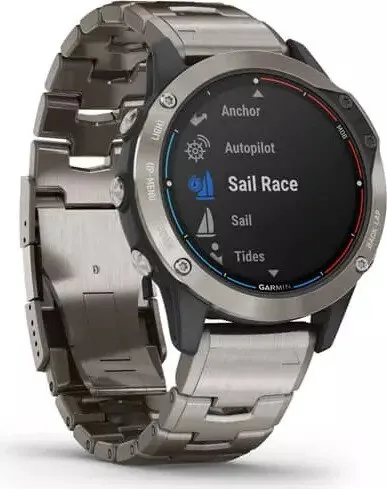
The Garmin quatix 6 stands out as a premium tactical and marine watch designed for extreme conditions. Its robust build quality ensures durability during deep sea dives or mountain expeditions. The Garmin quatix 6 Manual guides users on setup and configuration for all activities. Whether you are tracking fishing expeditions or managing group activities, this watch delivers precise data. The interface is intuitive yet packed with sensors for accurate measurement of heart rate and performance. It is engineered for those who demand reliability in harsh environments without compromising on style or functionality. Advanced GPS tracking provides accurate location data even in dense forests or under heavy cloud cover.
Marine Capabilities
Navigation is key for boaters seeking adventure on the water. You can access tides, waypoints, and autopilot control directly from your wrist. The tactical edition allows for advanced navigation modes suitable for complex environments. Marine maps can be downloaded for offline use ensuring you never lose your way on open waters. Sail racing tools help calibrate wind angles for better performance during competitions. Fishing modes count your daily catch and track time remaining for competition events. Anchor assist features prevent drifting during overnight stays while anchored. Autopilot linking controls steering systems for hands-free operation on long voyages. Boat data streaming shows critical navigation information from compatible chartplotters.
Fitness and Safety
Training metrics include VO2 Max estimates and Body Battery levels to monitor recovery. Safety features like incident detection alert contacts automatically if you fall in water or sustain an injury during outdoor sports. Music storage lets you stream favorites while training away from your phone. The device supports various heart rate monitors for enhanced accuracy during intense workouts. You can also track sleep quality to understand your body stress levels over time. Lactate threshold testing helps determine optimal training zones for peak athletic output. Recovery time is estimated to guide your daily rest requirements accurately. Pulse Oximeter readings provide insights into blood oxygen saturation levels at altitude.
Connectivity and Customization
Sync with smart devices to view calls and messages. Garmin Pay enables contactless payments at compatible terminals. Bluetooth and Wi-Fi keep your software updated without cables. Custom watch faces allow personal styling to match your gear. Connect IQ enables third-party apps for added functionality like weather reports or specific sport statistics. GroupTrack allows you to follow friends during multi-person events in real time. LiveTrack ensures family knows where you are during solo adventures. You can manage notifications to stay connected without distraction during critical tasks.
Maintenance and Care
Regular cleaning of contacts ensures proper charging function. Avoid submerging the device beyond its rated water resistance limits unless specified for diving. Keep the lens clean to maintain solar charging efficiency on compatible models. Firmware updates should happen regularly to fix bugs and add features. Check battery health over time to ensure reliability during long expeditions away from power sources.
Notes: Verify smartphone compatibility before purchase to ensure seamless synchronization with your ecosystem. Ensure battery life meets your expedition needs for extended tracking sessions without interruption. Always read safety warnings regarding dive depths and altitude limits to prevent equipment damage. Consider the weight if you plan to wear it for long periods during daily workouts.
Search for 67,706 Manuals online


Type-in Brand or Model