
Garmin D2 Mach 1 Manual
PDF manual · 146 Pages
English


Quick check
Incorrect answer, please try again.
Chat with your Garmin D2 Mach 1 manual using AI
Get instant AI answers from your Garmin D2 Mach 1 manual
Ask anything about the Garmin D2 Mach 1. Answers come from this manual, with the pages they are based on.
D2 Mach 1 Maintenance Schedule
Rinse the device with clear water after contact with chlorine or salt water, sunscreens, cosmetics, alcohol, or other harsh chemicals.
Thoroughly clean and dry the contacts and surrounding area before charging or connecting to a computer to protect against corrosion.
Rinse the device with clear water after every training session.
Wipe the watch with a cloth moistened with a mild cleaning solution, then wipe dry and let it dry completely.
Wipe leather bands with a dry cloth and use a leather care product for cleaning.
Ask a Question
Do you recommend D2 Mach 1?
Yes NoFrequently Asked Questions
Yes, it includes specialized aviation features like NEXRAD weather radar, METAR/TAF data, and emergency navigation tools. However, it should not replace primary aircraft instruments.
Is this answer helpful?
The watch is water-resistant and suitable for swimming, but it is not designed for scuba diving. Using it for deep diving may damage the device and void the warranty.
Is this answer helpful?
Yes, it supports Garmin Pay, allowing you to make secure contactless purchases directly from your wrist at compatible terminals.
Is this answer helpful?
It helps parachutists plan jumps by calculating release points based on wind data and aircraft speed, guiding them to the desired impact point.
Is this answer helpful?
While the touchscreen works well, wearing thick gloves may reduce sensitivity. You can often use the physical buttons for better control in cold conditions.
Is this answer helpful?
Advantages and Disadvantages
Advantages

- Comprehensive aviation features including NEXRAD radar and Jumpmaster mode
- High-resolution AMOLED display with excellent sunlight readability
- Advanced fitness metrics like Body Battery and VO2 max estimation
- Seamless integration with Garmin Connect and third-party apps
- Durable build quality designed for extreme conditions
Disadvantages

- Premium price point may be prohibitive for casual users
- Complex menu system requires time to master for new pilots
- Battery life decreases significantly when using continuous GPS and cellular features
- Limited customization options for non-Garmin ecosystem devices
- Touchscreen functionality can be less responsive with wet hands or gloves
Product Specification
Display
1.3, 416x416 Pixel, Color Display, OLED, Touchscreen, Round, Backlit
Operating System
Proprietary
Interfaces
Wi-Fi (WLAN), Bluetooth, NFC, ANT+
Heart Rate Monitoring
Integrated
Measurement Functions
Time, Stopwatch, Countdown, Step Counter, Stair Counter, Cadence, Swimming Strokes, Speed, Distance, Sleep Monitoring, Cycle Tracking, Heart Rate, Blood Oxygen, Calorie Burn, Temperature, Altimeter, Barometer
Other Functions
Time Zones, Date, Calendar, 12/24h Display, Alarm, Weather Forecast, Internal Music Storage, Inactivity Alert, Payment Function, Music Control (iOS, Android), Message Notifications (iOS, Android), Call Notifications (iOS, Android)
Sensors
Barometer
Navigation
Yes, Compass, GPS, GLONASS, Galileo
Compatibility
Android, iOS
Power Supply
Battery
Battery Life
11 Days (Typical), 42 Hours (GPS)
Glass Type
Sapphire Glass
Case Material
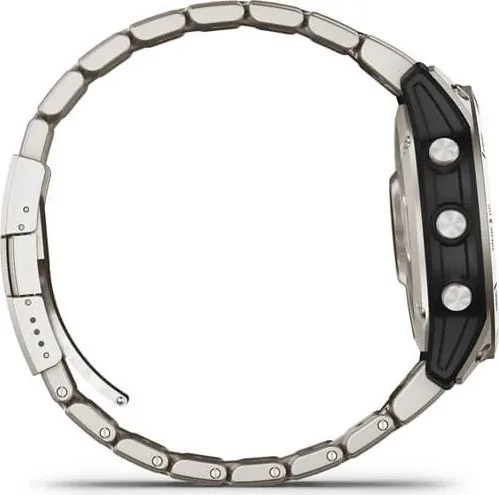
Plastic, Titanium
Case Colors
Silver
Dimensions (Case)
1.85x0.57 in
Band Width
0.87 in
Weight
2.47 oz
Features
Vibration, Water Resistant (up to 10 ATM), Interchangeable Band, Compatible with Foot Pod
Note
Some measurement functions require an optional foot pod
Product Description
Discover the Garmin D2 Mach 1: Your Ultimate Aviation and Fitness Companion
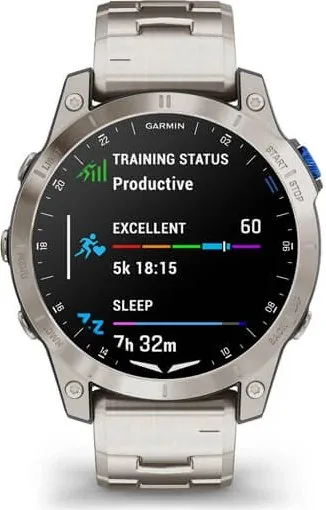
The Garmin D2 Mach 1 stands as a pinnacle of innovation, blending high-performance aviation tools with advanced fitness tracking capabilities. Designed for pilots, adventurers, and athletes alike, this smartwatch offers an unparalleled user experience that goes beyond standard timekeeping. Whether you are navigating through complex flight paths or training for your next marathon, the D2 Mach 1 adapts to your needs with precision and reliability.
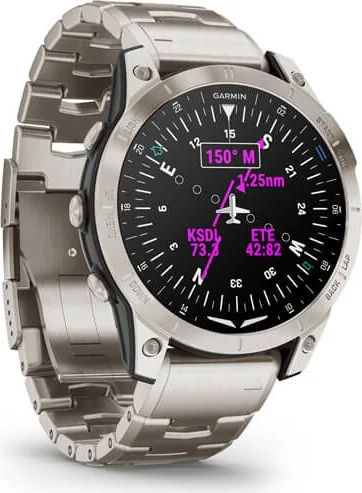
At its core, the device features a vibrant AMOLED display that ensures clear visibility in all lighting conditions. The intuitive interface allows users to easily manage settings, from adjusting touchscreens to customizing data fields. For aviators, the watch provides critical navigation aids including NEXRAD weather radar integration, METAR and TAF information access, and a dedicated Jumpmaster function for parachute operations. The automatic flight detection feature seamlessly records air activities, while the emergency mode offers essential guidance to the nearest airport during unforeseen situations.
Beyond the cockpit, the D2 Mach 1 excels in sports and fitness. It supports a vast array of activities including running, swimming, cycling, and strength training. Advanced metrics such as Body Battery energy monitoring, VO2 max estimation, and real-time recovery advice help optimize your training regimen. The watch also integrates with popular platforms like Strava and Zwift, ensuring your data is always synchronized and accessible. Golfers benefit from preloaded course maps and distance-to-pin features, while climbers can track their routes and bouldering sessions with detailed statistics.
Connectivity is robust, featuring Bluetooth and Wi-Fi support for seamless smartphone integration. Users can receive notifications, control music playback, and utilize Garmin Pay for contactless transactions. The inclusion of ANT+ technology allows connection to external sensors for enhanced accuracy in heart rate and power measurement. With its durable construction and long battery life, the Garmin D2 Mach 1 is built to withstand the rigors of extreme environments while keeping you connected and informed.
Key Highlights
- Comprehensive aviation tools for professional and recreational pilots.
- Advanced health and fitness tracking with personalized insights.
- Customizable interfaces and extensive activity profiles.
- Seamless connectivity with smartphones and third-party apps.
- Durable design suitable for outdoor adventures and daily wear.
Search for 67,706 Manuals online


Type-in Brand or Model