
Garmin D2 Delta S Manual
PDF manual · 52 Pages
English


Quick check
Incorrect answer, please try again.
Chat with your Garmin D2 Delta S manual using AI
Get instant AI answers from your Garmin D2 Delta S manual
Ask anything about the Garmin D2 Delta S. Answers come from this manual, with the pages they are based on.
D2 Delta S Maintenance Schedule
Thoroughly clean and dry the contacts and surrounding area before charging or connecting to a computer to protect against corrosion.
Rinse the device with clear water after contact with chlorine, saltwater, sunscreen, cosmetics, alcohol, or other harsh chemicals.
Wipe the device with a cloth dampened with mild cleaning solution, then wipe it dry and let it fully air dry.
Hand wash the heart rate sensor strap with a small amount of mild detergent after every seventh use or after swimming.
Ask a Question
Do you recommend D2 Delta S?
Yes NoFrequently Asked Questions
It is designed as a pilot-oriented smartwatch with aviation navigation tools, flight planning, weather support, and connected cockpit features. It also works as a full multisport and daily smartwatch.
Is this answer helpful?
Yes. It tracks activities like running, cycling, swimming, golf, skiing, strength training, and multisport events. It also offers metrics such as heart rate, VO2 max estimates, training load, and recovery time.
Is this answer helpful?
Yes. Pairing with Garmin Connect Mobile enables notifications, syncing, software updates, weather, GroupTrack, LiveTrack, and other connected features. Some tools also work with Wi‑Fi.
Is this answer helpful?
Yes. It supports music playback through Bluetooth headphones, downloaded audio content, and third-party providers. It also includes Garmin Pay for contactless payments in supported regions.
Is this answer helpful?
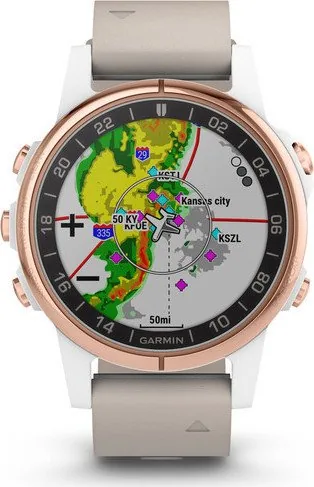
Very much so. The watch can show aviation waypoints, nearest airports, flight plans, altitude alerts, barometric pressure, and NEXRAD weather radar when paired with a smartphone.
Is this answer helpful?
You can customize activities, data screens, widgets, watch faces, controls menu items, navigation settings, and sensor options. Connect IQ also lets you add extra apps and data fields.
Is this answer helpful?
Advantages and Disadvantages
Advantages

- Aviation-focused tools include flight plans, waypoint navigation, altitude alerts, and weather features.
- Supports many sports and training metrics, from running dynamics to swimming and golf.
- Offers smart features like notifications, Garmin Pay, music, and Connect IQ apps.
- Works with Garmin Connect, Garmin Pilot, and compatible sensors for broader functionality.
Disadvantages

- Many advanced features depend on pairing with a smartphone or external accessories.
- Aviation and fitness settings can feel complex for first-time users.
- Battery life may drop faster when using GPS, music, or broadcasting heart rate.
- Some features are limited by device type, region, or compatible sensor availability.
Product Specification
Display
1.2", 240x240 pixels, color display, round, backlit
Operating System
proprietary
Interfaces
Wi-Fi (WLAN), Bluetooth, NFC, ANT+
Heart Rate Measurement
integrated
Measurement Functions
Time, Stopwatch, Countdown, Pedometer, Stair counter, Cadence, Swim strokes, Speed, Distance, Lap counter, Sleep monitoring, Cycle monitoring, Heart rate, Calorie consumption, Temperature, Altimeter, Air pressure
Other Functions
Time zones, Date, Calendar, 12/24h display, Alarm clock, Weather forecast, internal music storage, Music control (iOS, Android), Message notification (iOS, Android), Call notification (iOS, Android)
Sensors
Barometer
Navigation
yes, Compass, GPS, GLONASS
Compatibility
Android, iOS
Power Supply
Battery
Operating Time
7 days (typical), 11h (GPS)
Glass Type
Sapphire glass
Case Material
Stainless steel, Plastic
Strap Material
Leather
Case Colors
rose gold, white
Strap Colors
beige
Dimensions (Case)
1.65x0.61in
Width (Strap)
1.02in
Weight
0.14lb
Special Features
Vibration, waterproof (up to 328.08ft water column), interchangeable strap
Note
Some measurement functions are only possible with an optional cadence sensor
Product Description
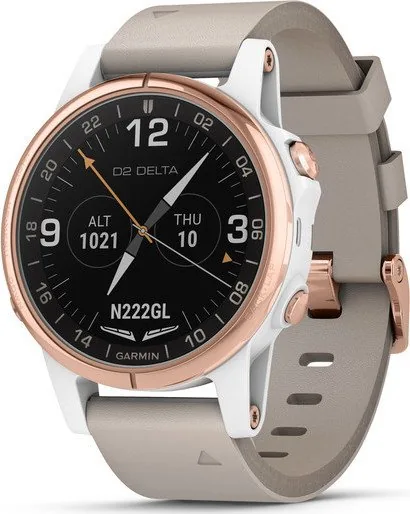
Garmin D2 Delta S: A Pilot-Focused Smartwatch with Everyday Power
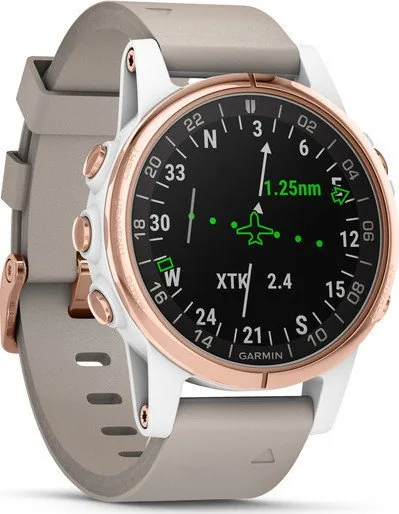
The Garmin D2 Delta S blends aviation tools, fitness tracking, and smart convenience into one compact watch. Built for pilots but useful far beyond the cockpit, it supports flight planning, altitude alerts, weather awareness, navigation, and sensor-rich activity tracking. If you search for the Garmin D2 Delta S Manual, you will find that this watch is designed to guide users through both airborne and daily features with a surprisingly wide range of functions.
What makes the D2 Delta S stand out is its depth. It is not just a GPS watch; it is a connected aviation companion that can pair with a smartphone, sync with Garmin Connect, and even work with Garmin Pilot and Connext devices. That means weather radar, flight plans, waypoint details, and aviation database updates can all be managed with confidence. For travelers and frequent flyers, this level of integration adds real value.
Outside of flying, the watch performs like a serious multisport device. It supports running, cycling, swimming, strength training, skiing, golfing, and triathlon-style multisport routines. Users can track heart rate, recovery time, training load, VO2 max estimates, running dynamics, and other performance metrics. It also includes music controls, Bluetooth notifications, Garmin Pay, Connect IQ customization, and wireless sensor support, making it feel like a complete lifestyle tool rather than a niche device.
The design also reflects practical use. You can customize data screens, create flight plans, manage alarms, view maps, and explore nearby points of interest. For athletes, features like interval workouts, training plans, lap tracking, and cadence-based metronome tools add structure to training sessions. For golfers, the watch offers scorekeeping, hazards, layup distances, and shot measurement, showing just how broad its purpose really is.
For anyone comparing premium smartwatches, the Garmin D2 Delta S is appealing because it delivers aviation-grade utility without sacrificing everyday fitness and smart features. It is especially attractive to users who want one watch to cover work, travel, workouts, and connected life.
Notes
- Best suited for pilots, active users, and travelers who want one versatile device.
- Strong aviation tools are paired with deep fitness and health metrics.
- Requires app and sensor pairing to unlock the fullest feature set.
- Customization options are broad, from watch faces to activities and data fields.
Search for 67,706 Manuals online


Type-in Brand or Model